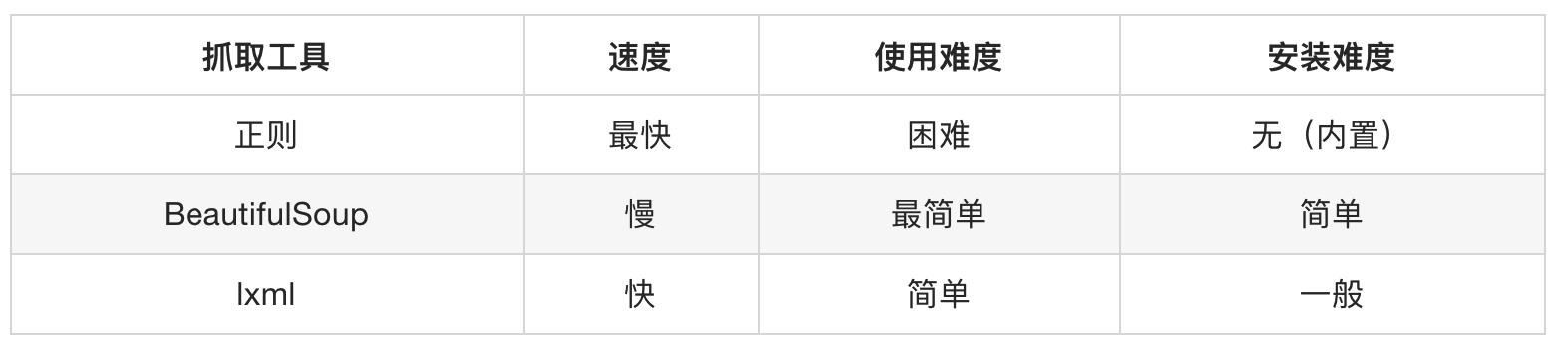
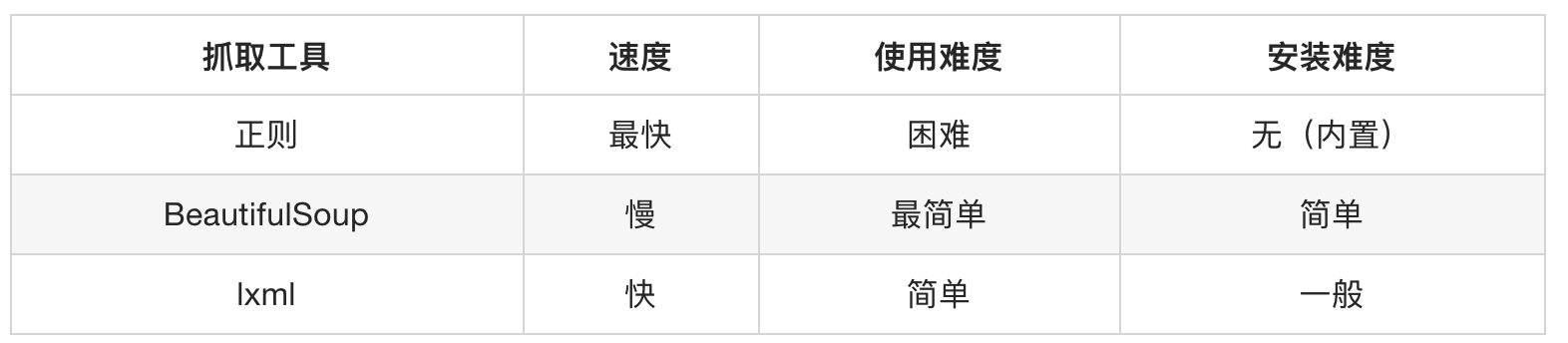
不是自带的, 需要下载
第一节 Xpath语法 4.1.1 语法规则 XPath使用路径表达式来选取文档中的节点或者节点集。这些路径表达式和我们在常规的电脑文件系统中看到的表达式 非常相似。
表达式 描述 nodename选中该元素 /从根节点选取、或者是元素和元素间的过渡 //从匹配选择的当前节点选择文档中的节点,而不考虑它们的位置 .选取当前节点 ..选取当前节点的父节点 @选取属性 text()选取文本
路径表达式
路径表达式 结果 bookstore选择bookstore元素 /bookstore选取根元素 bookstore。注释:假如路径起始于正斜杠(/),则此路径始终代表到某元素的绝对路径! bookstore/book选取属于 bookstore 的子元素的所有 book 元素 //book选取所有 book 子元素,而不管它们在文档中的位置 bookstore//book选择属于 bookstore 元素的后代的所有 book 元素,而不管它们位于 bookstore 之下的什么位置 //book/title/@lang选择所有的book下面的title中的lang属性的值 //book/title/text()选择所有的book下面的title的文本
查询特定节点
路径表达式 结果 //title[@lang="eng"]选择lang属性值为eng的所有title元素 /bookstore/book[1]选取属于 bookstore 子元素的第1个 book 元素 /bookstore/book[last()]选取属于 bookstore 子元素的最后1个 book 元素 /bookstore/book[last()-1]选取属于 bookstore 子元素的==倒数第2个== book 元素 /bookstore/book[position()>1]选择bookstore下面的book元素,从第2个开始选择 /bookstore/book[position()>1 and position()<4]选择bookstore下面的book元素,从第2个开始取到第4个元素 //book/title[text()='Harry Potter']选择所有book下的title元素,仅仅选择文本为Harry Potter的title元素
第二节 lxml包语法 使用lxml包使用xpath语法做数据清洗的步骤
STEP1: html语法的字符串=>Element对象 STEP2: 调用Element对象的.xpath("xpath语法")方法 4.2.1 html代码的字符串 与Element对象 语法:
需求 方法 返回值 字符串=>Element element对象 = etree.HTML("html代码的字符串")<class 'lxml.etree._Element'>Element=>字符串html代码的字符串=etree.tostring(html)<class 'bytes'>
注意⚠️: 从element=>字符串的时候, 要是想转中文, 不能decode(), 没用, 得指定etree.tostring()中encodeing属性值为unicode
1
2
3
4
5
6
7
8
9
10
11
12
13
14
15
16
from lxml import etreehtml_string = ''' <div> <ul> <li class="item-1">中文<a>first item</a></li> <li class="item-1"><a href="link2.html">second item</a></li> <li class="item-inactive"><a href="link3.html">third item</a></li> <li class="item-1"><a href="link4.html">fourth item</a></li> <li class="item-0"><a href="link5.html">fifth item</a> </ul> </div> ''' html = etree.HTML(html_string) string = etree.tostring(html) string_unicode = etree.tostring(html, encoding="unicode" )
4.2.2 Element对象使用xpath语法 语法: Element.xpath("xpath语法)返回值: <class 'list'> ==列表==, 如果语法错误or没有内容🔙空列表1 2 3 4 5 6 7 8 9 10 11 12 13 14 15 16 17 18 19 20 21 from lxml import etreetext = ''' <div> <ul> <li class="item-1"><a href="link1.html">first item</a></li> <li class="item-1"><a href="link2.html">second item</a></li> <li class="item-inactive"><a href="link3.html">third item</a></li> <li class="item-1"><a href="link4.html">fourth item</a></li> <li class="item-0"><a href="link5.html">fifth item</a> </ul> </div> ''' html = etree.HTML(text) href_list = html.xpath("//li[@class='item-1']/a/@href" ) title_list = html.xpath("//li[@class='item-1']/a/text()" ) for title, href in zip (title_list, href_list): item = dict () item["title" ] = title item["href" ] = href print (item)
4.2.3 XPath分次提取 前面我们取到属性,或者是文本的时候,返回字符串
但是如果我们取到的是一个节点,返回什么呢? 返回的是element对象,可以继续使用xpath方法
对此我们可以在后面的数据提取过程中:先根据某个xpath规则进行提取部分节点,然后再次使用xpath进行数据的提取
示例如下:
1 2 3 4 5 6 7 8 9 10 11 12 13 14 15 16 from lxml import etreetext = ''' <div> <ul> <li class="item-1"><a>first item</a></li> <li class="item-1"><a href="link2.html">second item</a></li> <li class="item-inactive"><a href="link3.html">third item</a></li> <li class="item-1"><a href="link4.html">fourth item</a></li> <li class="item-0"><a href="link5.html">fifth item</a> </ul> </div> ''' html = etree.HTML(text) li_list = html.xpath("//li[@class='item-1']" ) print (li_list)
可以发现结果是一个element对象(的列表),这个对象能够继续使用xpath方法
先根据li标签进行分组,之后再进行数据的提取
1 2 3 4 5 6 7 8 9 10 11 12 13 14 15 16 17 18 19 20 21 22 from lxml import etreetext = ''' <div> <ul> <li class="item-1"><a>first item</a></li> <li class="item-1"><a href="link2.html">second item</a></li> <li class="item-inactive"><a href="link3.html">third item</a></li> <li class="item-1"><a href="link4.html">fourth item</a></li> <li class="item-0"><a href="link5.html">fifth item</a> </ul> </div> ''' html = etree.HTML(text) li_list = html.xpath("//li[@class='item-1']" ) print (li_list)for li in li_list: item = dict () item["href" ] = li.xpath("./a/@href" )[0 ] if len (li.xpath("./a/@href" )) > 0 else None item["title" ] = li.xpath("./a/text()" )[0 ] if len (li.xpath("./a/text()" )) > 0 else None print (item)
4.2.4 总结 lxml库的安装: pip install lxmllxml的导包:from lxml import etree;lxml转换解析类型的方法:etree.HTML(text)lxml解析数据的方法:data.xpath("//div/text()")需要注意lxml提取完毕数据的数据类型都是列表类型 如果数据比较复杂:先提取大节点, 然后再进行小节点操作 第三节 作业 4.3.1 获取小说排行 需求: 获取小说网 的
1 2 3 4 5 6 7 8 9 10 11 12 13 14 15 16 17 18 19 20 21 22 23 24 25 26 27 28 """ 分析 小说名称(xpath): //dd//h3//a/text() 小说链接(xpath): //dd//h3//a/@href 前缀: https://www.77xsw.com/ """ from lxml import etree import requestsaim_url = "https://www.77xsw.com/top/all_0_1.html" result = requests.get(aim_url).content.decode() html = etree.HTML(result) noval_name = html.xpath("//dd//h3//a/text()" ) noval_link = html.xpath(" //dd//h3//a/@href" ) noval_link = ["https://www.77xsw.com" + i for i in noval_link] r1 = list (zip (noval_name, noval_link)) for i in r1: print (i)
4.3.2 获取房源信息 需求: 用xpath做一个简单的爬虫,爬取链家网 里的租房信息获取标题 ,位置 ,房屋的格局(三室一厅) ,关注人数 ,单价 ,总价
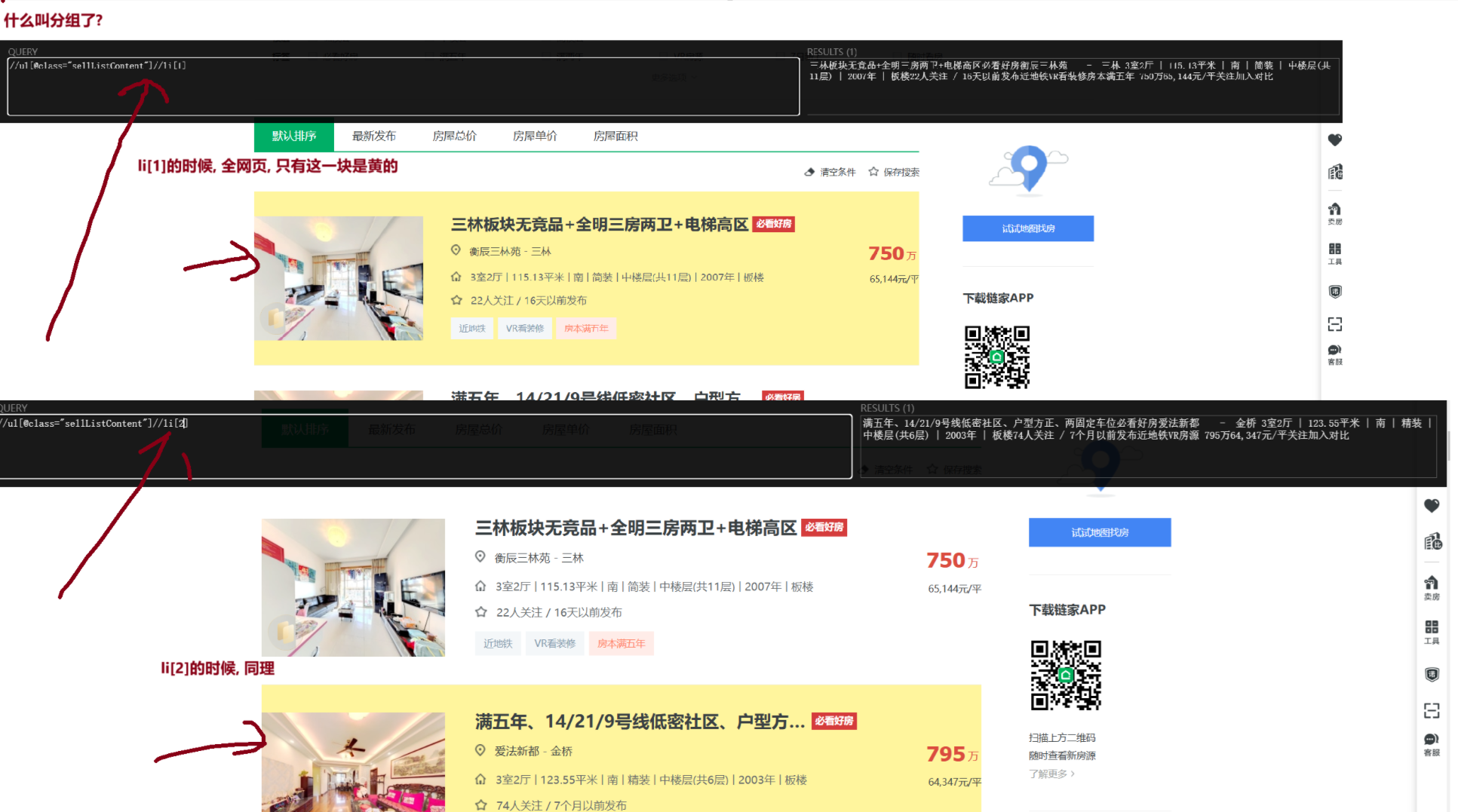
1 2 3 4 5 6 7 8 9 10 11 12 13 14 15 16 17 18 19 20 21 22 23 24 25 26 27 28 29 30 31 32 33 34 35 36 37 38 39 40 41 42 43 44 45 46 import requestsfrom lxml import etree""" xpath分析 答疑课提醒: ①一定要分组,xpath分组是什么意思? 前面想同( //div[@class='info clear'])一定都是单独的方框, 这尽管里面的数据有缺失, 也不会乱 ②多个类,找xpath定位的优先级 id > 仅一个class > 多个class (因为页面渲染出来的html!=爬下来的源码html,类多个,可能不是源码的是渲染产生的) ③.//a 是从当前节点开始; //a是以html根节点开始(无论当前是否属于某个节点) """ aim_url = "https://sh.lianjia.com/ershoufang/pudong/pg2/" headers = { "user-agent" : "Mozilla/5.0 (Windows NT 10.0; Win64; x64) AppleWebKit/537.36 (KHTML, like Gecko) Chrome/131.0.0.0 Safari/537.36" , "cookie" : "lianjia_uuid=3b7b0674-b1a6-447b-a435-09f10739b984; crosSdkDT2019DeviceId=-dse9ij-sbyxd0-lbsnz2mk5si5un3-dn1m2qusl; ftkrc_=eb2baf39-22f8-493c-b001-f1458f20af7e; lfrc_=bfc2c2a2-612a-4411-9ee5-892eb1dc9152; _ga=GA1.2.1794759318.1733126288; sensorsdata2015jssdkcross=%7B%22distinct_id%22%3A%221938660417f1d1c-03b2448eadc76-26011851-2359296-193866041801f5d%22%2C%22%24device_id%22%3A%221938660417f1d1c-03b2448eadc76-26011851-2359296-193866041801f5d%22%2C%22props%22%3A%7B%22%24latest_traffic_source_type%22%3A%22%E7%9B%B4%E6%8E%A5%E6%B5%81%E9%87%8F%22%2C%22%24latest_referrer%22%3A%22%22%2C%22%24latest_referrer_host%22%3A%22%22%2C%22%24latest_search_keyword%22%3A%22%E6%9C%AA%E5%8F%96%E5%88%B0%E5%80%BC_%E7%9B%B4%E6%8E%A5%E6%89%93%E5%BC%80%22%7D%7D; _ga_GVYN2J1PCG=GS1.2.1733126289.1.1.1733127368.0.0.0; _ga_LRLL77SF11=GS1.2.1733126289.1.1.1733127368.0.0.0; select_city=310000; lianjia_ssid=c0f3afe8-efb3-4bc0-98e3-d2ad09cc445a; Hm_lvt_46bf127ac9b856df503ec2dbf942b67e=1733126275,1733223449; HMACCOUNT=1B16DEE07AC062C0; login_ucid=2000000075296624; lianjia_token=2.0012c624dc6fd9a640036b0ded2a71dc29; lianjia_token_secure=2.0012c624dc6fd9a640036b0ded2a71dc29; security_ticket=Tt6J/9Y8dIAxqSlq9+5yvUNfTbTfoSKCbUp1ZSl4zHq6gzp+PvWu0I1U5Evm5azgqZRLyVhiwrGedwvvbpV6BTYUvgvSQfBFQZOnpAWFTZIiN8gf1ADeHxo0lAMkAeoHbgn2YTBHfENQjNKZ4YlqM9okf7h+exV0iRVFcWBFqEQ=; Hm_lpvt_46bf127ac9b856df503ec2dbf942b67e=1733223521" } html = requests.get(aim_url, headers=headers) element = etree.HTML(html.content.decode()) li_list = element.xpath('//ul[@class="sellListContent"]//li' ) house_list = [] for i in li_list: one_house = {} one_house["title" ] = i.xpath('.//div[@class="title"]/a/text()' )[0 ] one_house["positionInfo" ] = '-' .join(i.xpath('.//div[@class="positionInfo"]/a/text()' )) one_house["houseInfo" ] = i.xpath('.//div[@class="houseInfo"]/text()' )[0 ] one_house["followInfo" ] = i.xpath('.//div[@class="followInfo"]/text()' )[0 ] one_house["unitPrice" ] = i.xpath('.//div[@class="unitPrice"]//span/text()' )[0 ] one_house["totalPrice" ] = i.xpath('.//div[@class="totalPrice totalPrice2"]//span/text()' )[0 ] house_list.append(one_house) [print (i) for i in house_list]
第四节 使用xpath爬取的流程 4.4.1 STEP1: 先将目标爬取数据, 进行分组 怎么检测是否分好组了? 这两个条件缺一不可
①页面上一个索引, 仅选中一块区域
②返回列表长度=需要爬取数据长度
1 2 li_list = element.xpath('//ul[@class="sellListContent"]//li' ) print (len (li_list))
4.4.2 STEP2 对组内每个元素操作.// 记住!! 一定是.// 这个才表示从当前节点开始模糊查询, //不管在哪, 是否有当前节点, 都是从html根开始模糊查询 第五章 易错点 定位数据的顺序: id > 仅一个class > 多个class .//a 是从**当前节点 开始; //a是以 html根节点开始 **(无论当前是否属于某个节点)==返回的都是列表:== 无论是xpath语法中的 xpath()方法; 还是bs4语法中的find_all()/select() ;返回值都是列表!!!都是列表!!!都是列表!!!第五章 BS4 bs4包 介绍
BeautifulSoup4简称BS4,和使用lxml模块 一样,Beautiful Soup 也是一个HTML/XML的解析器,主要的功能也是解析和提取HTML/XML数据。
Beautiful Soup是基于HTML DOM的,会载入整个文档,解析整个DOM树,因此时间和内存开销都会大很多,所以性能要低于lxml模块。
BeautifulSoup用来解析HTML比较简单,API非常人性化,支持CSS选择器、Python标准库中的HTML解析器,也支持lxml模块的XML解析器
安装
1 pip install beautifulsoup4 -i https://pypi.tuna.tsinghua.edu.cn/simple
官方文档:http://beautifulsoup.readthedocs.io/zh_CN/v4.4.0
第一节 创建BeautifulSoup对象 语法: BeautifulSoup("html代码的字符串", "文档解析器") 文档解析器可以是(“lxml”[推荐], “html.parser”, “html5lib”)1 2 3 4 5 6 7 8 9 10 11 12 13 14 15 16 17 18 from bs4 import BeautifulSouphtml = """ <html><head><title>The Dormouse's story</title></head> <body> <p class="title" name="dromouse"><b>The Dormouse's story</b></p> <p class="story">Once upon a time there were three little sisters; and their names were <a href="http://example.com/elsie" class="sister" id="link1">Elsie</a>, <a href="http://example.com/lacie" class="sister" id="link2">Lacie</a> and <a href="http://example.com/tillie" class="sister" id="link3">Tillie</a>; and they lived at the bottom of a well.</p> <p class="story">...</p> """ soup = BeautifulSoup(html, "lxml" ) print (type (soup)) print (soup.prettify())
第二节 获取HTML中的标签 find_all() 语法:
1 def find_all (self, name=None , attrs={}, recursive=True , string=None , limit=None , **kwargs )...
返回值: <class 'bs4.element.ResultSet'>===列表==, 列表中每个元素的类型为<class 'bs4.element.Tag'>
其他: find()的用法与find_all一样,区别在于find返回第一个符合匹配结果,find_all则返回所有匹配结果的列表
5.2.1 按标签名称 选择标签 name参数 1 2 3 4 5 6 7 8 9 10 11 12 13 14 15 16 17 18 19 20 21 22 23 24 25 26 27 28 29 30 31 32 33 34 35 36 37 38 39 40 41 42 43 44 45 46 47 48 49 50 51 52 53 54 55 56 57 58 59 60 61 62 63 64 65 66 67 68 69 70 71 72 73 74 75 76 html = """ <html><head><title>The Dormouse's story</title></head> <body> <p class="title" name="dromouse"><b>The Dormouse's story</b></p> <p class="story">Once upon a time there were three little sisters; and their names were <a href="http://example.com/elsie" class="sister" id="link1">Elsie</a>, <a href="http://example.com/lacie" class="sister" id="link2">Lacie</a> and <a href="http://example.com/tillie" class="sister" id="link3">Tillie</a>; and they lived at the bottom of a well.</p> <p class="story">...</p> """ soup = BeautifulSoup(html, "lxml" ) result = soup.find_all("a" ) print (type (result)) for i in result: print (i, type (i)) """输出结果 <a class="sister" href="http://example.com/elsie" id="link1">Elsie</a> <class 'bs4.element.Tag'> <a class="sister" href="http://example.com/lacie" id="link2">Lacie</a> <class 'bs4.element.Tag'> <a class="sister" href="http://example.com/tillie" id="link3">Tillie</a> <class 'bs4.element.Tag'> """ html2 = """ <html> <body> <ul> <li>1</li> <li>2</li> <li>3</li> </ul> </body> </html> """ soup2 = bs4.BeautifulSoup(html2, "lxml" ) result = soup2.find_all(re.compile (".*l.*" )) print (result)""" 输出结果: [<html> <body> <ul> <li>1</li> <li>2</li> <li>3</li> </ul> </body> </html>, <ul> <li>1</li> <li>2</li> <li>3</li> </ul>, <li>1</li>, <li>2</li>, <li>3</li>] """ result = soup2.find_all(['li' , 'ul' ]) print (result)"""输出结果 [<ul> <li>1</li> <li>2</li> <li>3</li> </ul>, <li>1</li>, <li>2</li>, <li>3</li>] """
5.2.2 按照属性 选中标签 attrs参数 注意.⚠️: 简写的时候, 注意, 属性后又下划线class_ class1 2 3 4 5 6 7 8 9 10 11 12 13 14 15 16 17 18 19 20 21 22 23 24 25 26 27 soup = BeautifulSoup(html, "lxml" ) ret_1 = soup.find_all(attrs={'class' : 'sister' }) ret_2 = soup.find_all(class_='sister' ) print (ret_1)"""输出结果 [<a class="sister" href="http://example.com/elsie" id="link1">Elsie</a>, <a class="sister" href="http://example.com/lacie" id="link2">Lacie</a>, <a class="sister" href="http://example.com/tillie" id="link3">Tillie</a>] """ ret_3 = soup.find_all(id_='link2' ) print (ret_3)"""输出结果 [<a class="sister" href="http://example.com/lacie" id="link2">Lacie</a>] """ html2 = """ <p class='hhh'>ppp1</p> <a class='hhh'>link1</a> """ soup2 = bs4.BeautifulSoup(html2, "lxml" ) ret_4 = soup2.find_all("a" , attrs={"class" : "hhh" }) print (ret_4)
5.2.3 配合文本内容 选择标签 string参数 1 2 3 4 5 6 7 8 9 soup = BeautifulSoup(html, "lxml" ) result = soup.find_all(name="a" , string="Elsie" ) print (result) result = soup.find_all(attrs={"class" : "sister" }, string="Tillie" ) print (result)
第三节 获取HTML中的标签select() 语法: select("CSS选择器") 接受一个字符串参数,该字符串是 CSS 选择器。返回值: <class 'list'>它返回一个==列表==,其中包含所有匹配的元素。如果没有找到匹配的元素,返回一个空列表。列表中每个元素的类型为 <class 'bs4.element.Tag'>1 2 3 4 5 6 7 8 9 10 11 12 13 14 15 16 17 18 19 20 21 22 23 24 25 26 27 28 29 30 31 32 33 34 35 36 37 38 39 40 41 42 43 44 45 46 47 48 49 50 51 52 53 54 55 56 57 58 59 60 61 62 63 64 65 66 67 68 69 from bs4 import BeautifulSouphtml = """ <html> <head><title>The Dormouse's story</title></head> <body> <p class="title" name="dromouse"><b>The Dormouse's story</b></p> <p class="story"> Once upon a time there were three little sisters; and their names were <a href="http://example.com/elsie" class="sister" id="link1">Elsie</a>, <a href="http://example.com/lacie" class="sister" id="link2">Lacie</a> and <a href="http://example.com/lacie" class="sister" id="link2">Lacie</a> and <a href="http://example.com/tillie" class="sister" id="link3">Tillie</a>; and they lived at the bottom of a well. </p> <p class="story" style="color:red">...</p> </body> </html> """ soup = BeautifulSoup(html, "lxml" ) result = soup.select("a" ) print (result)"""输出结果 [<a class="sister" href="http://example.com/elsie" id="link1">Elsie</a>, <a class="sister" href="http://example.com/lacie" id="link2">Lacie</a>, <a class="sister" href="http://example.com/lacie" id="link2">Lacie</a>, <a class="sister" href="http://example.com/tillie" id="link3">Tillie</a>] """ result = soup.select(".story" ) print (result)"""输出结果 [<p class="story"> Once upon a time there were three little sisters; and their names were <a class="sister" href="http://example.com/elsie" id="link1">Elsie</a>, <a class="sister" href="http://example.com/lacie" id="link2">Lacie</a> and <a class="sister" href="http://example.com/lacie" id="link2">Lacie</a> and <a class="sister" href="http://example.com/tillie" id="link3">Tillie</a>; and they lived at the bottom of a well. </p>, <p class="story" style="color:red">...</p>] """ result = soup.select("#link2" ) print (result)"""输出结果 [<a class="sister" href="http://example.com/lacie" id="link2">Lacie</a>, <a class="sister" href="http://example.com/lacie" id="link2">Lacie</a>] """ result = soup.select(".story a" ) print (result)"""输出结果 [<a class="sister" href="http://example.com/elsie" id="link1">Elsie</a>, <a class="sister" href="http://example.com/lacie" id="link2">Lacie</a>, <a class="sister" href="http://example.com/lacie" id="link2">Lacie</a>, <a class="sister" href="http://example.com/tillie" id="link3">Tillie</a>] """ result = soup.select("p[style=color:'red']" ) print (result)
第四节 获取属性/文本 <Tag>类 第五节 bs4 分次提取 和xpath分次提取一样: 获取到某个节点元素后, 后续的select()的”CSS选择器语法”是相对于当前节点的; 不是相对根1 2 3 4 5 6 li_list = soup.select(".sellListContent li" ) for i in li_list: title = i.select(".title a" )[0 ].getText() print (title)
第六章 作业 5.5.1 获取”搜狗微信”文字标题 使用BS4抓取搜狗微信 下的所有文章标题
1 2 3 4 5 6 7 8 9 10 11 12 13 14 15 16 17 18 19 20 21 22 23 24 25 26 import bs4import requestsfrom bs4 import BeautifulSoupheader = { "user-agent" : "Mozilla/5.0 (Windows NT 10.0; Win64; x64) AppleWebKit/537.36 (KHTML, like Gecko) Chrome/131.0.0.0 Safari/537.36" } def search_title (key_word, page ): aim_url = f"https://weixin.sogou.com/weixin?query={key_word} &_sug_type_=1&type=2&page={page} &ie=utf8" result = requests.get(aim_url, headers=header) html = bs4.BeautifulSoup(result.content.decode(), "lxml" ) text = html.select(".txt-box a" ) for i in text: print (i.getText()) if __name__ == '__main__' : search_title("java" , 2 )
5.5.2 获取”链家网”的房源信息 需求: 用bs4做一个简单的爬虫,爬取链家网 里的租房信息获取标题 ,位置 ,房屋的格局(三室一厅) ,关注人数 ,单价 ,总价
1 2 3 4 5 6 7 8 9 10 11 12 13 14 15 16 17 18 19 20 21 22 23 24 25 26 27 28 29 30 31 32 33 34 35 36 37 38 39 40 41 42 43 44 import requestsimport bs4aim_url = "https://sh.lianjia.com/ershoufang/pudong/pg2/" headers = { "user-agent" : "Mozilla/5.0 (Windows NT 10.0; Win64; x64) AppleWebKit/537.36 (KHTML, like Gecko) Chrome/131.0.0.0 Safari/537.36" , "cookie" : "lianjia_uuid=3b7b0674-b1a6-447b-a435-09f10739b984; crosSdkDT2019DeviceId=-dse9ij-sbyxd0-lbsnz2mk5si5un3-dn1m2qusl; ftkrc_=eb2baf39-22f8-493c-b001-f1458f20af7e; lfrc_=bfc2c2a2-612a-4411-9ee5-892eb1dc9152; _ga=GA1.2.1794759318.1733126288; sensorsdata2015jssdkcross=%7B%22distinct_id%22%3A%221938660417f1d1c-03b2448eadc76-26011851-2359296-193866041801f5d%22%2C%22%24device_id%22%3A%221938660417f1d1c-03b2448eadc76-26011851-2359296-193866041801f5d%22%2C%22props%22%3A%7B%22%24latest_traffic_source_type%22%3A%22%E7%9B%B4%E6%8E%A5%E6%B5%81%E9%87%8F%22%2C%22%24latest_referrer%22%3A%22%22%2C%22%24latest_referrer_host%22%3A%22%22%2C%22%24latest_search_keyword%22%3A%22%E6%9C%AA%E5%8F%96%E5%88%B0%E5%80%BC_%E7%9B%B4%E6%8E%A5%E6%89%93%E5%BC%80%22%7D%7D; _ga_GVYN2J1PCG=GS1.2.1733126289.1.1.1733127368.0.0.0; _ga_LRLL77SF11=GS1.2.1733126289.1.1.1733127368.0.0.0; select_city=310000; lianjia_ssid=c0f3afe8-efb3-4bc0-98e3-d2ad09cc445a; Hm_lvt_46bf127ac9b856df503ec2dbf942b67e=1733126275,1733223449; HMACCOUNT=1B16DEE07AC062C0; login_ucid=2000000075296624; lianjia_token=2.0012c624dc6fd9a640036b0ded2a71dc29; lianjia_token_secure=2.0012c624dc6fd9a640036b0ded2a71dc29; security_ticket=Tt6J/9Y8dIAxqSlq9+5yvUNfTbTfoSKCbUp1ZSl4zHq6gzp+PvWu0I1U5Evm5azgqZRLyVhiwrGedwvvbpV6BTYUvgvSQfBFQZOnpAWFTZIiN8gf1ADeHxo0lAMkAeoHbgn2YTBHfENQjNKZ4YlqM9okf7h+exV0iRVFcWBFqEQ=; Hm_lpvt_46bf127ac9b856df503ec2dbf942b67e=1733223521" } result = requests.get(aim_url, headers=headers) soup = bs4.BeautifulSoup(result.content.decode(), "lxml" ) li_list = soup.select(".sellListContent li" ) house_info_list = [] for i in li_list: one_dict = {} one_dict["title" ] = i.select(".title a" )[0 ].getText() one_dict["positionInfo" ] = i.select('.positionInfo a' )[0 ].getText() + "-" + i.select('.positionInfo a' )[1 ].getText() one_dict["houseInfo" ] = i.select('.houseInfo' )[0 ].getText() one_dict["followInfo" ] = i.select('.followInfo' )[0 ].getText() one_dict["unitPrice" ] = i.select('.unitPrice' )[0 ].getText() one_dict["totalPrice" ] = i.select('.totalPrice span' )[0 ].getText() + "万" house_info_list.append(one_dict) [print (i) for i in house_info_list]