3.Js调用和扣代码

3.Js调用和扣代码

明廷盛 嘻嘻😁

第一章 Python调用JS代码

第一节 Py调用同步的JS代码

1.1.1 使用execjs

同步代码的调用异步代码的调用输出结果
pyexecjs✔️函数的返回值, 不会返回原js代码打印的内容
1
pip install pyexecjs
  • & 说明: ①内置NodeJS环境 ②只能获取 “同步JS代码“ 的执行结果
  • $ 语法:
    • ①STEP1: node=execjs.get()获取node环境
    • ②STEP2:ctx = node.compile("字符串的js代码")编译js代码
    • ③STEP3: ctx.eval()ctx.call()执行js函数, 并获取结果
  • ! 注意:
    1. 如果execjs.get()打印结果为 “JavaScript” 就只能重装Pychram解决, 必须为 “Node.js(V8)”才能正常运行
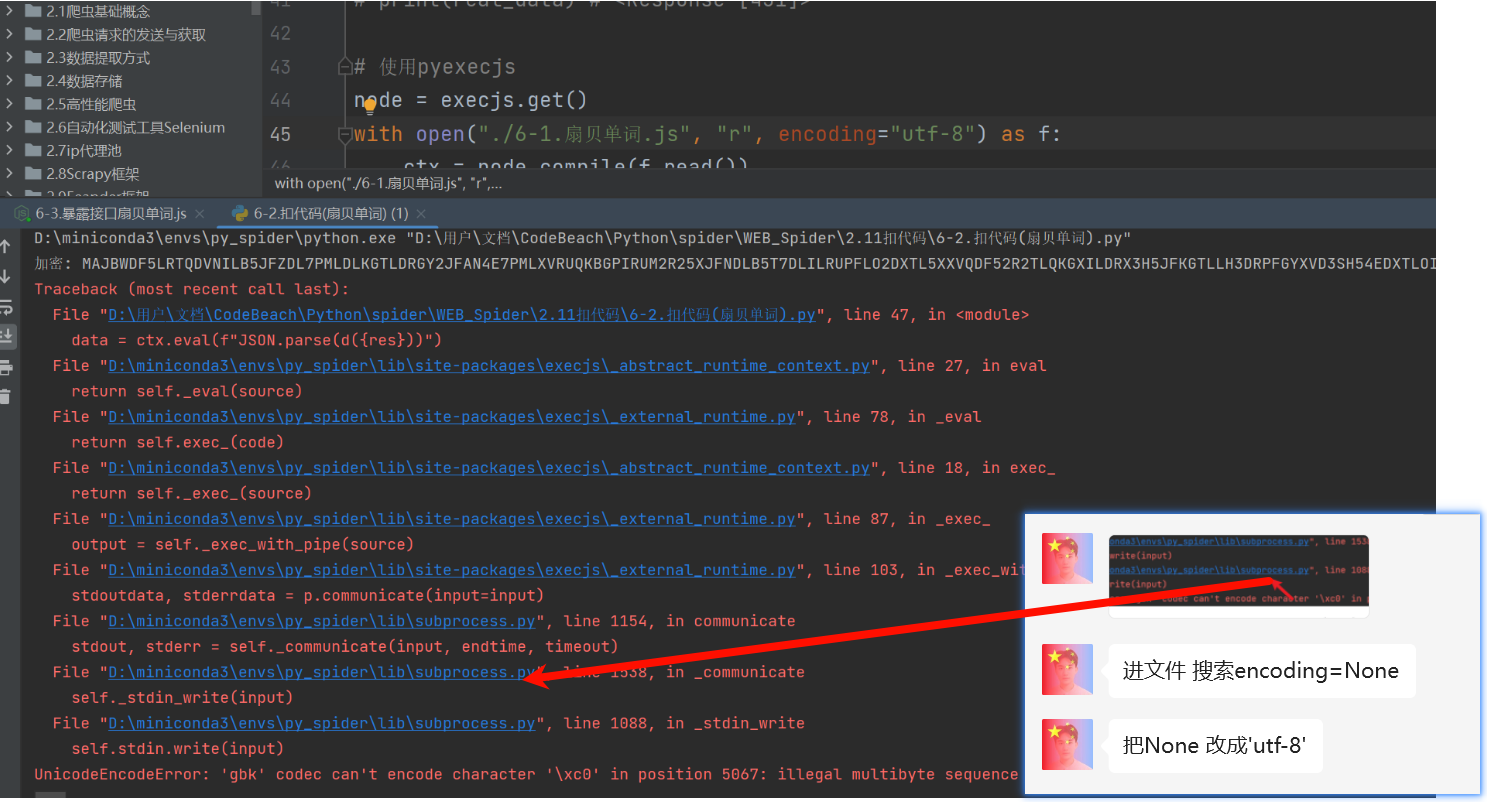
    2. 如果设置了utf-8还是显示gbk报错的话
      |675
1
2
3
4
5
6
7
8
9
10
11
12
13
14
15
16
17
18
19
20
import execjs

# 生成JavaScript运行环境,环境名可以指定
# 1.获取node对象
node = execjs.get() # 安装nodejs后,会得到运行环境名为:Node.js (V8)
print(node)

# 2.读取js代码
with open("./1.js_code.js", "r", encoding="utf-8") as f:
js_code = f.read()


# 编译js代码
ctx = node.compile(js_code) # compile方法去加载js代码

# 两种方式执行js函数
data1 = ctx.eval('fun1("eval传入")') # eval方法中,整个函数调用包含在字符串内
print(data1)
data2 = ctx.call('fun1', ['call传入']) # call方法中,第一个参数是函数名(str),后面接参数
print(data2)

1.1.2 JS开接口给Py用

同步代码的调用异步代码的调用输出结果
js开接口给py调拿结果✔️✔️想要什么, js接口就返回什么
  • $ 语法: js开一个接口, 和Controller开接口一样, “里面嵌入JS代码即可”, py通过请求这个接口, “获取接口的返回值“ ,从而获取JS的计算结果
  • ! 注意: 如果报SSL, urllib3之类的错误; pip install urllib3==1.24.3 把这个包降级下, 尽可能降低到能跑, 不过太低不支持?拼接传参
title
1
2
3
4
5
6
7
8
9
10
11
12
13
14
15
16
17
18
19
20
21
22
23
24
25
26
27
28
29
30
31
32
33
34
35
36
37
38
39
40
41
42
// 1.导入 express
var express = require('express')

// 2.创建 web 服务器
var app = express()

/*嵌入需要执行的JS代码*/
function fun1(aa) {
return "同步的返回:" + aa
}

function getAsyncData(aa) {
// resolve成功的回调, reject失败的回调
return new Promise(function (resolve, reject) {
resolve(aa)
})
}


// 3.get请求 req是请求对象 res响应对象
app.get('/test', function (req, res) {
params = req.query // 查询字符串传来的参数
/**假设传来的params对象(dict)中有一个字段为param1,我们要这个键的值*/

// 同步的结果
res1 = fun1(params.param1)

// 异步的结果
getAsyncData(params).then(result => {
console.log("异步代码的结果:", result.param1)
res_dict = {
"res1": res1,
"res2": result.param1
}
res.send(res_dict)// 调用express提供的res.send()方法,向客户端响应一个JSON对象
})
})

// 4.启动 web 服务器
app.listen(8080, function () {
console.log("服务启动") // 启动时在py控制台, 打印"服务启动"
})

title
1
2
3
4
import requests

res = requests.get('https://localhost:8080/test', timeout=1, verify=False)
print(res)

1.2.3 subprocess实现异步调用

  • $ 语法:
    • ①执行代码: result = subprocess.run(['node', "需要执行的js文件.js"], capture_output=True, text=True, encoding="utf-8")
    • ②获取结果: result.stdout.strip()
  • ! 注意: ①获取到result的内容是原js文件打印的内容!!!
ins
1
2
3
4
5
6
7
8
9
10
11
12
13
14
15
16
17
18
19
20
21
22
23
24
25
26
27
28
29
const fs = require('fs');
const wasmCode = fs.readFileSync('Wasm.wasm');
let wasmFunction;

async function aa() {
const result = await WebAssembly.instantiate(wasmCode, { // 需要导入的变量
"env": {},
"wasi_snapshot_preview1": {}
});
const instance = result.instance;
wasmFunction = instance.exports; // 所有的模块

}

async function simulate_encrypt(offset) {
if (!wasmFunction) {
await aa(); // 确保Wasm模块已加载
}
const n = offset;
const timestamp = parseInt(Math.round((new Date).getTime() / 1e3).toString());
res = wasmFunction.encrypt(n, timestamp); // 直接调用encrypt方法
return res
}

// 使用async/await调用simulate_encrypt
(async() =>{
var result = await simulate_encrypt(process.argv[1])
console.log(result)
})()
ins
1
2
3
4
5
6
7
8
9
10
11
12
13
14
15
16
17
18
19
20
21
22
23
24
25
26
27
28
29
30
31
32
import requests
import subprocess

headers = {
'Accept': 'application/json, text/plain, */*',
'Accept-Language': 'zh-CN,zh;q=0.9,en;q=0.8',
'Cache-Control': 'no-cache',
'Connection': 'keep-alive',
'Pragma': 'no-cache',
'Referer': 'https://spa14.scrape.center/page/3',
'Sec-Fetch-Dest': 'empty',
'Sec-Fetch-Mode': 'cors',
'Sec-Fetch-Site': 'same-origin',
'User-Agent': 'Mozilla/5.0 (Windows NT 10.0; Win64; x64) AppleWebKit/537.36 (KHTML, like Gecko) Chrome/133.0.0.0 Safari/537.36',
'sec-ch-ua': '"Not(A:Brand";v="99", "Google Chrome";v="133", "Chromium";v="133"',
'sec-ch-ua-mobile': '?0',
'sec-ch-ua-platform': '"Windows"',
}
offset = 0 # 翻页
params = {
'limit': '10',
'offset': str(offset), # (页数-1)*10
'sign': '580296895', # TODO
}
js = subprocess.run(["node", "1-1电影排行Scrape平台.js", str(offset)], capture_output=True, text=True)
js_res = js.stdout.strip()
params['sign']=js_res
print(params)

response = requests.get('https://spa14.scrape.center/api/movie/', params=params, headers=headers)
print(response)
print(response.text)
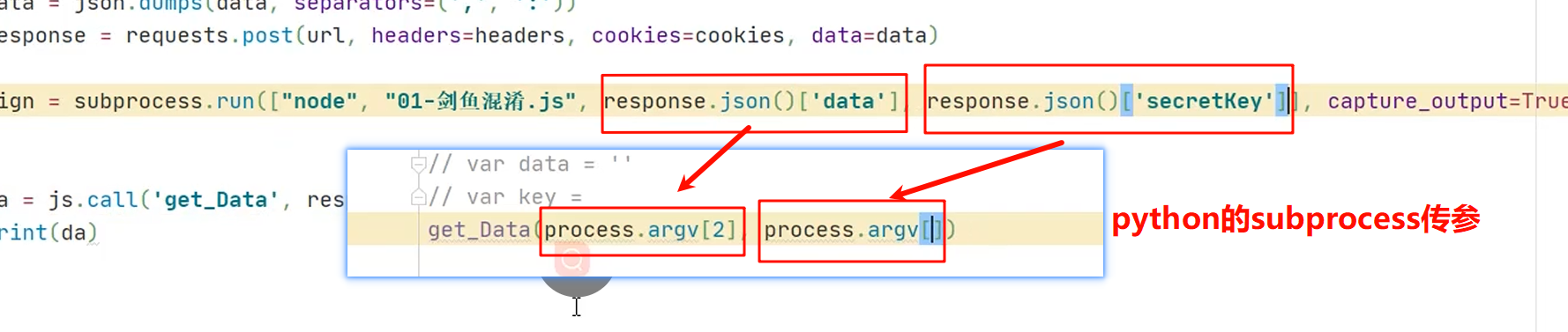
  • ! 注意: 控制台不能传参过长 【可以 读取文件->替换输入内容, 写入新文件->subprocess执行新文件】
1
2
3
4
5
6
7
8
# STEP1: 读取原文件内容, 替换输入的key="kkk"和source="sss",
new_content = open("3-2.剑鱼.js", "r", encoding="utf-8").read().replace("kkk", response.json()['secretKey']).replace("sss", response.json()['data'])
# STEP2: 写入
new_file_name = "3-2剑鱼temp.js"
with open(new_file_name, "w", encoding="utf-8") as f:
f.write(new_content)
# STEP3: subprocess 执行新的文件
js_res = subprocess.run(['node', new_file_name], capture_output=True, text=True, encoding="utf-8").stdout.strip()

第二章 扣代码

如果我们能将网址的加密过程, 在本地模拟, 加上我们又会用Python执行js代码, 那不就可以直接模拟加密, 直接取值了;👍

1
2
3
4
5
6
7
8
9
10
11
12
13
14
15
16
17
18
19
20
21
22
23
24
25
26
27
28
29
30
31
32
33
34
35
36
37
38
39
40
41
42
43
44
45
46
47
48
49
50
51
52
53
54
55
56
57
58
59
60
61
62
63
64
65
66
67
68
69
70
71
72
73
74
75
76
77
78
R = global
t = {
"url": "/rank/offline",
"baseURL": "https://api.qimai.cn",
"params": {
country: "hk",
date: "2025-02-20",
edate: "",
genre: "36",
option: "4",
sdate: "2025-02-20",
status: "3",
},
}
function p(t) {
// a传来的时候, 没有用到 o() 这个方法
t = R["encodeURIComponent"](t)["replace"](/%([0-9A-F]{2})/g, function (n, t) {
return o("0x" + t)
});
try {
return R["btoa"](t)
} catch (n) {
return R[W5][K5](t)[U5](Z5)
}
}

function o(n) {
t = "",
["66", "72", "6f", "6d", "43", "68", "61", "72", "43", "6f", "64", "65"]["forEach"](function (n) {
t += R["unescape"]("%u00" + n)
});
var t, e = t;
return R["String"][e](n)
}

function u() {
return R["unescape"]("861831832863830866861836861862839831831839862863839830865834861863837837830830837839836861835833"["replace"](/8/g, "%u00"))
}

function h(n, t) {
t = t || u();
for (var e = (n = n["split"](""))["length"], r = t["length"], a = "charCodeAt", i = 0; i < e; i++)
n[i] = o(n[i][a](0) ^ t[(i + 10) % r][a](0));
return n["join"]("")
}

// 扣a
var a = [];
if (t["params"] === void 0) {
t['params'] = {}
}
R["Object"]["keys"](t["params"])["forEach"](
function (n) {
if (n == "analysis")
return !1;
t["params"]["hasOwnProperty"](n) && a["push"](t["params"][n])
}
)// 运行到当前行 a = [ 'hk', '2025-02-20', '', '36', '4', '2025-02-20', '3' ]
a = a["sort"]()["join"]("")// 运行到当前行 a = "2025-02-202025-02-203364hk"
a = p(a) // 运行到当前行 a = MjAyNS0wMi0yMDIwMjUtMDItMjAzMzY0aGs=
// 扣a-r
var e, r = +new R["Date"] - 1661224081041; // undefined 78809950590 (这里的e只是定义)
// r = 78811861589 # 这里是时间戳, 所以运行时间不同, 这个值也不同
a = (a += '@#' + t["url"]["replace"](t["baseURL"], '')) + ("@#" + r) + ("@#" + 3)
console.log(a)
// 扣d (发现这玩意是个常量)
d = "xyz517cda96efgh"
e = p(h(a, d))

// 最后:推t
true && (t["url"] += (-1 != t["url"]["indexOf"]("?") ? "&" : "?") + "analysis" + "=" + R["encodeURIComponent"](e))

console.log('url: ',t['url'])

/*学到的JS基础
1. return a, b, c; //a, b都是执行, 只有c才会真正返回
2. void 0 是 undefined 的安全写法(避免 undefined 被重写)
* */

视频解析: link

1
2
3
4
5
6
7
8
9
10
11
12
13
14
15
16
17
18
19
20
21
22
23
24
25
26
27
28
29
30
31
32
33
34
35
36
37
38
39
40
41
42
43
44
45
46
47
48
49
50
51
52
53
54
55
56
57
58
59
60
61
62
63
64
65
66
67
68
69
70
71
72
73
74
75
76
77
78
79
80
81
82
83
84
85
86
87
88
89
90
91
92
93
94
95
96
97
98
99
100
101
102
103
104
105
106
107
108
109
110
111
112
113
114
115
116
117
118
119
120
121
122
123
124
125
126
127
128
129
130
131
132
133
134
135
136
137
138
139
140
141
142
143
144
145
146
147
148
149
150
151
152
153
154
155
156
157
158
159
160
161
162
163
164
165
166
167
168
169
170
171
172
173
174
175
176
177
178
179
180
181
182
183
184
185
186
187
188
189
190
191
192
193
194
195
196
197
198
199
200
201
202
203
204
205
206
207
208
209
210
211
212
213
214
215
216
217
218
219
220
221
222
223
224
225
function o_default() {
this._status = [];
this._mat1 = 0;
this._mat2 = 0;
this._tmat = 0
}

function f() {
this._char = ".";
this._children = {}

this.getChildren = getChildren
this.setChildren = setChildren
this.setChar = setChar
this.getChar = getChar
}

function a_default(t) {
this._random = new o_default;
this._sign = "";
this._inter = {};
this._head = new f
}


function loop(t, r) {
"v".repeat(t).split("").map(function (t, e) {
return r(e)
})
}

function get(t) {
return t >>> 0
}

function xor(t, e) {
return get(get(t) ^ get(e))
}

function mul(t, e) {
var r = ((4294901760 & t) >>> 0) * e
, n = (65535 & t) * e;
return get((r >>> 0) + (n >>> 0))
}

function and(t, e) {
return get(get(t) & get(e))
}

function shiftRight(t, e) {
return get(t) >>> e
}

function shiftLeft(t, e) {
return get(get(t) << e)
}

function _next_state() {
var t = void 0
, e = void 0;

e = this._status[3],
t = xor(and(this._status[0], 2147483647), xor(this._status[1], this._status[2])),
t = xor(t, shiftLeft(t, 1)),
e = xor(e, xor(shiftRight(e, 1), t)),
this._status[0] = this._status[1],
this._status[1] = this._status[2],
this._status[2] = xor(t, shiftLeft(e, 10)),
this._status[3] = e,
this._status[1] = xor(this._status[1], and(-and(e, 1), this._mat1)),
this._status[2] = xor(this._status[2], and(-and(e, 1), this._mat2))
}

function _init() {
var e = this;
loop(7, function (t) {
e._status[t + 1 & 3] = xor(e._status[t + 1 & 3], t + 1 + mul(1812433253, xor(e._status[3 & t], shiftRight(e._status[3 & t], 30))))
});
0 == (2147483647 & this._status[0]) && 0 === this._status[1] && 0 === this._status[2] && 0 === this._status[3]
&& (this._status[0] = 66, this._status[1] = 65, this._status[2] = 89, this._status[3] = 83);

e._next_state = _next_state
loop(8, function () {
return e._next_state()
})
}

function seed(e) {
var r = this;
loop(4, function (t) {
e.length > t ? r._status[t] = get(e.charAt(t).charCodeAt()) : r._status[t] = get(110)
});
this._mat1 = this._status[1];
this._mat2 = this._status[2];
this._tmat = this._status[3];
this._init = _init
this._init()
}

function generate(t) {
this._next_state();
var e, r = void 0;
return r = this._status[3],
e = xor(this._status[0], shiftRight(this._status[2], 8)),
r = xor(r, e),
(r = xor(and(-and(e, 1), this._tmat), r)) % t
}

function getChildren() {
return this._children
}

function setChildren(t, e) {
this._children[t] = e
}

function setChar(t) {
this._char = t
}

function getChar() {
return this._char
}

function _addSymbol(t, e) {
this._random.generate = generate


var r = this
, n = this._head
, o = "";


return loop(e, function (t) {
for (var e = s[r._random.generate(32)]; e in n.getChildren() && "." !== n.getChildren()[e].getChar();)
e = s[r._random.generate(32)];
o += e,
e in n.getChildren() || n.setChildren(e, new f),
n = n.getChildren()[e]
}),
n.setChar(t),
this._inter[t] = o
}

s = "ABCDEFGHIJKLMNOPQRSTUVWXYZ234567"
c = [1, 2, 2, 2, 2, 2]

function init(t) {
var e = this;
// 补
this._random.seed = seed
this._random.seed(t);
this._sign = t;
e._addSymbol = _addSymbol

loop(64, function (t) {
e._addSymbol("ABCDEFGHIJKLMNOPQRSTUVWXYZabcdefghijklmnopqrstuvwxyz0123456789+/"[t], c[parseInt((t + 1) / 11)])
});
this._inter["="] = "="
}

function decode(t) {
for (var e = "", r = 4; r < t.length;)
if ("=" !== t[r]) {
for (var n = this._head; t[r] in n.getChildren();)
n = n.getChildren()[t[r]],
r++;
e += n.getChar()
} else
e += "=",
r++;
return e
}

function _atob(t) {
return global.atob(t)
}

re_btou = new RegExp(["[À-ß][€-¿]", "[à-ï][€-¿]{2}", "[ð-÷][€-¿]{3}"].join("|"), "g")
cb_btou = function (t) {
switch (t.length) {
case 4:
var e = ((7 & t.charCodeAt(0)) << 18 | (63 & t.charCodeAt(1)) << 12 | (63 & t.charCodeAt(2)) << 6 | 63 & t.charCodeAt(3)) - 65536;
return String.fromCharCode(55296 + (e >>> 10)) + String.fromCharCode(56320 + (1023 & e));
case 3:
return String.fromCharCode((15 & t.charCodeAt(0)) << 12 | (63 & t.charCodeAt(1)) << 6 | 63 & t.charCodeAt(2));
default:
return String.fromCharCode((31 & t.charCodeAt(0)) << 6 | 63 & t.charCodeAt(1))
}
}
btou = function (t) {
return t.replace(re_btou, cb_btou)
}

function _decode(t) {
return btou(_atob(t))
}

Bdecode = function (t) {
return _decode(String(t).replace(/[-_]/g, function (t) {
return "-" == t ? "+" : "/"
}).replace(/[^A-Za-z0-9\+\/]/g, ""))
}

function d(t) {
var e = new a_default;
e.init = init
e.init(t.substr(0, 4));
e.decode = decode
var r = e.decode(t);

return Bdecode(r)
}

// 外部调用这个
function my_decode(code) {
return JSON.parse(d(code))
}

/*
* 1.补方法
* * 如果该方法中没有this, 或this调用的是无关痛痒的东西, 直接删除前缀, 直接调用 ①a.default.get(t) ②get()中没有任何的this ③get()把a.default去掉
* * 有方法中有this: ①变量.func1(`o.this`) 需要给这个变量中的属性补方法 ②this.func1 可以直接给this补方法
* ! 发现补完后, 有时能用, 有时用不了==>是不是想树上节点一样, 去到初始化的时候补方法,
* */
ins
1
2
3
4
5
6
7
8
9
10
11
12
13
14
15
16
17
18
19
20
21
22
23
24
25
26
27
28
29
30
31
32
33
34
35
36
37
38
39
40
41
42
43
44
45
46
47
48
49
50
51
52
53
54
55
56
57
58
59
60
61
62
63
64
65
66
67
68
69
70
71
72
73
74
75
76
77
78
79
80
81
82
# =================================
# @Time : 2025年02月20日
# @Author : 明廷盛
# @File : 2.扣代码(扇贝单词).py
# @Software: PyCharm
# @ProjectBackground: $END$
# =================================
import csv
import json

import requests
import execjs
from loguru import logger


def query_words(page):
headers = {
"accept": "application/json, text/plain, */*",
"accept-language": "zh-CN,zh;q=0.9,en;q=0.8",
"cache-control": "no-cache",
"origin": "https://web.shanbay.com",
"pragma": "no-cache",
"priority": "u=1, i",
"referer": "https://web.shanbay.com/",
"sec-ch-ua": "\"Not(A:Brand\";v=\"99\", \"Google Chrome\";v=\"133\", \"Chromium\";v=\"133\"",
"sec-ch-ua-mobile": "?0",
"sec-ch-ua-platform": "\"Windows\"",
"sec-fetch-dest": "empty",
"sec-fetch-mode": "cors",
"sec-fetch-site": "same-site",
"user-agent": "Mozilla/5.0 (Windows NT 10.0; Win64; x64) AppleWebKit/537.36 (KHTML, like Gecko) Chrome/133.0.0.0 Safari/537.36",
"x-csrftoken": "6a335401bb860647f86ec8c78b85f54a",
"cookie": "_ga=GA1.2.1275909203.1738765682; tfstk=gd8tXvgLuvDGk_QoSVihiu0jk6cntEdwvdR7otXgcpppNLhVcOYcknpvH5jjQNYvpQ9FiEXgSrIAdtW_INjcMt6HNfl2nfPwYLA7SFmNorQNuZMoE40ksC7VlmHkH1VNRsfAGqXbfy_NiNgwLj0k_CPB_c9Jj42AeQeW1t9ffwgCg9111t9jR26Fgsw1GPGpO9WCGRsbfJwC_1a_1K_j9M6FGZ1sMwZO3oWbk3nZscZ8O5Z40eCOXtUcQrKwozjhFGBL6DpO6-6W19UboOmMdndpsAUytN8He_viRPpJ139XVpgLWM-69EIyuRGClitHqGKKCrBHSsI5lMFblBQ1LMTOP4wdTHOMcFJTMr1wSUjAUMhbuibBrgtWBSlyON1X3g8mUPW6GQ8yqa3YRNIf4DYky7_UETC0fXhL0oS1TeoVc7IN9V3C9TcHtorVx01dEXhL0oS1T6BotBq40Mm5.; sensorsdata2015jssdkcross=%7B%22distinct_id%22%3A%22fuprbh%22%2C%22first_id%22%3A%22194d682c5b856b-0e0aa09797dd62-26011b51-1638720-194d682c5b9168f%22%2C%22props%22%3A%7B%22%24latest_traffic_source_type%22%3A%22%E7%9B%B4%E6%8E%A5%E6%B5%81%E9%87%8F%22%2C%22%24latest_search_keyword%22%3A%22%E6%9C%AA%E5%8F%96%E5%88%B0%E5%80%BC_%E7%9B%B4%E6%8E%A5%E6%89%93%E5%BC%80%22%2C%22%24latest_referrer%22%3A%22%22%2C%22%24latest_referrer_host%22%3A%22%22%7D%2C%22%24device_id%22%3A%22194d682c5b856b-0e0aa09797dd62-26011b51-1638720-194d682c5b9168f%22%7D; auth_token=eyJhbGciOiJIUzI1NiIsInR5cCI6IkpXVCJ9.eyJpZCI6MjYzNDQxMjAwLCJleHAiOjE3NDI2MzYxNjMsImV4cF92MiI6MTc0MjYzNjE2MywiZGV2aWNlIjoiIiwidXNlcm5hbWUiOiJQaG9uZV85OWQ4NDE4ZDE1YTg5MDQ2IiwiaXNfc3RhZmYiOjAsInNlc3Npb25faWQiOiI3YTE0MjgyNGUzY2QxMWVmOGE0YTNhYTU0NzY2MTZkMiJ9.GLP-7kHWdG8t077q-JnZUuC_BbfJTwtFAy6Xnmphw04; csrftoken=6a335401bb860647f86ec8c78b85f54a",
}
url = "https://apiv3.shanbay.com/wordsapp/user_material_books/oisnc/learning/words/unlearned_items"
params = {
"ipp": "10",
"page": str(page)
}
code = requests.get(url, headers=headers, params=params).json()['data']
return code


if __name__ == '__main__':
# 使用pyexecjs
node = execjs.compile(open("./6-1.扇贝单词.js", "r", encoding="utf-8").read())

# 获取所有数据
all_words = []
for page in range(1, 800):
code = query_words(page)
print(f"{page} 加密:", code)

word_list = node.call("my_decode", code)
if not word_list['objects']:
break
# 数据清洗
for word in word_list['objects']:
temp_dict = {}
temp_dict['word'] = word['vocab_with_senses']['word'] # 单词
# 释义
temp_dict['translation']=""
translations = [i['definition_cn'] for i in word['vocab_with_senses']['senses']]
temp_dict['translation'] += "#".join(translations)

print(temp_dict)
all_words.append(temp_dict)

# 存储数据
print("==================")
print(all_words)
with open("./文件/words.csv", "w", encoding="utf-8", newline="") as f:
# 使用DictWriter更直观
fieldnames = ['word', 'translation']
writer = csv.DictWriter(f, fieldnames=fieldnames)

# 写入表头
writer.writeheader()

# 直接写入字典列表
writer.writerows(all_words)

  • Title: 3.Js调用和扣代码
  • Author: 明廷盛
  • Created at : 2025-02-19 20:53:47
  • Updated at : 2025-02-22 16:15:00
  • Link: https://blog.20040424.xyz/2025/02/19/🐍爬虫工程师/第二部分 JS逆向/3.Js调用和扣代码/
  • License: All Rights Reserved © 明廷盛