4. 摘要算法

4. 摘要算法

明廷盛 嘻嘻😁

第一章 概要

第一节 为什么要学加密算法

1
2
> 上一章扣代码, 难受不? (其实个人感觉还好😂)
加密算法就是, 我学了后, 看下网站, 就知道是什么加密的了, 比如我知道是MD5加密, **那我就不用扣了,直接调用py/js的现成加密库**, 即可实现模拟加密

第二节 摘要算法

  • $ 概念: “摘要算法” 就是 “哈希算法”
  • $ 特点:
    • ① 不可逆:
    • ② 固定长度
    • ③ 高度敏感: 明文该一个空格, 密文都会完全不同

第三节 辨析编码和加密

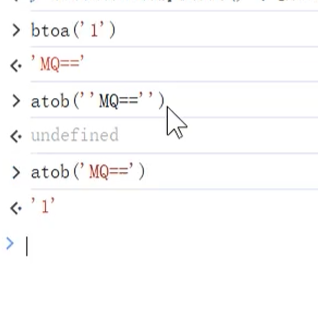
加密数据中有= , 可能就是b64编码的, 就会涉及有btoa, 和atob这两个方法,( 获取可以直接搜索??)

  • $ 字符串=>B64编码:btoa("1)
  • $ B64编码=>字符串: atob("MQ==")
    |218
编码加密
目的将信息转换形式,以便存储、传输和处理
保护信息,防止未授权访问
原理依标准规则转换(如 Unicorn映射字符二进制,公开透明)靠复杂算法和密钥(如AES算法通过数学运算与密钥干扰转换明文为乱密文,算法密钥保密关键)
可逆性双向且易逆(如UTF-8编中文,二进制易还原中文字符)双向但逆程受密钥算法控,无密钥难还原
常见ASCII编码英文字符, B64编码摘要算法(哈希), 对称加密, 非对称加密

第二章 MD5加密

第一节 特点

名称类型私钥长度公钥长度IV模式补位明文长度密文长度密文固定?JS包
MD5哈希算法任意32固定crypto-js
SHA系哈希算法任意40/56/64/96/128固定crypto-js
HMAC哈希算法✔️任意和底层算法相同固定crypto-js
DES对称56✔️✔️✔️任意和明文长度成正比固定crypto-js
AES对称128/192/256✔️✔️✔️任意和明文长度成正比固定crypto-js
RSA非对称428/812/1588128/216/392✔️53/117/24588/172/344完全不固定JSEcrypt
  • 模式: ECB, CBC, CFB,OFB, CTR; 除了ECB都需要IV值
  • 补位: ZeroPadding, NoPadding等
  • ! ①RSA: 尽管 “公钥”, “私钥”一定, 加密也不固定; ②HMAC, DES, AES只要 “明文” 和”秘钥”一致, 输出的密文就是固定的
  • ! HMAC: HMAC 与其他摘要算法结合时,其密钥长度不会影响最终输出的长度,输出长度始终等于底层摘要算法的固有长度

第二节 JS实现

  • $ 语法: 不toString()展示的是加密后的幻数, toString()后才是加密的字符串
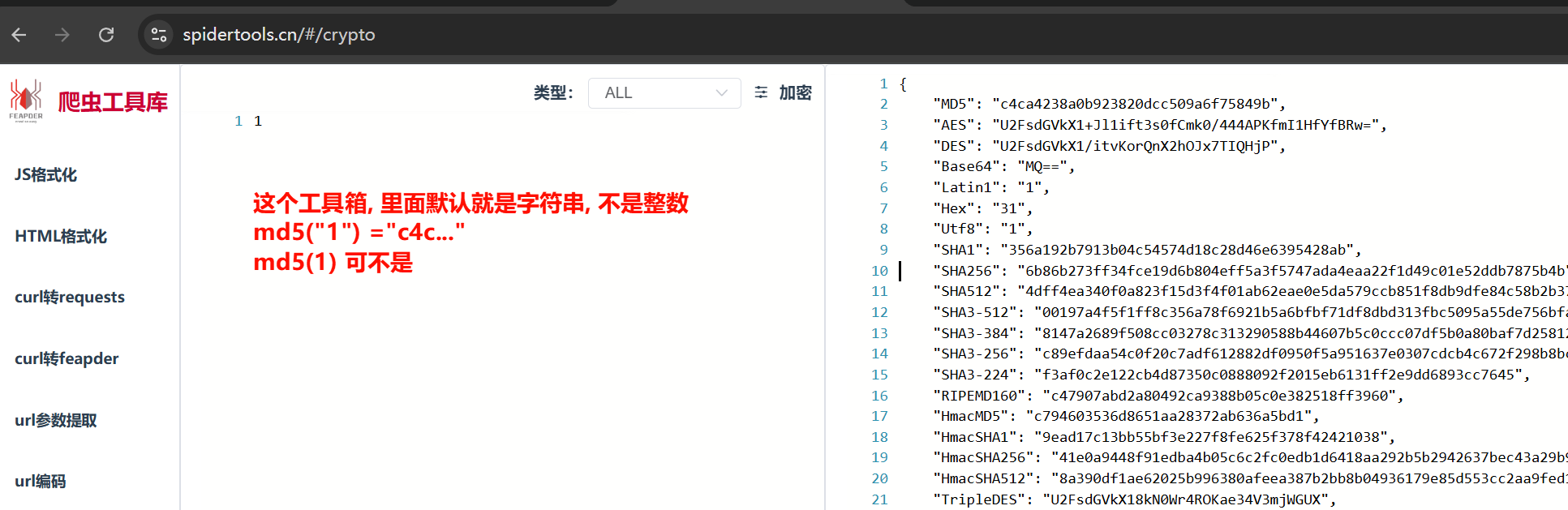
  • ! 注意: ①是加密”1”, 字符串的”1”, MD5结果才是c4c...; 数字1不是 ②爬虫工具箱 中输入会转为字符串进行加密, 数字1不是c4c❗
title
1
npm install crypto-js

1
2
3
4
5
6
7
8
9
10
11
12
13
14
15
16
17
18
19
20
21
22
23
24
25
26
27
28
29
30
31
32
33
34
35
36
37
var crypto = require("crypto-js")

var plaintext = "1" // 需要加密的内容

// 实现MD5
function my_MD5() {
res = crypto.MD5(plaintext) // 包含加密后的幻数
return res.toString() // 必须要toString()才是加密后的内容
}

// 实现SHA1/SHA224/SHA256/SHA384/SHA512
function my_SHA(type) {
return crypto[type](plaintext).toString()
}

// HMAC结合 MD5/SHA1/SHA224/SHA256/SHA384/SHA512
function my_HMAC(type) {
key = "secrypt"
return crypto[type](plaintext, key).toString()
}

console.log("MD5: ", my_MD5()); // MD5: c4ca4238a0b923820dcc509a6f75849b

["SHA1", "SHA224", "SHA256", "SHA384", "SHA512"].forEach(t => console.log(t, ": ", my_SHA(t)));
/*
SHA1 : 356a192b7913b04c54574d18c28d46e6395428ab
SHA224 : e25388fde8290dc286a6164fa2d97e551b53498dcbf7bc378eb1f178
SHA256 : 6b86b273ff34fce19d6b804eff5a3f5747ada4eaa22f1d49c01e52ddb7875b4b
SHA384 : 47f05d367b0c32e438fb63e6cf4a5f35c2aa2f90dc7543f8a41a0f95ce8a40a313ab5cf36134a2068c4c969cb50db776
SHA512 : 4dff4ea340f0a823f15d3f4f01ab62eae0e5da579ccb851f8db9dfe84c58b2b37b89903a740e1ee172da793a6e79d560e5f7f9bd058a12a280433ed6fa46510a
* */

["HmacMD5", "HmacSHA1", "HmacSHA224", "HmacSHA256", "HmacSHA384", "HmacSHA512"].forEach(t => console.log(t, ":", my_HMAC(t)))
/*秘钥不同, 结果不同, 没必要记加密"1"的结果
* */


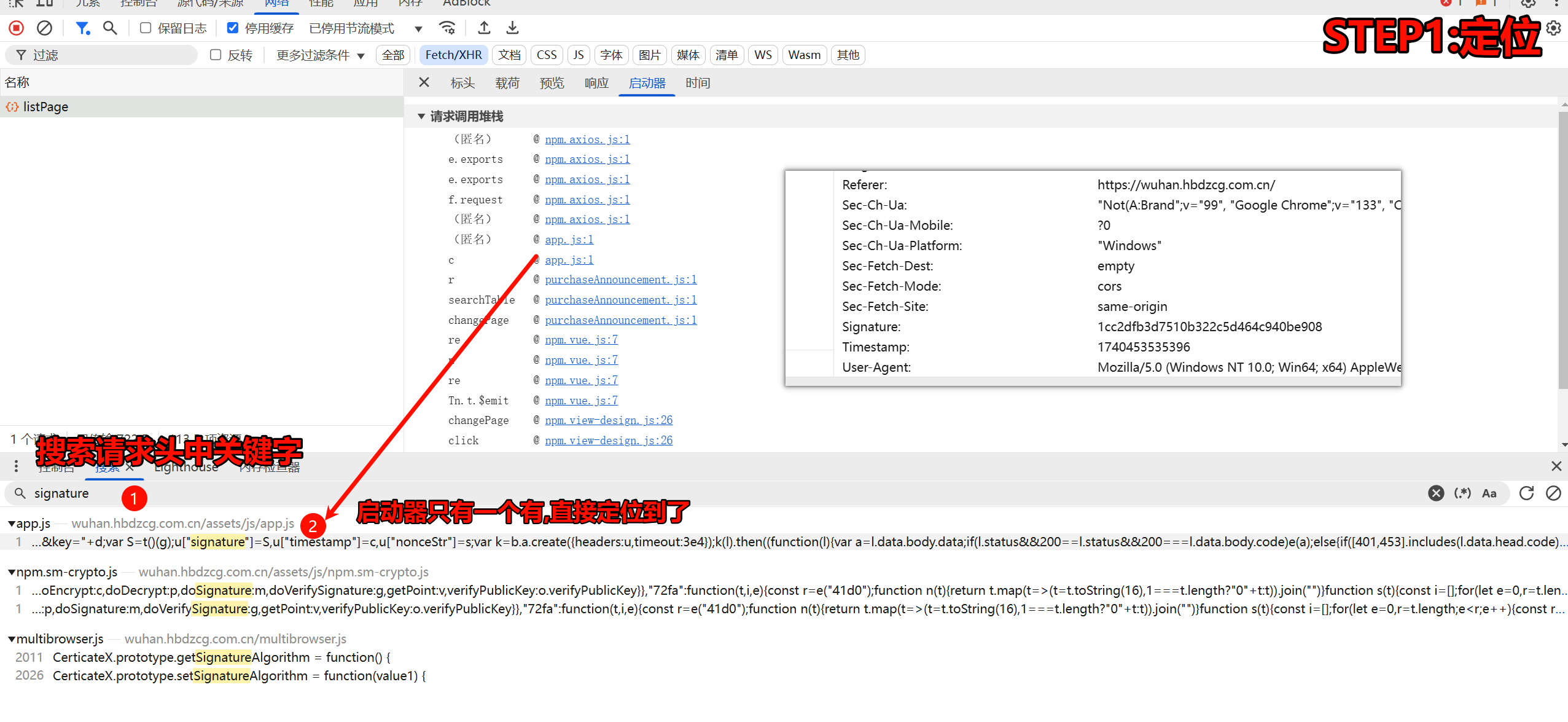
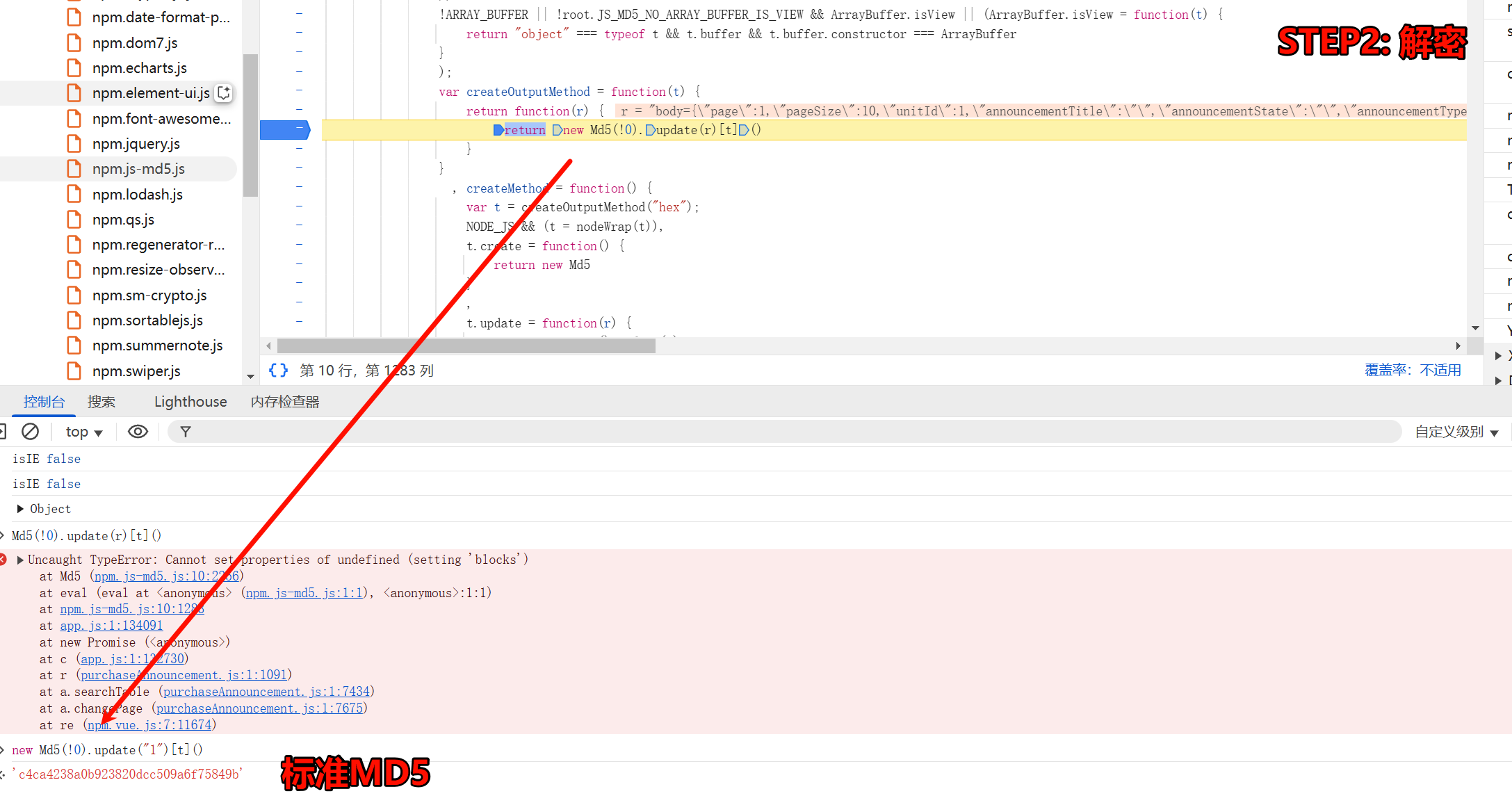
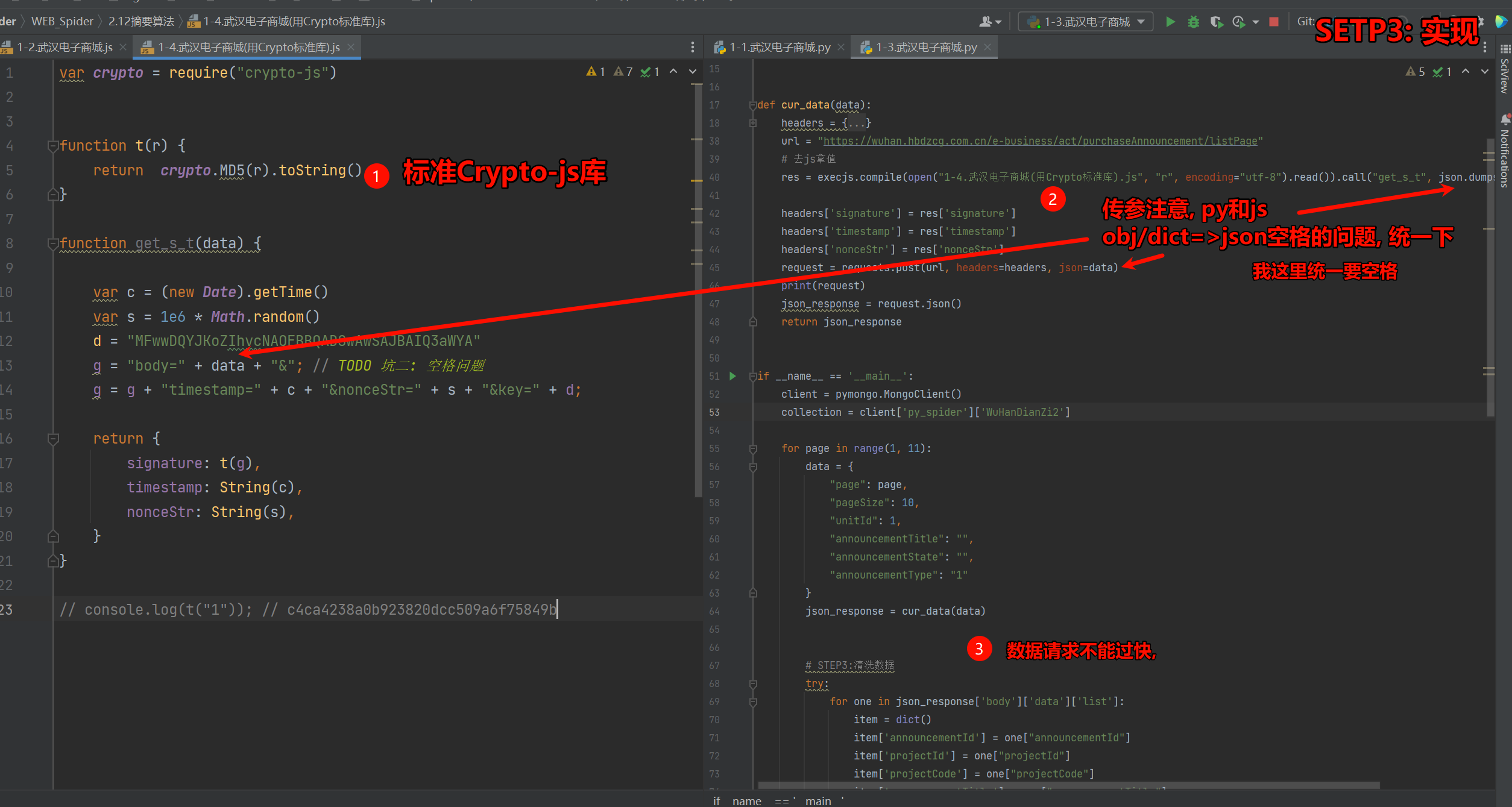
案例一 武汉电子商城

需求: 爬取 “武汉市政府采购电子商城” link中竞价公告的十页内容, 存入mongodb

  • ! 注意: POST请求传递json还是data??? [[4.Requests模块#第三节 发送POST请求post()使用 data传参]] link
  • ! 注意: 关于空格的问题: [[1.JS基础与浏览器开发工具#第13节 py和js转JSON时空格问题]] link
    |950
    2.png\|950
    3.png|950
1
2
3
4
5
6
7
8
9
10
11
12
13
14
15
16
17
18
19
20
21
22
23
var crypto = require("crypto-js")


function t(r) {
return crypto.MD5(r).toString()
}

function get_s_t(data) {

var c = (new Date).getTime()
var s = 1e6 * Math.random()
d = "MFwwDQYJKoZIhvcNAQEBBQADSwAwSAJBAIQ3aWYA"
g = "body=" + data + "&"; // TODO 坑二: 空格问题
g = g + "timestamp=" + c + "&nonceStr=" + s + "&key=" + d;

return {
signature: t(g),
timestamp: String(c),
nonceStr: String(s),
}
}

// console.log(t("1")); // c4ca4238a0b923820dcc509a6f75849b
1
2
3
4
5
6
7
8
9
10
11
12
13
14
15
16
17
18
19
20
21
22
23
24
25
26
27
28
29
30
31
32
33
34
35
36
37
38
39
40
41
42
43
44
45
46
47
48
49
50
51
52
53
54
55
56
57
58
59
60
61
62
63
64
65
66
67
68
69
70
71
72
73
74
75
76
77
78
79
80
81
82
83
84
85
86
87
88
# =================================
# @Time : 2025年02月22日
# @Author : 明廷盛
# @File : 1-1.武汉电子商城.py
# @Software: PyCharm
# @ProjectBackground: $END$
# =================================
import time

import execjs
import requests
import json
from loguru import logger
import pymongo


def cur_data(data):
headers = {
"Accept": "application/json, text/plain, */*",
"Accept-Language": "zh-CN,zh;q=0.9,en;q=0.8",
"Cache-Control": "no-cache",
"Connection": "keep-alive",
"Content-Type": "application/json",
"Origin": "https://wuhan.hbdzcg.com.cn",
"Pragma": "no-cache",
"Referer": "https://wuhan.hbdzcg.com.cn/",
"Sec-Fetch-Dest": "empty",
"Sec-Fetch-Mode": "cors",
"Sec-Fetch-Site": "same-origin",
"User-Agent": "Mozilla/5.0 (Windows NT 10.0; Win64; x64) AppleWebKit/537.36 (KHTML, like Gecko) Chrome/133.0.0.0 Safari/537.36",
"nonceStr": "553609.1504313218",
"sec-ch-ua": "\"Not(A:Brand\";v=\"99\", \"Google Chrome\";v=\"133\", \"Chromium\";v=\"133\"",
"sec-ch-ua-mobile": "?0",
"sec-ch-ua-platform": "\"Windows\"",
"signature": "0aa870538cb538b0f6024c11e839cac4",
"timestamp": "1740211944128"
}
url = "https://wuhan.hbdzcg.com.cn/e-business/act/purchaseAnnouncement/listPage"
# 去js拿值
res = execjs.compile(open("1-4.武汉电子商城(用Crypto标准库).js", "r", encoding="utf-8").read()).call("get_s_t", json.dumps(data))

headers['signature'] = res['signature']
headers['timestamp'] = res['timestamp']
headers['nonceStr'] = res['nonceStr']
request = requests.post(url, headers=headers, json=data)
print(request)
json_response = request.json()
return json_response


if __name__ == '__main__':
client = pymongo.MongoClient()
collection = client['py_spider']['WuHanDianZi2']

for page in range(1, 11):
data = {
"page": page,
"pageSize": 10,
"unitId": 1,
"announcementTitle": "",
"announcementState": "",
"announcementType": "1"
}
json_response = cur_data(data)


# STEP3:清洗数据
try:
for one in json_response['body']['data']['list']:
item = dict()
item['announcementId'] = one["announcementId"]
item['projectId'] = one["projectId"]
item['projectCode'] = one["projectCode"]
item['announcementTitle'] = one["announcementTitle"]
item['createdTime'] = one["createdTime"]
item['bidTime'] = one["bidTime"]
# STEP4:存储数据
logger.info(f"数据{item}插入中")
try:
collection.insert_one(item)
logger.info("数据插入成功:", )
except Exception as e:
logger.error("数据插入失败:", e)
except Exception as e:
logger.error("json解析可能存在问题: ", e)
print(json_response) # time.sleep(60) # 坑三: {'code': 21999, 'msg': '请求过快,请稍后再试!', 'success': False, 'data': None}}
time.sleep(30)

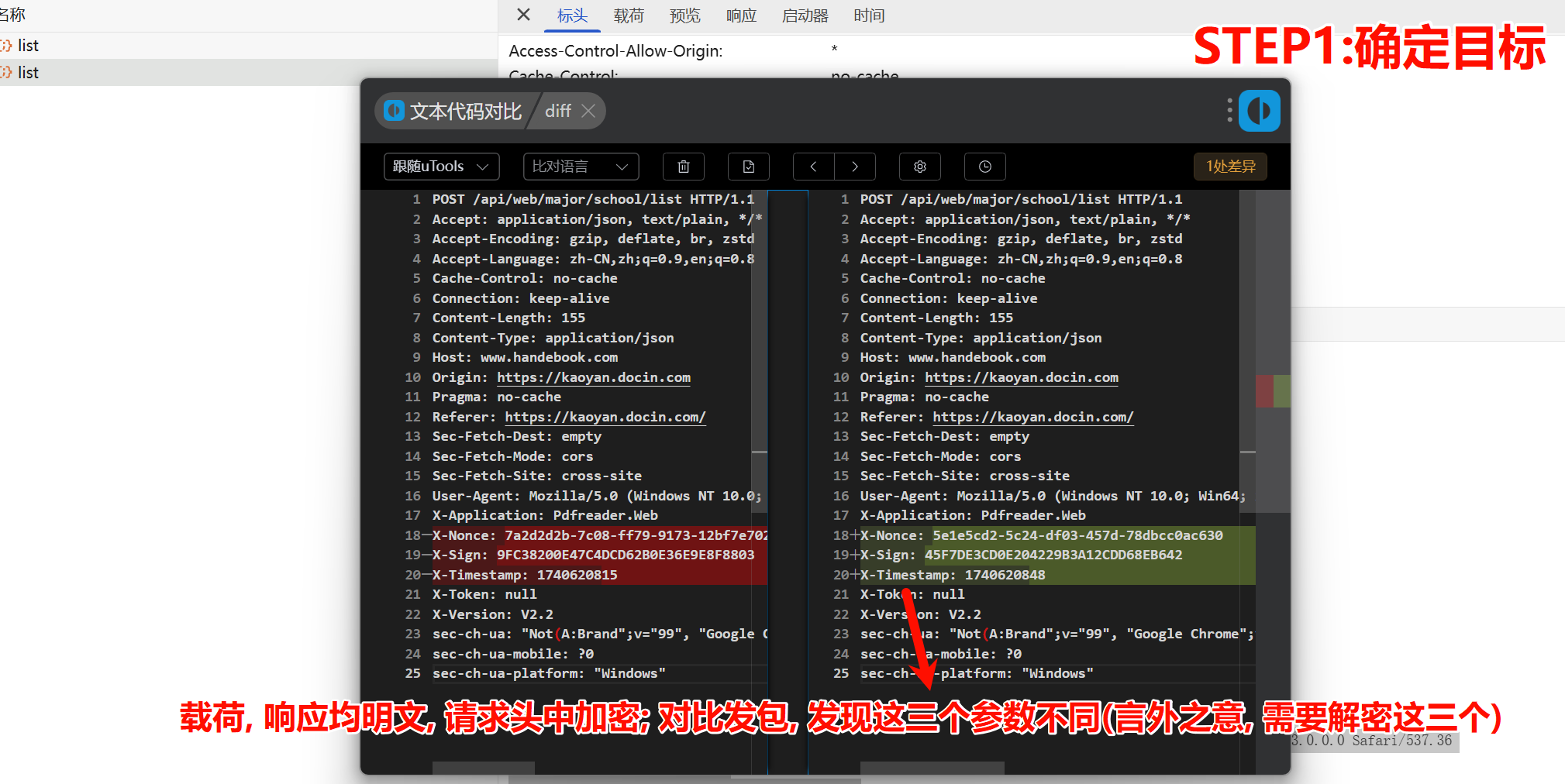
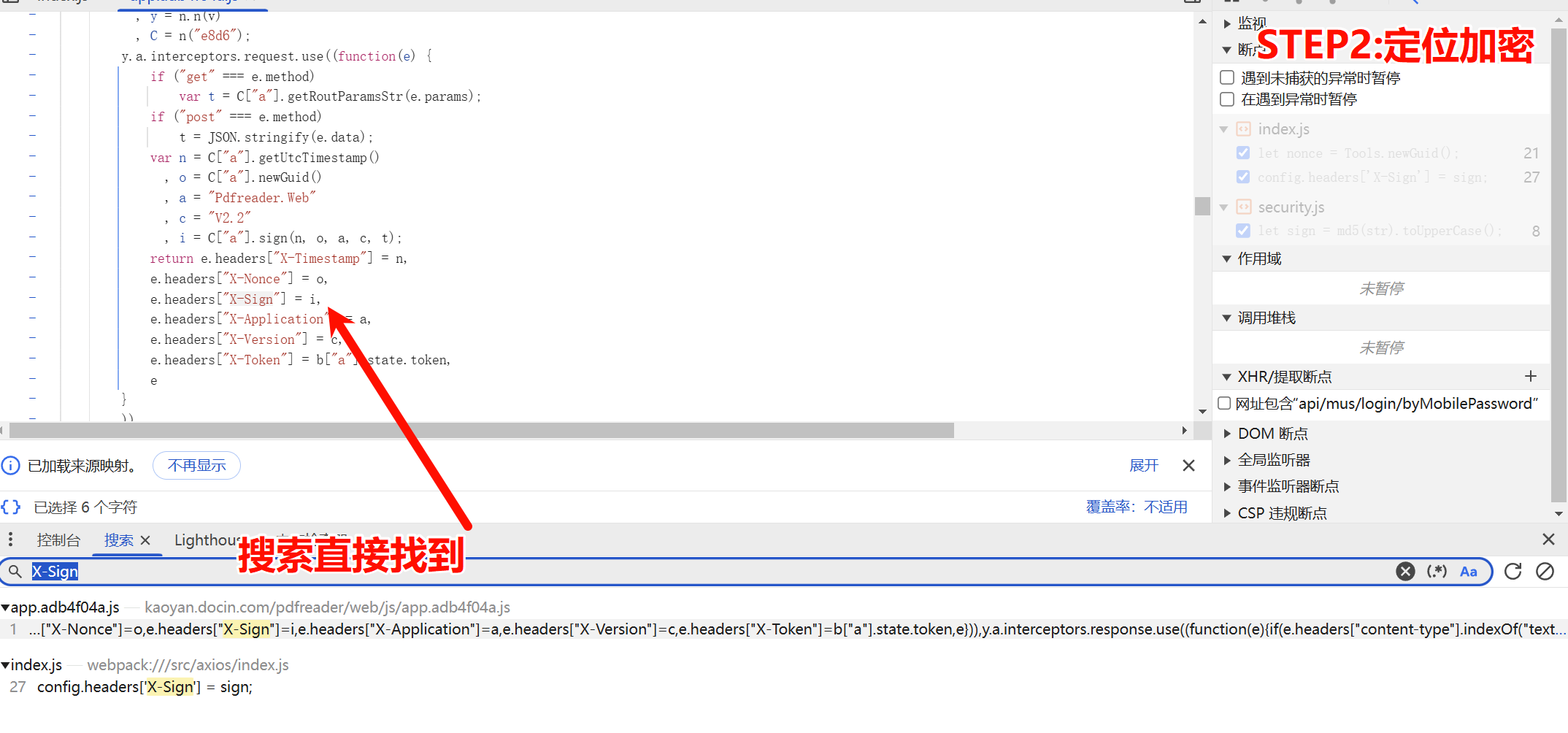
案例二 豆丁考研

需求: 爬取 “豆丁考研” link软件工程开设院校的数据

  • $ 语法: 深入理解 JS的对象 [[1.JS基础与浏览器开发工具#第14节 JS的对象 function XXX() {} 和class XXX{}]] link


1
2
3
4
5
6
7
8
9
10
11
12
13
14
15
16
17
18
19
20
21
22
23
24
25
26
27
28
29
30
31
32
33
34
35
36
37
38
39
40
41
42
43
44
45
46
47
48
49
50
51
52
53
54
55
56
57
58
59
60
61
62
63
64
65
66
67
68
69
70
71
72
73
74
75
76
77
78
79
80
81
82
83
84
85
86
87
88
89
90
91
92
93
94
95
96
97
98
99
100
101
102
103
104
105
106
107
108
109
110
111
112
113
114
115
116
117
118
119
120
121
122
123
124
125
126
127
128
129
130
131
132
133
134
135
136
137
138
139
140
141
142
143
144
145
146
147
148
149
150
151
152
153
154
155
156
157
158
159
160
161
162
163
164
165
166
167
168
169
170
171
172
173
174
175
176
177
178
179
180
181
182
183
184
185
186
187
188
189
190
191
192
193
194
195
196
197
198
199
200
var crypto = require('crypto-js')

function MyMD5(str) {
return crypto.MD5(str).toString()
}


// 相当于给Tools定义构造函数
class Tools {
static newGuid(format) {
return Guid.NewGuid().ToString(format);
}

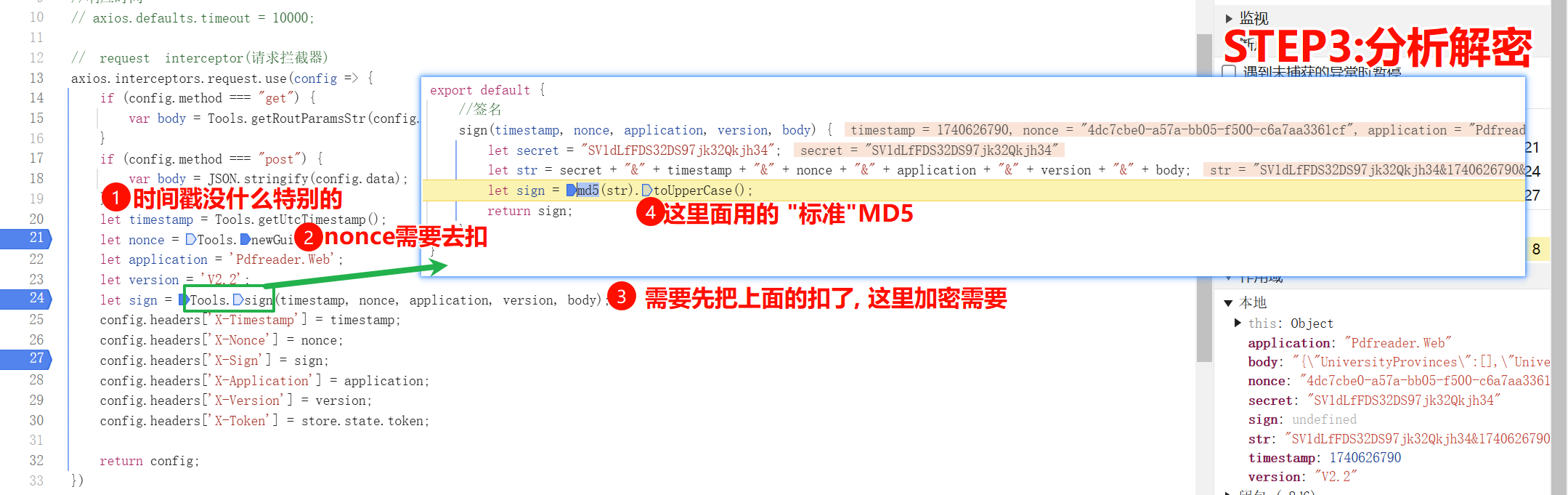
static sign(timestamp, nonce, application, version, body) {
let secret = "SV1dLfFDS32DS97jk32Qkjh34";
let str = secret + "&" + timestamp + "&" + nonce + "&" + application + "&" + version + "&" + body;
// for test
// str = 'SV1dLfFDS32DS97jk32Qkjh34&1740237565&3393839a-5fbe-9bd1-68c7-24f56d834d07&Pdfreader.Web&V2.2&{"UniversityProvinces":[],"UniversityTeachTypes":[],"UniversityCharacteristics":[],"UniversitySubject":"","MajorCode":"083500","PageIndex":3,"PageSize":10}'
let _sign = MyMD5(str).toUpperCase();
console.log(_sign)
return _sign;
}

}

function Guid(g) {
var arr = new Array(); //存放32位数值的数组
if (typeof (g) == "string") { //如果构造函数的参数为字符串
InitByString(arr, g);
} else {
InitByOther(arr);
}
//返回一个值,该值指示 Guid 的两个实例是否表示同一个值。
this.Equals = function (o) {
if (o && o.IsGuid) {

return this.ToString() == o.ToString();

} else {

return false;

}

}

//Guid对象的标记

this.IsGuid = function () {
}

//返回 Guid 类的此实例值的 String 表示形式。

this.ToString = function (format) {

if (typeof (format) == "string") {

if (format == "N" || format == "D" || format == "B" || format == "P") {

return ToStringWithFormat(arr, format);

} else {

return ToStringWithFormat(arr, "D");

}

} else {

return ToStringWithFormat(arr, "D");

}

}

//由字符串加载

function InitByString(arr, g) {

g = g.replace(/\{|\(|\)|\}|-/g, "");

g = g.toLowerCase();

if (g.length != 32 || g.search(/[^0-9,a-f]/i) != -1) {

InitByOther(arr);

} else {

for (var i = 0; i < g.length; i++) {

arr.push(g[i]);

}

}

}

//由其他类型加载

function InitByOther(arr) {

var i = 32;

while (i--) {

arr.push("0");

}

}

/*

根据所提供的格式说明符,返回此 Guid 实例值的 String 表示形式。

N 32 位: xxxxxxxxxxxxxxxxxxxxxxxxxxxxxxxx

D 由连字符分隔的 32 位数字 xxxxxxxx-xxxx-xxxx-xxxx-xxxxxxxxxxxx

B 括在大括号中、由连字符分隔的 32 位数字:{xxxxxxxx-xxxx-xxxx-xxxx-xxxxxxxxxxxx}

P 括在圆括号中、由连字符分隔的 32 位数字:(xxxxxxxx-xxxx-xxxx-xxxx-xxxxxxxxxxxx)

*/

function ToStringWithFormat(arr, format) {

switch (format) {

case "N":

return arr.toString().replace(/,/g, "");

case "D":

var str = arr.slice(0, 8) + "-" + arr.slice(8, 12) + "-" + arr.slice(12, 16) + "-" + arr.slice(16, 20) + "-" + arr.slice(20, 32);

str = str.replace(/,/g, "");

return str;

case "B":

var str = ToStringWithFormat(arr, "D");

str = "{" + str + "}";

return str;

case "P":

var str = ToStringWithFormat(arr, "D");

str = "(" + str + ")";

return str;

default:

return new Guid();

}

}

}

// 没有prototype, 静态方法, 直接类名.调用
Guid.NewGuid = function () {
var g = "";
var i = 32;
while (i--) {
g += Math.floor(Math.random() * 16.0).toString(16);
}
return new Guid(g);
}


// 加上prototype就是成员方法, 需要new Tools()后才能调用
Tools.prototype.getUtcTimestamp = function () {
return Math.floor((new Date()).getTime() / 1000);
}


function get_real_answer(data) {
// data= JSON.parse(data)
body = data
application = 'Pdfreader.Web';
version = 'V2.2';
timestamp = new Tools().getUtcTimestamp()
nonce = Tools.newGuid();
sign = Tools.sign(timestamp, nonce, application, version, body);
return {
"timestamp": String(timestamp),
"nonce": String(nonce),
"sign": String(sign),
}
}
1
2
3
4
5
6
7
8
9
10
11
12
13
14
15
16
17
18
19
20
21
22
23
24
25
26
27
28
29
30
31
32
33
34
35
36
37
38
39
40
41
42
43
44
45
46
47
48
49
50
51
52
53
54
55
56
57
58
59
60
61
62
63
# =================================
# @Time : 2025年02月22日
# @Author : 明廷盛
# @File : 2-1.豆丁考研.py
# @Software: PyCharm
# @ProjectBackground: $END$
# =================================
import execjs
import requests
import json

headers = {
"Accept": "application/json, text/plain, */*",
"Accept-Language": "zh-CN,zh;q=0.9,en;q=0.8",
"Cache-Control": "no-cache",
"Connection": "keep-alive",
"Content-Type": "application/json",
"Origin": "https://kaoyan.docin.com",
"Pragma": "no-cache",
"Referer": "https://kaoyan.docin.com/",
"Sec-Fetch-Dest": "empty",
"Sec-Fetch-Mode": "cors",
"Sec-Fetch-Site": "cross-site",
"User-Agent": "Mozilla/5.0 (Windows NT 10.0; Win64; x64) AppleWebKit/537.36 (KHTML, like Gecko) Chrome/133.0.0.0 Safari/537.36",
"X-Application": "Pdfreader.Web",
"X-Nonce": "8663aa53-e303-13ab-6083-677616e72054",
"X-Sign": "C4A7E2EF5D72C64FE5427495F3910975",
"X-Timestamp": "1740232298",
"X-Token": "null",
"X-Version": "V2.2",
"sec-ch-ua": "\"Not(A:Brand\";v=\"99\", \"Google Chrome\";v=\"133\", \"Chromium\";v=\"133\"",
"sec-ch-ua-mobile": "?0",
"sec-ch-ua-platform": "\"Windows\""
}
url = "https://www.handebook.com/api/web/major/school/list"
data = {
"UniversityProvinces": [],
"UniversityTeachTypes": [],
"UniversityCharacteristics": [],
"UniversitySubject": "",
"MajorCode": "083500",
"PageIndex": 3,
"PageSize": 10
}

# 执行js代码
with open("./2-1豆丁考研.js", "r", encoding="utf-8") as f:
js = execjs.compile(f.read())

js_res = js.call("get_real_answer", json.dumps(data))
print(js_res)

headers['X-Nonce'] = js_res['nonce']
headers['X-Sign'] = js_res["sign"]
headers['X-Timestamp'] = js_res["timestamp"]
print(js_res)
print(headers)

response = requests.post(url, headers=headers, json=data)

print(response.text)
print(response)

第三章 sha系列加密算法

第四章 hmac系列加密算法

  • Title: 4. 摘要算法
  • Author: 明廷盛
  • Created at : 2025-02-22 19:06:18
  • Updated at : 2025-02-26 08:13:00
  • Link: https://blog.20040424.xyz/2025/02/22/🐍爬虫工程师/第二部分 JS逆向/4. 摘要算法/
  • License: All Rights Reserved © 明廷盛