0.规划

0.规划

明廷盛 嘻嘻😁

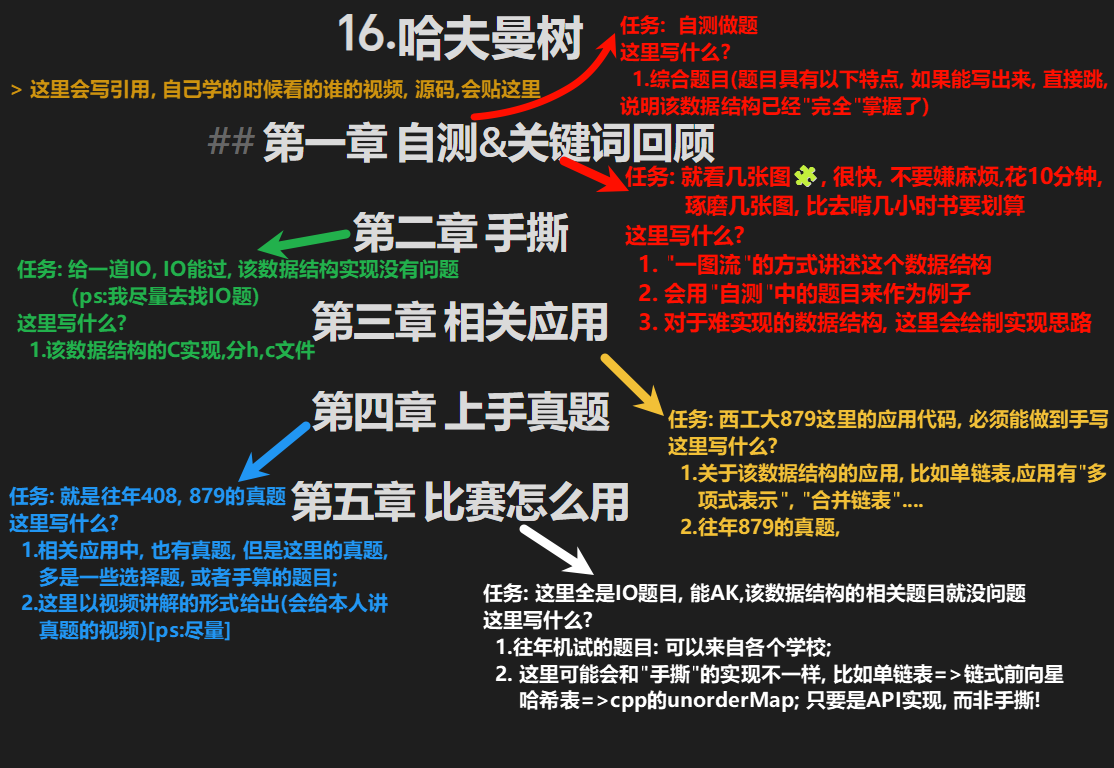
第零章 如何使用笔记📔

第一章 规划

英文名称中文名称应用(代表)难度是否已经实现
一. Linner一.线性数据结构
Linear List线性表1分✔️
Generalized List广义表5分✔️
Single Link List单链表多项式表示3分✔️
Double Link List双链表3分✔️
Loop Link List循环链表约瑟夫环3分✔️
KMP ➕ BF串的匹配算法7分✔️
Stack表达式计算3分✔️
Queue ➕Circular Queue队列 + 循环队列4分✔️
Deque双端队列3分
二. Tree二.树
Binary Tree( [Non]Recursive Traverse) ➕ Travel Tree(/Pre/In/Post/Level Thread)二叉树([非]递归实现) + 遍历5分✔️
Threaded Binary Tree(Pre/In/Post)线索二叉树(前中后)6分✔️
Binary Search Tree二叉搜索树6分✔️
AVL Binary Tree自平衡二叉树8分✔️
Red-Black Tree红黑树10分✔️
B/B+ TreeB/B+树9分
Huffman Tree哈夫曼树5分
Heap7分
三. Graph三.图
Graph ➕ BFS/DFS图的存储与遍历(深搜/广搜)5分
Minimum Spanning Tree(Prim/Kruskal)最小生成树(普里姆/克鲁斯卡尔)6分
Short Path Algorithms(Dijkstra/Floyd)最短路算法(迪杰斯特拉/弗洛伊德)7分
TopLogicalSort ➕ Critical Path拓扑排序 + 关键路径6分
四. Search四.查找
Hash哈希6分
Union Find并查集6分
五.Sort五.排序
Insertion Sort (Straight Insertion/Binary Insertion/Shell)插入排序(直接/折半/希尔)2分
Swapping Sort (Bubble / Quick )交换排序(冒泡/快排)3分
Selection Sort ➕Merge Sort ➕Counting Sort➕Radix Sort选择排序 / 归并 /计数 /基数3分
Outer Sort外部排序4分

第二章 vscode使用

我依稀记得, 这应该是我第4次配vscode了(vscode配置C/C++的环境)

STEP1: 下载MinGW

  • 官网下载: https://www.mingw-w64.org 【下好去bin目录看下 有没有gcc.exe(运行c的) g++.exe(运行c++的) gdb(调试c,c++的)
  • 解压+配置环境变量(把最后的\加上, 否则下一步检测不到):

STEP2: 下载插件

STEP3: 配置.vscode文件夹中的配置文件

第一个插件的配置 ①可以将C/C++的版本设置为比赛用的版本

1
2
3
4
5
6
7
8
9
10
11
12
13
14
15
16
17
18
19
20
21
{
"configurations": [
{
"name": "Win32",
"includePath": [
"${workspaceFolder}/**"
],
"defines": [
"_DEBUG",
"UNICODE",
"_UNICODE"
],
"windowsSdkVersion": "10.0.22621.0",
"compilerPath": "D:/mingw64/bin/gcc.exe",
"cStandard": "c99",
"cppStandard": "c++11",
"intelliSenseMode": "windows-gcc-x64"
}
],
"version": 4
}

调试用的 ①任意C/C++文件右上角都有一个齿轮,点击可以自动生成 ②externalConsole: 是否用系统的终端进行调试(只有调试模式下生效, 运行只能在vscode的终端)

1
2
3
4
5
6
7
8
9
10
11
12
13
14
15
16
17
18
19
20
21
22
23
24
25
26
27
28
29
30
31
32
33
34
35
36
37
38
39
40
41
42
43
44
45
46
47
48
49
50
51
52
53
54
55
56
57
{
"configurations": [
{
"name": "C调试",
"type": "cppdbg",
"request": "launch",
"program": "${fileDirname}/output.exe",
"args": [],
"stopAtEntry": false,
"cwd": "${fileDirname}",
"environment": [],
"externalConsole": true,
"MIMode": "gdb",
"miDebuggerPath": "D:\\mingw64\\bin\\gdb.exe",
"setupCommands": [
{
"description": "Enable pretty-printing for gdb",
"text": "-enable-pretty-printing",
"ignoreFailures": true
},
{
"description": "Set Disassembly Flavor to Intel",
"text": "-gdb-set disassembly-flavor intel",
"ignoreFailures": true
}
],
"preLaunchTask": "gcc"
},
{
"name": "C++调试",
"type": "cppdbg",
"request": "launch",
"program": "${fileDirname}/output.exe",
"args": [],
"stopAtEntry": false,
"cwd": "${fileDirname}",
"environment": [],
"externalConsole": true, // 是否使用系统控制台进行调试
"MIMode": "gdb",
"miDebuggerPath": "D:\\mingw64\\bin\\gdb.exe",
"setupCommands": [
{
"description": "Enable pretty-printing for gdb",
"text": "-enable-pretty-printing",
"ignoreFailures": true
},
{
"description": "Set Disassembly Flavor to Intel",
"text": "-gdb-set disassembly-flavor intel",
"ignoreFailures": true
}
],
"preLaunchTask": "g++" // 就改一个地方
}
],
"version": "2.0.0"
}

第四个插件的配置文件: ①配置了格式化 ②多个文件运行! ③配置了默认vscode终端编码为UTF-8(chcp65001)和vscode默认编码保持一致 ④去设置搜索”Run In Terminal”勾选(要下载第四个插件)
注意如果你要改格式化的相关配置, 请在这里修改 格式化配置参考

1
2
3
4
5
6
7
8
9
10
11
12
13
14
15
16
17
18
19
20
21
22
23
24
25
26
27
28
29
30
31
32
33
34
35
36
37
38
39
40
41
42
{
"C_Cpp.clang_format_style": "{BasedOnStyle: LLVM, BreakBeforeBraces: Attach, AlignTrailingComments: true, ReflowComments: true, SpacesBeforeTrailingComments: 2, IndentWidth: 4, TabWidth: 4, UseTab: Never, ColumnLimit: 100, AllowShortIfStatementsOnASingleLine: true, AllowShortBlocksOnASingleLine: Always, AllowShortLoopsOnASingleLine: true, AllowShortCaseLabelsOnASingleLine: true, AllowShortFunctionsOnASingleLine: All, IndentCaseLabels: true, PointerAlignment: Right}",
"C_Cpp.clang_format_fallbackStyle": "LLVM",
"editor.formatOnSave": true, // 保存时自动格式化
"editor.defaultFormatter": "ms-vscode.cpptools",
// 使用C/C++扩展的格式化工具
"[jsonc]": {
"editor.defaultFormatter": "vscode.json-language-features"
},
// 配置多文件运行
"code-runner.executorMap": {
// 单个文件
//"c": "cd $dir && gcc $fileName -o $fileNameWithoutExt && $dir$fileNameWithoutExt",
// "cpp": "cd $dir && g++ $fileName -o $fileNameWithoutExt && $dir$fileNameWithoutExt",
// 多个文件
"c": "chcp 65001 && cd $dirWithoutTrailingSlash && gcc *.c -o output && .\\output.exe",
"cpp": "chcp 65001 && cd $dirWithoutTrailingSlash && g++ *.cpp -o output && .\\output.exe"
},
"files.associations": {
"header.h": "c",
"generallist.h": "c",
"random": "c",
"bit": "cpp",
"compare": "cpp",
"concepts": "cpp",
"type_traits": "cpp",
"cmath": "cpp",
"limits": "cpp",
"new": "cpp",
"array": "c",
"string": "c",
"string_view": "c",
"span": "c",
"polynomial.h": "c",
"time.h": "c",
"assert.h": "c"
},
"C_Cpp.errorSquiggles": "enabled",
"code-runner.terminalRoot": "",
"code-runner.runInTerminal": true,
"code-runner.saveFileBeforeRun": true
}

运行配置文件: 运行时的指令相关的

1
2
3
4
5
6
7
8
9
10
11
12
13
14
15
16
17
18
19
20
21
22
23
24
25
26
27
28
29
30
31
32
33
34
35
36
37
38
39
40
41
42
43
44
45
46
47
48
49
50
51
52
53
54
55
56
57
58
59
60
61
62
63
64
65
66
67
68
69
70
71
72
73
74
75
76
77
78
79
80
81
82
83
84
85
86
87
88
89
90
91
92
93
94
95
96
97
98
99
100
101
102
103
{
"version": "2.0.0",
"tasks": [
{
"type": "cppbuild", //
"label": "gcc", // C运行
"command": "D:/mingw64/bin/gcc.exe",
"args": [
"-fdiagnostics-color=always",
"-g",
// "${file}",
"${fileDirname}\\*.c",
"-o",
"output.exe"
],
"detail": "compiler: D:/mingw64/bin/gcc.exe",
"options": {
"cwd": "${fileDirname}",
"shell": true
},
"problemMatcher": [
"$gcc"
],
"group": {
"kind": "build",
"isDefault": true
},
},
{
"type": "cppbuild",
"label": "g++", // C++运行
"command": "D:/mingw64/bin/g++.exe", // 使用g++编译器
"args": [
"-fdiagnostics-color=always",
"-g",
// "${file}",
"${fileDirname}\\*.cpp",
"-std=c++11", // 添加C++标准参数
"-o",
"output.exe"
],
"detail": "compiler: D:/mingw64/bin/g++.exe",
"options": {
"cwd": "${fileDirname}",
"shell": true
},
"problemMatcher": [ // 错误输出
"$gcc"
],
"group": {
"kind": "build",
"isDefault": true
},
},
{
"type": "shell",
"label": "gcc-utf8",
"command": "chcp 65001 && D:/mingw64/bin/gcc.exe",
"args": [
"-fdiagnostics-color=always",
"-g",
"*.c",
"-o",
"output.exe"
],
"options": {
"cwd": "${fileDirname}",
"shell": true
},
"problemMatcher": [
"$gcc"
],
"group": {
"kind": "build",
"isDefault": true
}
},
{
"type": "shell",
"label": "g++-utf8",
"command": "chcp 65001 && D:/mingw64/bin/g++.exe",
"args": [
"-fdiagnostics-color=always",
"-g",
"*.cpp",
"-std=c++11",
"-o",
"output.exe"
],
"options": {
"cwd": "${fileDirname}",
"shell": true
},
"problemMatcher": [
"$gcc"
],
"group": {
"kind": "build",
"isDefault": false
}
}
]
}

STEP4: 常见问题

调试不了?

①检测gdb.exe文件位置是否正确 ②报错的文件路径中, 不能有中文(“用户”, “文档”这样的都不行, 极其严格)

调试时scanf()没法输入??

参考文章: https://blog.csdn.net/weixin_48485807/article/details/129997680

控制台乱码?

vscode运行后弹出的cmd中输入以下命令, 临时改变cmd的编码为utf-8;
参考文章: https://www.cnblogs.com/luckyang/p/18269484

1
chcp 65001

命令面板没法快捷键打开?

把PicList的快捷键关了, vscode的命令面板(ctrl+shift+p)冲突了
|675

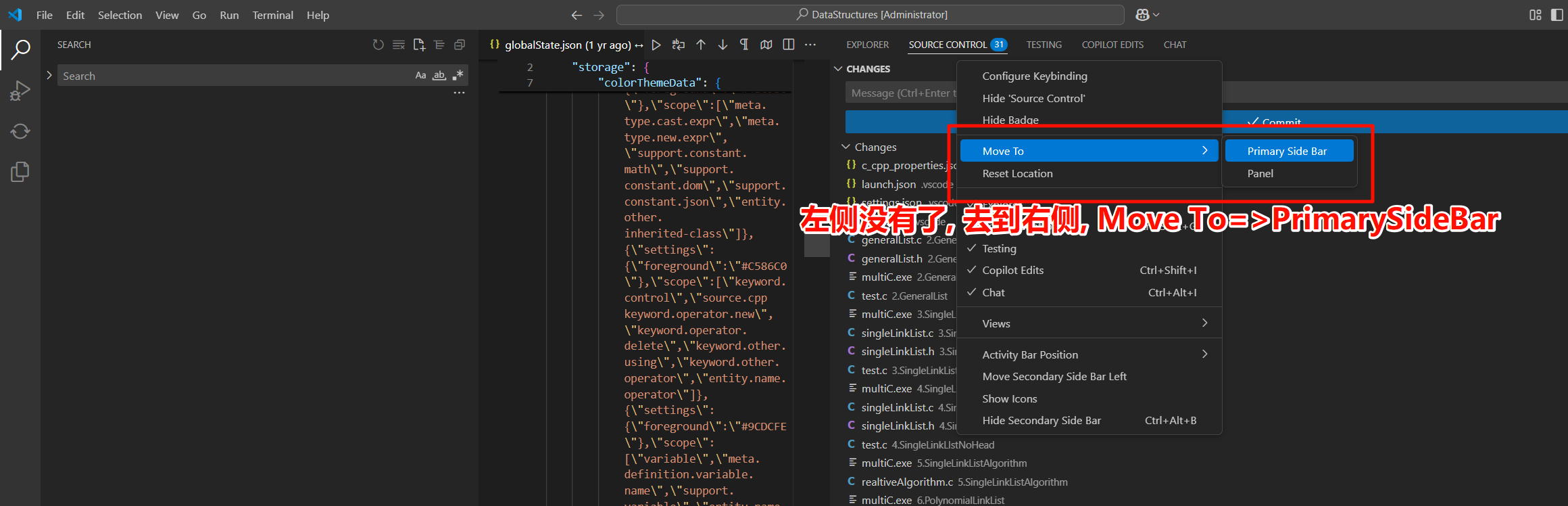
左侧东西没了?

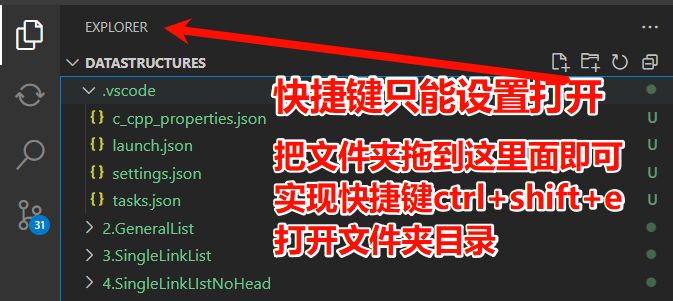
快捷键打开文件夹?

第三章 C语言基础

第一节 一级指针与二级指针

3.1.1 “修改A”与”修改A中的变量”的区别

  1. 修改A本身(需要二级指针):
    • 当A是二级指针时:*A = ...;
    • 这种操作改变了A指向的地址
  2. 修改A指向的结构体中的成员(使用一级指针即可):
    • 当A是二级指针时:(*A)->rchild = ...;
    • 当A是一级指针时:A->rchild = ...;
    • 这两种操作等价,只是修改结构体内部的值
    • 所以, 为了避免不必要的麻烦, 我们严格规定,如果只修改”A指向的结构体中的成员”; 不允许传递二级指针

3.1.2 指针赋值的效力

  1. 二级指针的赋值
1
2
TreeNode **A;
TreeNode **p = A; // p与A等价,都是二级指针
  • p可以用来修改A本身或A中的变量
  1. 一级指针的获取方式
1
2
TreeNode **A;
TreeNode *p = *A; // 从二级指针获取一级指针

1
2
TreeNode *A;
TreeNode *p = A; // 直接复制一级指针
  • 这两种情况中p都只能用来修改指向结构体的成员
  • Title: 0.规划
  • Author: 明廷盛
  • Created at : 2025-03-17 16:45:12
  • Updated at : 2025-03-23 16:59:00
  • Link: https://blog.20040424.xyz/2025/03/17/🏫考研/第一部分 数据结构/0.写在前面/
  • License: All Rights Reserved © 明廷盛