10.ip代理池

如果忘记 “重用ip代理” 如何编写, 去看[[11.Scrapy框架#2.8.3 设置代理IP 🔒]] “版本锁”
第一章 免费代理
第一节 免费ip代理池搭建
- & 总结: 免费的每一个能用的-_-!
- & 说明: 这个复习了①协程 ②协程中出现异常怎么办 [[8.高性能爬虫#第四节 关于协程对象的异常处理
gather()]] ③xpath ④请求如何带上proxy需求: 获取这个云代理提供的免费ip代理,中可用的ip地址(使用网页进行验证) 因为一个个发送请求等3秒验证很慢, 所以得用协程
# =================================
# @Time    : 2025年01月17日
# @Author  : 明廷盛
# @File    : 1.免费ip代理池搭建.py
# @Software: PyCharm
# @ProjectBackground:
# 需求: 获取这个[云代理](http://www.ip3366.net/)提供的免费ip代理,中可用的ip地址(使用[网页](http://httpbin.org/ip)进行验证)
#      因为一个个发送请求等3秒验证很慢, 所以得用协程 (自己加的条件, 。。) )
# =================================
import aiohttp
import asyncio
from lxml import etree


class FreeProxyPool:
    # 爬虫STEP1:确定目标网址
    provide_url = "http://www.ip3366.net/?stype=1&page={}"
    headers = {
        "user-agent": "Mozilla/5.0 (Windows NT 10.0; Win64; x64) AppleWebKit/537.36 (KHTML, like Gecko) Chrome/132.0.0.0 Safari/537.36"
    }

    # 爬虫STEP2:模拟发送请求
    async def grasp_data(self, client, page) -> list:
        res = await client.get(self.provide_url.format(page))
        page_source = await res.text("gbk")

        # 爬虫STEP3:数据清洗_1
        html_obj = etree.HTML(page_source)
        tr_list = html_obj.xpath("//tbody/tr")
        ip_list = list()
        for tr in tr_list:
            ip_address = tr.xpath("./td[1]/text()")[0]
            port = tr.xpath("./td[2]/text()")[0]
            _type = str.lower(tr.xpath("./td[4]/text()")[0])  # http or https
            ip_url = _type + "://" + ip_address + ":" + port
            ip_list.append(ip_url)
        return ip_list

    # 爬虫STEP3:清洗数据_2-验证其中可以正常使用的ip
    async def validata_ip(self, client, ip_list) -> list:
        tasks = list()
        verify_url = "http://httpbin.org/ip"  # 验证当前代理IP能否跑通的网站
        for ip in ip_list:
            print(f"验证中ip:{ip}")
            coroutine_obj = client.get(verify_url, proxy=ip, timeout=2)
            task = asyncio.create_task(coroutine_obj)
            tasks.append(task)
        results = await asyncio.gather(*tasks, return_exceptions=True)  # 能用就返回ClientResponse的对象,否则返回超时的错误
        available_ip_list = list()
        for result in results:
            print(type(result), result)
            if isinstance(result, aiohttp.client_reqrep.ClientResponse):
                ip = await result.json()
                available_ip_list.append(ip['origin'])
        return available_ip_list

    # 启动函数
    async def launch(self):
        async with aiohttp.ClientSession(headers=self.headers) as client:
            # 获取总页数
            res = await client.get(self.provide_url)
            page_source = await res.text("gbk")
            html_obj = etree.HTML(page_source)  # 转为etree对象
            total_page = int(html_obj.xpath('//div[@id="listnav"]//strong/text()')[0][1:])  # 获取总页数
            # 需求步骤:循环爬取每个页面
            available_ip = []  # 所有可用的ip
            for page in range(1, total_page + 1):
                ip_list = await self.grasp_data(client, page)  # 爬虫STEP2:模拟发送请求并获取数据
                pass_id_list = await self.validata_ip(client, ip_list)  # 验证可以的IP
                available_ip += pass_id_list
            [print(i) for i in available_ip]  # 打印下


if __name__ == '__main__':
    free_proxy_pool = FreeProxyPool()
    asyncio.run(free_proxy_pool.launch())
第二节 http代理和https代理
- ! 注意: 使用http代理 访问 https网站, 会使用本地ip, 而不是代理ip ; 解决方法, 使用https代理

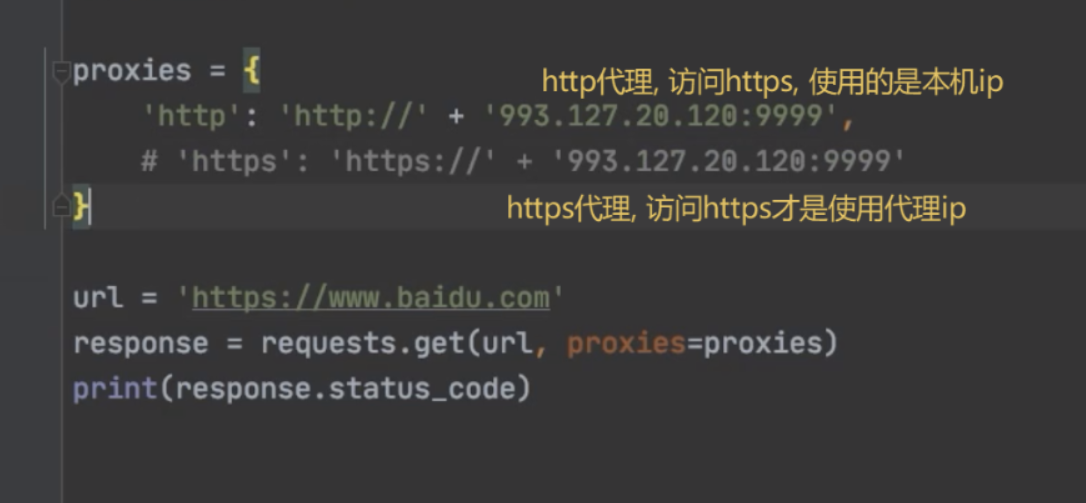
第二章 付费代理
- 如何付费: 使用 快代理平台
- $ 语法: 帮助文档
- 基本使用:
- 实战使用: 注意这个的ip买ip的时候, 选时间只有
1分钟的自定义ip, 这样可以将损耗将到最低- 代码缺陷: ①每个ip还是没有”物尽其用”, 平均每个ip只请求1-2次网站(最好情况是, 尽管是1min的ip, 也能请求10次左右) ②如果ip有效时间比较长, 建议用redis(需要修改
get_proxy_ip()和fetch()的第一部分)
- 代码缺陷: ①每个ip还是没有”物尽其用”, 平均每个ip只请求1-2次网站(最好情况是, 尽管是1min的ip, 也能请求10次左右) ②如果ip有效时间比较长, 建议用redis(需要修改
import re
import asyncio
import aiohttp
from aiohttp import TCPConnector

"""全局变量, '快代理'的基本代理参数配置 """
username = "d4472377283"
password = "rudm2ozb"
api_url = "https://dps.kdlapi.com/api/getdps/?secret_id=o5b3w54kddfiskjsu5ta&signature=tr45ga5grnvp1943h0paert5qwquy7cb&num=1&pt=1&format=json&sep=1"  # API接口


class AmazonCommodityInfo:
    headers = {
        "User-Agent": "Mozilla/5.0 (Windows NT 10.0; Win64; x64) AppleWebKit/537.36 (KHTML, like Gecko) Chrome/107.0.0.0 Safari/537.36",
        'cookie': 'i18n-prefs=USD; session-id=130-9348969-9472654; ubid-main=132-4278027-6860024; session-id-time=2082787201l; lc-main=zh_CN; sp-cdn="L5Z9:HK"; session-token=xqGp4dFymTVT+Qou8E0C2TbIAa0eDkCWp0kxfL0lbh0uk7OU/KqojGDABQOz5Cc8Q63u6IPfMIwKNxoE8hvyKjvGOaB5tXqgsfpxaYK9+A1uVYCHXZuOnuzP9WdkFzjHEJQixMf/bblxWCN0RjvdbGsxluPYrRnvzg53QIZyy/F5Y+xPf7FygYkJ4ah53K/Ema15wI2/IuEInrWUV8rOLwWuDgfqHbPoWdnyaxHc39WelWFBjYNL+cGsPcvyZUmfms6lZi+sLMCOQBzqY/THpkMHUWpucP13amAmRthipjAXbhmO+JJcSHASN06K6pH7hTrawP5P+bNYxKHVb27oPefWWsLBw/R8; skin=noskin; csm-hit=tb:s-6K5TXMJ99AG0F2BMDE5G|1737183719347&t:1737183720056&adb:adblk_yes',
        "Referer": "https://www.amazon.com/s?i=specialty-aps&bbn=16225013011&language=zh",
        "X-Requested-With": "XMLHttpRequest",
        "downlink": "10",
        "ect": "4g",
        "rtt": "200",
    }
    """ip相关"""
    proxy_auth = aiohttp.BasicAuth(username, password)  # 代理认证
    ip_queue = asyncio.Queue()  # ip队列
    max_retries = 11

    # 获取代理ip
    async def get_proxy_ip(self):
        # 快代理API接口,返回格式为json
        async with aiohttp.ClientSession(connector=TCPConnector(ssl=False)) as client:
            async with client.get(api_url) as response:
                if response.status == 200:
                    data = await response.json()
                    proxy_ip = "http://" + data.get('data').get('proxy_list')[0]  # 每次只获取一个ip
                    print(f"log: 从快代理获取到的ip为: {proxy_ip}")
                    await self.ip_queue.put(proxy_ip)  # 将获取到的ip压入队列
                    return proxy_ip  # 返回指定的proxies
                else:
                    print(f"请求失败,状态码: {response.status}")
                    return None

    # 发送请求, 并重试
    async def fetch(self, client, url, input_headers=None):
        headers = self.headers if input_headers is None else input_headers
        # 重试逻辑
        retries = 1
        while retries < self.max_retries:  # 最大重试次数
            # 1.获取ip地址
            while True:
                # 1.1.如果ip_queue为空,就重新获取一个
                if self.ip_queue.empty():
                    await self.get_proxy_ip()
                proxy_ip = await self.ip_queue.get()
                # 1.2.判断ip是否过期
                test_ip_url = "http://httpbin.org/ip"  # 验证ip是否可用的地址
                try:
                    async with client.get(test_ip_url, proxy=proxy_ip, proxy_auth=self.proxy_auth, timeout=2) as response:
                        if response.status == 200:
                            json_data = await response.json()
                            if 'origin' in json_data:
                                backtrack_ip = "http://" + json_data['origin']
                                print(f"proxy_ip {proxy_ip}, 访问转发backtrack_ip: {backtrack_ip}")
                                break  # 退出循环
                        else:
                            print(f"log: 验证ip失败 {response.status}, ip不可用")
                except Exception as e:
                    print(f"log: 验证ip报错: {e}")
            # 2.发送请求,并重试
            try:
                async with client.get(url, proxy=proxy_ip, proxy_auth=self.proxy_auth, headers=headers, timeout=5) as response:
                    # 2.1请求成功后的逻辑
                    if response.status == 200:
                        await self.ip_queue.put(proxy_ip)  # 重新将ip放回ip_queue
                        print(f"log:请求{url}成功, 使用IP:{proxy_ip}")
                        # 获取页面内容 # TODO 这个地方是个大坑,因为这是协程,如果将res返回给调用处, 一定会超时, 所以只能在这里获取后将结果返回回去
                        #                   所以这里用 match...case...来处理
                        content_type = response.content_type
                        match content_type:
                            case "application/json":
                                return await response.json()
                            case "text/html":
                                return await response.text()
                            case _:  # 默认情况
                                return await response.text()
                    else:
                        print(f"log:重试次数: {retries}, 请求失败,状态码:{response.status}")
            except Exception as e:
                print(f"log:重试次数: {retries}, 报错 {e}")
                retries += 1

            await self.ip_queue.put(proxy_ip)  # 重新将ip放回ip_queue,这里不怕被封因为,队列,不会一直只get到一个ip
        print(f"log:达到最大请求数量, {url}未请求成功")

    async def launch(self):
        aim_url = "http://httpbin.org/ip"  # 验证ip是否可用的地址
        baidu_url = "https://baidu.com"  # 验证返回值类型
        async with aiohttp.ClientSession(connector=TCPConnector(ssl=False)) as client:
            res_text = await self.fetch(client, aim_url)
            print(res_text)


if __name__ == '__main__':
    amazon_commodity_info = AmazonCommodityInfo()
    asyncio.run(amazon_commodity_info.launch())
第三章 实战(爬取亚马逊商品)
- & 说明: 商品太多, 爬不下来(运行一次, 跑了我500个ip, 还没爬完, 🥲)
# =================================
# @Time : 2025年01月17日
# @Author : 明廷盛
# @File : 3.作业(爬取亚马逊所有商品信息).py
# @Software: PyCharm
# @ProjectBackground:
# =================================
import random
import time
import requests
import re
import asyncio
import aiohttp
import aiomysql
import traceback
import retrying
from tenacity import retry, stop_after_attempt, retry_if_exception_type, retry_if_exception
from aiohttp import ClientResponse, TCPConnector
from feapder.network.user_agent import get
from lxml import etree
"""全局变量, '快代理'的基本代理参数配置 """
username = "d4472377283"
password = "rudm2ozb"
api_url = "https://dps.kdlapi.com/api/getdps/?secret_id=o5b3w54kddfiskjsu5ta&signature=tr45ga5grnvp1943h0paert5qwquy7cb&num=1&pt=1&format=json&sep=1"
class AmazonCommodityInfo:
headers = {
"User-Agent": "Mozilla/5.0 (Windows NT 10.0; Win64; x64) AppleWebKit/537.36 (KHTML, like Gecko) Chrome/107.0.0.0 Safari/537.36",
'cookie': 'i18n-prefs=USD; session-id=130-9348969-9472654; ubid-main=132-4278027-6860024; session-id-time=2082787201l; lc-main=zh_CN; sp-cdn="L5Z9:HK"; session-token=xqGp4dFymTVT+Qou8E0C2TbIAa0eDkCWp0kxfL0lbh0uk7OU/KqojGDABQOz5Cc8Q63u6IPfMIwKNxoE8hvyKjvGOaB5tXqgsfpxaYK9+A1uVYCHXZuOnuzP9WdkFzjHEJQixMf/bblxWCN0RjvdbGsxluPYrRnvzg53QIZyy/F5Y+xPf7FygYkJ4ah53K/Ema15wI2/IuEInrWUV8rOLwWuDgfqHbPoWdnyaxHc39WelWFBjYNL+cGsPcvyZUmfms6lZi+sLMCOQBzqY/THpkMHUWpucP13amAmRthipjAXbhmO+JJcSHASN06K6pH7hTrawP5P+bNYxKHVb27oPefWWsLBw/R8; skin=noskin; csm-hit=tb:s-6K5TXMJ99AG0F2BMDE5G|1737183719347&t:1737183720056&adb:adblk_yes',
"Referer": "https://www.amazon.com/s?i=specialty-aps&bbn=16225013011&language=zh",
"X-Requested-With": "XMLHttpRequest",
"downlink": "10",
"ect": "4g",
"rtt": "200",
}
"""链接"""
# catalog_url是一个json,其中的['data']数据是一段HTML,要用xpath解读,并获取所有的商品品类信息
catalog_url = "https://www.amazon.com/nav/ajax/hamburgerMainContent?ajaxTemplate=hamburgerMainContent&pageType=Gateway&hmDataAjaxHint=1&navDeviceType=desktop&isSmile=0&isPrime=0&isBackup=false&hashCustomerAndSessionId=9265450a4a37ea1ecc6f3377d5c592346f0ab06a&languageCode=zh_CN&environmentVFI=AmazonNavigationCards/development@B6285729334-AL2_aarch64&secondLayerTreeName=prm_digital_music_hawkfire%2Bkindle%2Bandroid_appstore%2Belectronics_exports%2Bcomputers_exports%2Bsbd_alexa_smart_home%2Barts_and_crafts_exports%2Bautomotive_exports%2Bbaby_exports%2Bbeauty_and_personal_care_exports%2Bwomens_fashion_exports%2Bmens_fashion_exports%2Bgirls_fashion_exports%2Bboys_fashion_exports%2Bhealth_and_household_exports%2Bhome_and_kitchen_exports%2Bindustrial_and_scientific_exports%2Bluggage_exports%2Bmovies_and_television_exports%2Bpet_supplies_exports%2Bsoftware_exports%2Bsports_and_outdoors_exports%2Btools_home_improvement_exports%2Btoys_games_exports%2Bvideo_games_exports%2Bgiftcards%2Bamazon_live%2BAmazon_Global&customerCountryCode=HK"
# 每种商品详细页的网址
aim_url = "https://www.amazon.com/s?i=specialty-aps&bbn={}&page={}&language=zh"
# https://www.amazon.com/s?i=specialty-aps&bbn=16225019011&language=zh&page=19
"""ip相关"""
proxy_auth = aiohttp.BasicAuth(username, password) # 代理认证
ip_queue = asyncio.Queue() # ip队列
max_retries = 11
# 获取代理ip
async def get_proxy_ip(self):
# 快代理API接口,返回格式为json
async with aiohttp.ClientSession(connector=TCPConnector(ssl=False)) as client:
async with client.get(api_url) as response:
if response.status == 200:
data = await response.json()
proxy_ip = "http://" + data.get('data').get('proxy_list')[0] # 每次只获取一个ip
print(f"log: 从快代理获取到的ip为: {proxy_ip}")
await self.ip_queue.put(proxy_ip) # 将获取到的ip压入队列
return proxy_ip # 返回指定的proxies
else:
print(f"请求失败,状态码: {response.status}")
return None
# 发送请求, 并重试
async def fetch(self, client, url, input_headers=None):
headers = self.headers if input_headers is None else input_headers
# 重试逻辑
retries = 1
while retries < self.max_retries: # 最大重试次数
# 1.获取ip地址
while True:
# 1.1.如果ip_queue为空,就重新获取一个
if self.ip_queue.empty():
await self.get_proxy_ip()
proxy_ip = await self.ip_queue.get()
# 1.2.判断ip是否过期
test_ip_url = "http://httpbin.org/ip" # 验证ip是否可用的地址
try:
async with client.get(test_ip_url, proxy=proxy_ip, proxy_auth=self.proxy_auth, timeout=2) as response:
if response.status == 200:
json_data = await response.json()
if 'origin' in json_data:
backtrack_ip = "http://" + json_data['origin']
print(f"proxy_ip {proxy_ip}, 访问转发backtrack_ip: {backtrack_ip}")
break # 退出循环
else:
print(f"log: 验证ip失败 {response.status}, ip不可用")
except Exception as e:
print(f"log: 验证ip报错: {e}")
# 2.发送请求,并重试
try:
async with client.get(url, proxy=proxy_ip, proxy_auth=self.proxy_auth, headers=headers, timeout=5) as response:
# 2.1请求成功后的逻辑
if response.status == 200:
await self.ip_queue.put(proxy_ip) # 重新将ip放回ip_queue
print(f"log:请求{url}成功, 使用IP:{proxy_ip}")
# 获取页面内容 # TODO 这个地方是个大坑,因为这是协程,如果将res返回给调用处, 一定会超时, 所以只能在这里获取后将结果返回回去
# 所以这里用 match...case...来处理
content_type = response.content_type
match content_type:
case "application/json":
return await response.json()
case "text/html":
return await response.text()
case _: # 默认情况
return await response.text()
else:
print(f"log:重试次数: {retries}, 请求失败,状态码:{response.status}")
except Exception as e:
print(f"log:重试次数: {retries}, 报错 {e}")
retries += 1
# 重新将ip放回ip_queue,这里不怕被封因为,队列,不会一直只get到一个ip
await self.ip_queue.put(proxy_ip)
print(f"log:达到最大请求数量, {url}未请求成功")
"""需求实现"""
# 获取所有商品种类
async def get_commodity_catalog(self, client) -> list:
json_res = await self.fetch(client, self.catalog_url)
# 检查json_res是否包含'data'字段
if 'data' not in json_res:
print("错误: 响应中没有'data'字段")
return []
await asyncio.sleep(0.6)
catalog_id_list = re.findall("bbn=(\d*)", json_res['data']) # 所有"商品种类id"的列表
catalog_id_list = list(set(catalog_id_list))
print(f"log:所有商品id列表{len(catalog_id_list), catalog_id_list}")
return catalog_id_list
# 获取当前"商品ID"的所有商品数据,
async def get_page_commodity(self, client, commodity_id):
input_headers = {
'accept': 'text/html,application/xhtml+xml,application/xml;q=0.9,image/avif,image/webp,image/apng,*/*;q=0.8,application/signed-exchange;v=b3;q=0.7',
'accept-encoding': 'gzip, deflate, br, zstd',
'accept-language': 'zh-CN,zh;q=0.9,en;q=0.8',
'cache-control': 'no-cache',
'cookie': 'i18n-prefs=USD; session-id=130-9348969-9472654; ubid-main=132-4278027-6860024; session-id-time=2082787201l; lc-main=zh_CN; sp-cdn="L5Z9:HK"; skin=noskin; session-token=GKkaoAAhd7tMD+5bkg1Sp6oCfsjyKWaEkp4RHPqYi35vsc/OF/D0Ps6g+mxd2O1xmf+no/UHm5LwVwE3BvKt0CDVBw5rsXDp6QM6qRlnjwYJ1EIGqSFmAK92DnmG5urFfyTncC/Xc5oraOUngQowkQV45hGT+bxi7+0lDwekP7uFirhJsjbSIhmfYbHf92wgfZMRhrBxss3KTQvuSQ0qetliwyAkxkPhT8a5D9N2kd3PZQ0xc/uf5l6dD4t2hAUmMnxr0zzEYh4V6u/7Nor4n7nwegbSLseXJYd4MfIcd6cPyDa1sQNHv+Atey6/Gyu3157bRjPuvQE2yPuSennHpuPZ9Tt2BszT; csm-hit=tb:s-TF8PP3ZB5Z7AT54AQ0WN|1737186961126&t:1737186961536&adb:adblk_yes',
'device-memory': '8',
'downlink': '4.75',
'dpr': '1.125',
'ect': '4g',
'pragma': 'no-cache',
'priority': 'u=0, i',
'rtt': '250',
'sec-ch-device-memory': '8',
'sec-ch-dpr': '1.125',
'sec-ch-ua': '"Not A(Brand";v="8", "Chromium";v="132", "Google Chrome";v="132"',
'sec-ch-ua-mobile': '?0',
'sec-ch-ua-platform': '"Windows"',
'sec-ch-ua-platform-version': '"15.0.0"',
'sec-ch-viewport-width': '2274',
'sec-fetch-dest': 'document',
'sec-fetch-mode': 'navigate',
'sec-fetch-site': 'same-origin',
'sec-fetch-user': '?1',
'upgrade-insecure-requests': '1',
'user-agent': 'Mozilla/5.0 (Windows NT 10.0; Win64; x64) AppleWebKit/537.36 (KHTML, like Gecko) Chrome/132.0.0.0 Safari/537.36',
'viewport-width': '2274',
}
for page in range(100):
# 1.获取当页页面信息
text = await self.fetch(client, self.aim_url.format(commodity_id, page), input_headers=input_headers)
html_obj = etree.HTML(text)
flag = html_obj.xpath('//h2[@class="a-size-medium-plus a-spacing-none a-color-base a-text-bold"]/text()')
if not flag: # 列表为空 说明页面上没有"结果"这个二级标题,什么当前页没有商品,可以退出爬取了
break
# 2.分组获取url,title,price
group = html_obj.xpath('//div[@class="sg-col-20-of-24 s-result-item s-asin sg-col-0-of-12 sg-col-16-of-20 sg-col s-widget-spacing-small sg-col-12-of-16"][1]')
sava_tasks = list()
for good in group:
try:
title = good.xpath('.//h2[@class="a-size-medium a-spacing-none a-color-base a-text-normal"]/span/text()')[0]
price = good.xpath('.//span[@class="a-price"]//span[@class="a-offscreen"]/text()')[0] # 可能是一个list
url = "https://www.amazon.com/" + good.xpath('.//a[@class="a-link-normal s-no-hover s-underline-text s-underline-link-text s-link-style a-text-normal"]/@href')[0]
print(f"log:商品{title},{price}, {url}xpath解析成功")
except Exception as e:
print(f"log:xpath解析失败", e)
continue
# 成功解析后, 存储数据
coroutine_obj = self.sava_commodity(title, price, url) # 获取一个协程对象
sava_tasks.append(asyncio.create_task(coroutine_obj)) # 转为task类并存入任务列表
await asyncio.wait(sava_tasks) # 执行任务列表
# mysql建表
async def create_table():
async with aiomysql.connect(host="localhost", user="root", password="root", db="py_spider") as db:
async with db.cursor() as cursor:
sql = "SHOW TABLES LIKE 'tb_amazon';" # 检测表是否存在
flag = await cursor.execute(sql)
if not flag:
sql = """
create table if not exists tb_amazon (
id int auto_increment not null primary key,
title varchar(255),
price varchar(255),
url varchar(255)
) engine = innodb;
"""
try:
await cursor.execute(sql)
print("log:tb_amazon建表成功")
except Exception as e:
print("error", e)
else:
print("log:tb_amazon表已存在")
# mysql插入数据
async def sava_commodity(title, price, url):
pool = await aiomysql.create_pool(host="localhost", user="root", password="root", db="py_spider")
async with pool.acquire() as connects:
async with connects.cursor() as cursors:
sql = "insert into tb_amazon(title, price, url) values(%s,%s,%s)"
try:
await cursors.execute(sql, (title, price, url))
await connects.commit()
print(f"log:商品数据{title},{price},{url}插入成功!")
except Exception as e:
print(f"log:商品数据{title},{price},{url}插入失败! ", e)
await connects.rollback()
# 启动函数
async def launch(self):
async with aiohttp.ClientSession() as client:
# 需求STEP1:获取"商品种类id"
commodity_list = await self.get_commodity_catalog(client)
# 建表
await self.create_table()
# 需求STEP2:依据"商品品类ID"获取每种商品的所有商品数据
tasks = list()
for commodity_id in commodity_list:
coroutine_obj = self.get_page_commodity(client, commodity_id)
tasks.append(asyncio.create_task(coroutine_obj))
results = await asyncio.gather(*tasks, return_exceptions=True) # 报错返回错误类型,否则返回页面内容
# for debug
# with open(f"./for_debug作业3/back_text{index}.txt", "w", encoding="utf-8") as f:
# f.write(f"Index: {index}\n")
# f.write(f"Type: {type(res)}\n")
# if isinstance(res, Exception):
# f.write(f"Exception occurred: {str(res)}\n")
# # 如果需要更详细的异常信息,可以使用 traceback 模块
# traceback_str = ''.join(traceback.format_exception(type(res), res, res.__traceback__))
# f.write(f"Traceback:\n{traceback_str}")
# else:
# f.write(f"Content:\n{res}\n")
if __name__ == '__main__':
amazon_commodity_info = AmazonCommodityInfo()
asyncio.run(amazon_commodity_info.launch())
- Title: 10.ip代理池
- Author: 明廷盛
- Created at : 2026-02-12 01:17:04
- Updated at : 2025-02-09 16:00:00
- Link: https://blog.20040424.xyz/2026/02/12/🐍爬虫工程师/第一部分 爬虫基础/10.ip代理池/
- License: All Rights Reserved © 明廷盛