3.Js调用和扣代码

第一章 Python调用JS代码
第一节 Py调用同步的JS代码
1.1.1 使用execjs包
| 同步代码的调用 | 异步代码的调用 | 输出结果 | |
|---|---|---|---|
| pyexecjs | ✔️ | ❌ | 函数的返回值, 不会返回原js代码打印的内容 |
pip install pyexecjs
- & 说明: ①内置NodeJS环境 ②只能获取 “同步JS代码“ 的执行结果
- $ 语法:
- ①STEP1:
node=execjs.get()获取node环境 - ②STEP2:
ctx = node.compile("字符串的js代码")编译js代码 - ③STEP3:
ctx.eval()或ctx.call()执行js函数, 并获取结果
- ①STEP1:
- ! 注意:
- 如果
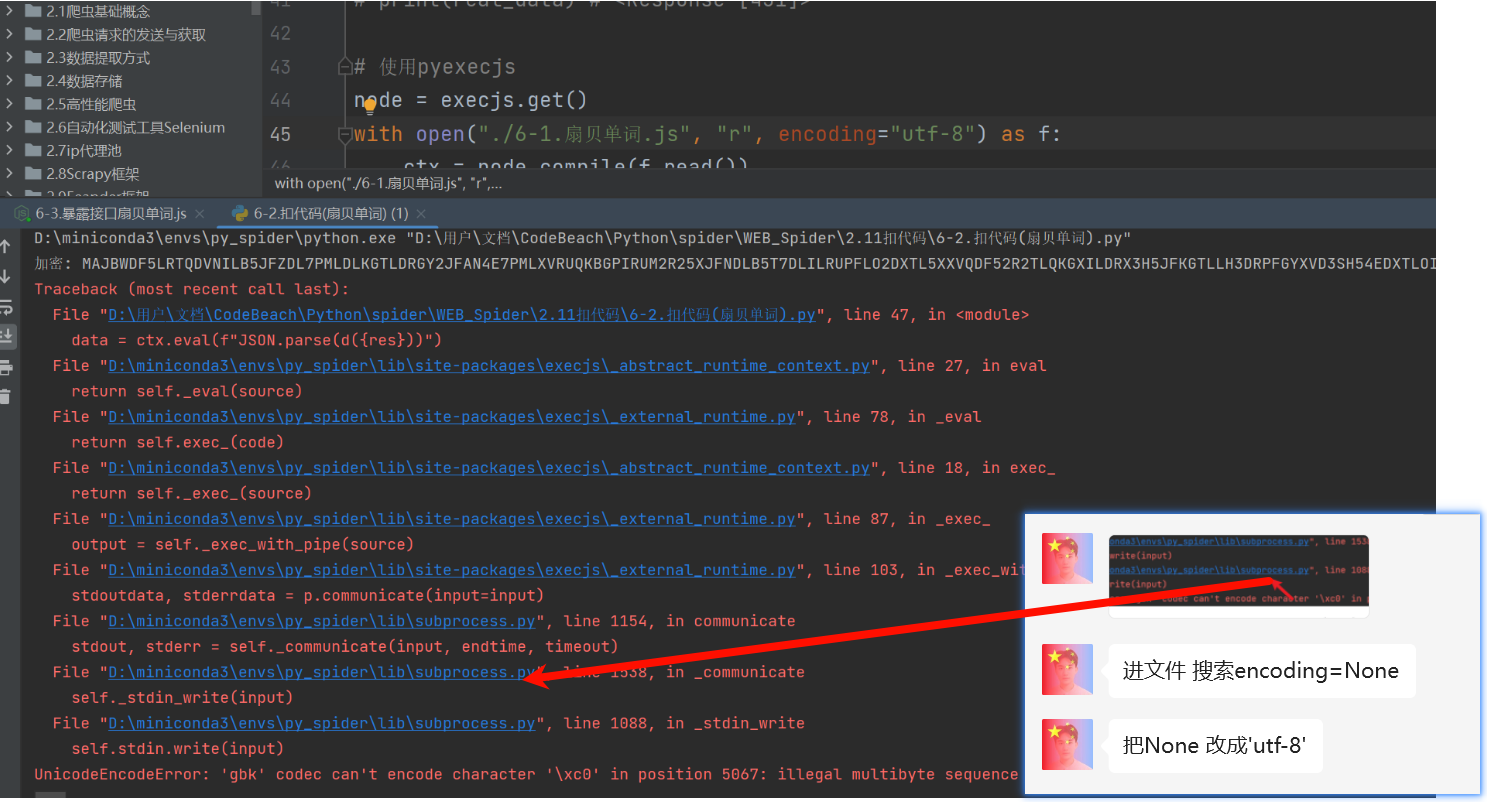
execjs.get()打印结果为 “JavaScript” 就只能重装Pychram解决, 必须为 “Node.js(V8)”才能正常运行 - 如果设置了
utf-8还是显示gbk报错的话

- 如果
import execjs

# 生成JavaScript运行环境,环境名可以指定
# 1.获取node对象
node = execjs.get()  # 安装nodejs后,会得到运行环境名为:Node.js (V8)
print(node)

# 2.读取js代码
with open("./1.js_code.js", "r", encoding="utf-8") as f:
    js_code = f.read()


# 编译js代码
ctx = node.compile(js_code)  # compile方法去加载js代码

# 两种方式执行js函数
data1 = ctx.eval('fun1("eval传入")')  # eval方法中,整个函数调用包含在字符串内
print(data1)
data2 = ctx.call('fun1', ['call传入'])  # call方法中,第一个参数是函数名(str),后面接参数
print(data2)
1.1.2 JS开接口给Py用
| 同步代码的调用 | 异步代码的调用 | 输出结果 | |
|---|---|---|---|
| js开接口给py调拿结果 | ✔️ | ✔️ | 想要什么, js接口就返回什么 |
- $ 语法: js开一个接口, 和Controller开接口一样, “里面嵌入JS代码即可”, py通过请求这个接口, “获取接口的返回值“ ,从而获取JS的计算结果
- ! 注意: 如果报SSL, urllib3之类的错误;
pip install urllib3==1.24.3把这个包降级下, 尽可能降低到能跑, 不过太低不支持?拼接传参
// 1.导入 express
var express = require('express')

// 2.创建 web 服务器
var app = express()

/*嵌入需要执行的JS代码*/
function fun1(aa) {
    return "同步的返回:" + aa
}

function getAsyncData(aa) {
    // resolve成功的回调, reject失败的回调
    return new Promise(function (resolve, reject) {
        resolve(aa)
    })
}


// 3.get请求 req是请求对象  res响应对象
app.get('/test', function (req, res) {
    params = req.query // 查询字符串传来的参数
    /**假设传来的params对象(dict)中有一个字段为param1,我们要这个键的值*/

    // 同步的结果
    res1 = fun1(params.param1)

    // 异步的结果
    getAsyncData(params).then(result => {
        console.log("异步代码的结果:", result.param1)
        res_dict = {
            "res1": res1,
            "res2": result.param1
        }
        res.send(res_dict)// 调用express提供的res.send()方法,向客户端响应一个JSON对象
    })
})

// 4.启动 web 服务器
app.listen(8080, function () {
    console.log("服务启动") // 启动时在py控制台, 打印"服务启动"
})
import requests

res = requests.get('https://localhost:8080/test', timeout=1, verify=False)
print(res)
1.2.3 subprocess实现异步调用
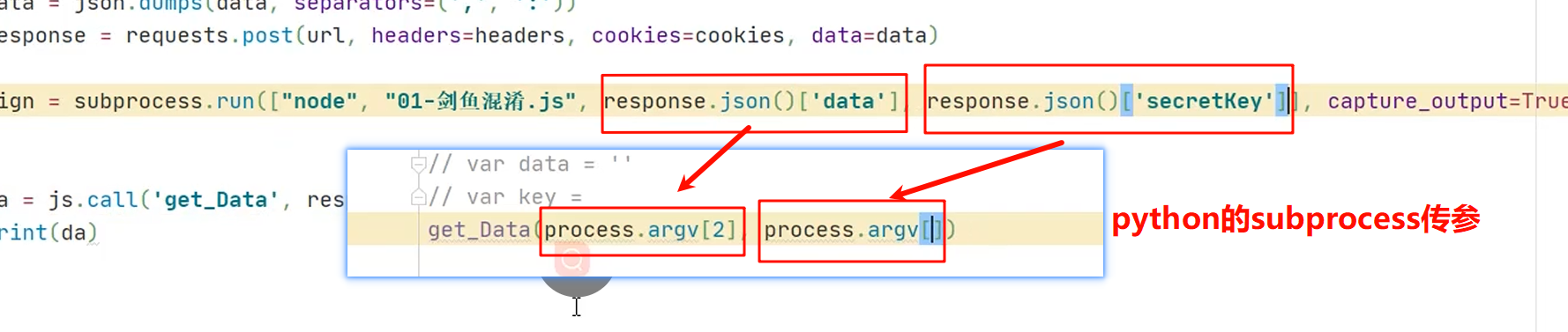
- $ 语法:
- ①执行代码:
result = subprocess.run(['node', "需要执行的js文件.js"], capture_output=True, text=True, encoding="utf-8") - ②获取结果:
result.stdout.strip()
- ①执行代码:
- ! 注意: ①获取到
result的内容是原js文件打印的内容!!!
const fs = require('fs');
const wasmCode = fs.readFileSync('Wasm.wasm');
let wasmFunction;

async function aa() {
    const result = await WebAssembly.instantiate(wasmCode, { // 需要导入的变量
        "env": {},
        "wasi_snapshot_preview1": {}
    });
    const instance = result.instance;
    wasmFunction = instance.exports; // 所有的模块

}

async function simulate_encrypt(offset) {
    if (!wasmFunction) {
        await aa(); // 确保Wasm模块已加载
    }
    const n = offset;
    const timestamp = parseInt(Math.round((new Date).getTime() / 1e3).toString());
    res = wasmFunction.encrypt(n, timestamp); // 直接调用encrypt方法
    return res
}

// 使用async/await调用simulate_encrypt
(async() =>{
    var result = await simulate_encrypt(process.argv[1])
    console.log(result)
})()
import requests
import subprocess

headers = {
    'Accept': 'application/json, text/plain, */*',
    'Accept-Language': 'zh-CN,zh;q=0.9,en;q=0.8',
    'Cache-Control': 'no-cache',
    'Connection': 'keep-alive',
    'Pragma': 'no-cache',
    'Referer': 'https://spa14.scrape.center/page/3',
    'Sec-Fetch-Dest': 'empty',
    'Sec-Fetch-Mode': 'cors',
    'Sec-Fetch-Site': 'same-origin',
    'User-Agent': 'Mozilla/5.0 (Windows NT 10.0; Win64; x64) AppleWebKit/537.36 (KHTML, like Gecko) Chrome/133.0.0.0 Safari/537.36',
    'sec-ch-ua': '"Not(A:Brand";v="99", "Google Chrome";v="133", "Chromium";v="133"',
    'sec-ch-ua-mobile': '?0',
    'sec-ch-ua-platform': '"Windows"',
}
offset = 0 # 翻页
params = {
    'limit': '10',
    'offset': str(offset), # (页数-1)*10
    'sign': '580296895',  # TODO
}
js = subprocess.run(["node", "1-1电影排行Scrape平台.js", str(offset)], capture_output=True, text=True)
js_res = js.stdout.strip()
params['sign']=js_res
print(params)

response = requests.get('https://spa14.scrape.center/api/movie/', params=params, headers=headers)
print(response)
print(response.text)
- ! 注意: 控制台不能传参过长 【可以 读取文件->替换输入内容, 写入新文件->subprocess执行新文件】

# STEP1: 读取原文件内容, 替换输入的key="kkk"和source="sss",
new_content = open("3-2.剑鱼.js", "r", encoding="utf-8").read().replace("kkk", response.json()['secretKey']).replace("sss", response.json()['data'])
# STEP2: 写入
new_file_name = "3-2剑鱼temp.js"
with open(new_file_name, "w", encoding="utf-8") as f:
    f.write(new_content)
# STEP3: subprocess 执行新的文件
js_res = subprocess.run(['node', new_file_name], capture_output=True, text=True, encoding="utf-8").stdout.strip()
第二章 扣代码
如果我们能将网址的加密过程, 在本地模拟, 加上我们又会用Python执行js代码, 那不就可以直接模拟加密, 直接取值了;👍
第一节 七麦数据 link
R = global
t = {
    "url": "/rank/offline",
    "baseURL": "https://api.qimai.cn",
    "params": {
        country: "hk",
        date: "2025-02-20",
        edate: "",
        genre: "36",
        option: "4",
        sdate: "2025-02-20",
        status: "3",
    },
}
function p(t) {
    // a传来的时候, 没有用到 o() 这个方法
    t = R["encodeURIComponent"](t)["replace"](/%([0-9A-F]{2})/g, function (n, t) {
        return o("0x" + t)
    });
    try {
        return R["btoa"](t)
    } catch (n) {
        return R[W5][K5](t)[U5](Z5)
    }
}

function o(n) {
    t = "",
        ["66", "72", "6f", "6d", "43", "68", "61", "72", "43", "6f", "64", "65"]["forEach"](function (n) {
            t += R["unescape"]("%u00" + n)
        });
    var t, e = t;
    return R["String"][e](n)
}

function u() {
    return R["unescape"]("861831832863830866861836861862839831831839862863839830865834861863837837830830837839836861835833"["replace"](/8/g, "%u00"))
}

function h(n, t) {
    t = t || u();
    for (var e = (n = n["split"](""))["length"], r = t["length"], a = "charCodeAt", i = 0; i < e; i++)
        n[i] = o(n[i][a](0) ^ t[(i + 10) % r][a](0));
    return n["join"]("")
}

// 扣a
var a = [];
if (t["params"] === void 0) {
    t['params'] = {}
}
R["Object"]["keys"](t["params"])["forEach"](
    function (n) {
        if (n == "analysis")
            return !1;
        t["params"]["hasOwnProperty"](n) && a["push"](t["params"][n])
    }
)// 运行到当前行 a = [ 'hk', '2025-02-20', '', '36', '4', '2025-02-20', '3' ]
a = a["sort"]()["join"]("")// 运行到当前行 a = "2025-02-202025-02-203364hk"
a = p(a) // 运行到当前行 a = MjAyNS0wMi0yMDIwMjUtMDItMjAzMzY0aGs=
// 扣a-r
var e, r = +new R["Date"] - 1661224081041; // undefined 78809950590 (这里的e只是定义)
// r = 78811861589 # 这里是时间戳, 所以运行时间不同, 这个值也不同
a = (a += '@#' + t["url"]["replace"](t["baseURL"], '')) + ("@#" + r) + ("@#" + 3)
console.log(a)
// 扣d (发现这玩意是个常量)
d = "xyz517cda96efgh"
e = p(h(a, d))

// 最后:推t
true && (t["url"] += (-1 != t["url"]["indexOf"]("?") ? "&" : "?") + "analysis" + "=" + R["encodeURIComponent"](e))

console.log('url: ',t['url'])

/*学到的JS基础
1. return a, b, c; //a, b都是执行, 只有c才会真正返回
2. void 0 是 undefined 的安全写法(避免 undefined 被重写)
* */
第二节 扇贝单词 link
视频解析: link
function o_default() {
this._status = [];
this._mat1 = 0;
this._mat2 = 0;
this._tmat = 0
}
function f() {
this._char = ".";
this._children = {}
this.getChildren = getChildren
this.setChildren = setChildren
this.setChar = setChar
this.getChar = getChar
}
function a_default(t) {
this._random = new o_default;
this._sign = "";
this._inter = {};
this._head = new f
}
function loop(t, r) {
"v".repeat(t).split("").map(function (t, e) {
return r(e)
})
}
function get(t) {
return t >>> 0
}
function xor(t, e) {
return get(get(t) ^ get(e))
}
function mul(t, e) {
var r = ((4294901760 & t) >>> 0) * e
, n = (65535 & t) * e;
return get((r >>> 0) + (n >>> 0))
}
function and(t, e) {
return get(get(t) & get(e))
}
function shiftRight(t, e) {
return get(t) >>> e
}
function shiftLeft(t, e) {
return get(get(t) << e)
}
function _next_state() {
var t = void 0
, e = void 0;
e = this._status[3],
t = xor(and(this._status[0], 2147483647), xor(this._status[1], this._status[2])),
t = xor(t, shiftLeft(t, 1)),
e = xor(e, xor(shiftRight(e, 1), t)),
this._status[0] = this._status[1],
this._status[1] = this._status[2],
this._status[2] = xor(t, shiftLeft(e, 10)),
this._status[3] = e,
this._status[1] = xor(this._status[1], and(-and(e, 1), this._mat1)),
this._status[2] = xor(this._status[2], and(-and(e, 1), this._mat2))
}
function _init() {
var e = this;
loop(7, function (t) {
e._status[t + 1 & 3] = xor(e._status[t + 1 & 3], t + 1 + mul(1812433253, xor(e._status[3 & t], shiftRight(e._status[3 & t], 30))))
});
0 == (2147483647 & this._status[0]) && 0 === this._status[1] && 0 === this._status[2] && 0 === this._status[3]
&& (this._status[0] = 66, this._status[1] = 65, this._status[2] = 89, this._status[3] = 83);
e._next_state = _next_state
loop(8, function () {
return e._next_state()
})
}
function seed(e) {
var r = this;
loop(4, function (t) {
e.length > t ? r._status[t] = get(e.charAt(t).charCodeAt()) : r._status[t] = get(110)
});
this._mat1 = this._status[1];
this._mat2 = this._status[2];
this._tmat = this._status[3];
this._init = _init
this._init()
}
function generate(t) {
this._next_state();
var e, r = void 0;
return r = this._status[3],
e = xor(this._status[0], shiftRight(this._status[2], 8)),
r = xor(r, e),
(r = xor(and(-and(e, 1), this._tmat), r)) % t
}
function getChildren() {
return this._children
}
function setChildren(t, e) {
this._children[t] = e
}
function setChar(t) {
this._char = t
}
function getChar() {
return this._char
}
function _addSymbol(t, e) {
this._random.generate = generate
var r = this
, n = this._head
, o = "";
return loop(e, function (t) {
for (var e = s[r._random.generate(32)]; e in n.getChildren() && "." !== n.getChildren()[e].getChar();)
e = s[r._random.generate(32)];
o += e,
e in n.getChildren() || n.setChildren(e, new f),
n = n.getChildren()[e]
}),
n.setChar(t),
this._inter[t] = o
}
s = "ABCDEFGHIJKLMNOPQRSTUVWXYZ234567"
c = [1, 2, 2, 2, 2, 2]
function init(t) {
var e = this;
// 补
this._random.seed = seed
this._random.seed(t);
this._sign = t;
e._addSymbol = _addSymbol
loop(64, function (t) {
e._addSymbol("ABCDEFGHIJKLMNOPQRSTUVWXYZabcdefghijklmnopqrstuvwxyz0123456789+/"[t], c[parseInt((t + 1) / 11)])
});
this._inter["="] = "="
}
function decode(t) {
for (var e = "", r = 4; r < t.length;)
if ("=" !== t[r]) {
for (var n = this._head; t[r] in n.getChildren();)
n = n.getChildren()[t[r]],
r++;
e += n.getChar()
} else
e += "=",
r++;
return e
}
function _atob(t) {
return global.atob(t)
}
re_btou = new RegExp(["[À-ß][-¿]", "[à-ï][-¿]{2}", "[ð-÷][-¿]{3}"].join("|"), "g")
cb_btou = function (t) {
switch (t.length) {
case 4:
var e = ((7 & t.charCodeAt(0)) << 18 | (63 & t.charCodeAt(1)) << 12 | (63 & t.charCodeAt(2)) << 6 | 63 & t.charCodeAt(3)) - 65536;
return String.fromCharCode(55296 + (e >>> 10)) + String.fromCharCode(56320 + (1023 & e));
case 3:
return String.fromCharCode((15 & t.charCodeAt(0)) << 12 | (63 & t.charCodeAt(1)) << 6 | 63 & t.charCodeAt(2));
default:
return String.fromCharCode((31 & t.charCodeAt(0)) << 6 | 63 & t.charCodeAt(1))
}
}
btou = function (t) {
return t.replace(re_btou, cb_btou)
}
function _decode(t) {
return btou(_atob(t))
}
Bdecode = function (t) {
return _decode(String(t).replace(/[-_]/g, function (t) {
return "-" == t ? "+" : "/"
}).replace(/[^A-Za-z0-9\+\/]/g, ""))
}
function d(t) {
var e = new a_default;
e.init = init
e.init(t.substr(0, 4));
e.decode = decode
var r = e.decode(t);
return Bdecode(r)
}
// 外部调用这个
function my_decode(code) {
return JSON.parse(d(code))
}
/*
* 1.补方法
* * 如果该方法中没有this, 或this调用的是无关痛痒的东西, 直接删除前缀, 直接调用 ①a.default.get(t) ②get()中没有任何的this ③get()把a.default去掉
* * 有方法中有this: ①变量.func1(`o.this`) 需要给这个变量中的属性补方法 ②this.func1 可以直接给this补方法
* ! 发现补完后, 有时能用, 有时用不了==>是不是想树上节点一样, 去到初始化的时候补方法,
* */
# =================================
# @Time    : 2025年02月20日
# @Author  : 明廷盛
# @File    : 2.扣代码(扇贝单词).py
# @Software: PyCharm
# @ProjectBackground: $END$
# =================================
import csv
import json

import requests
import execjs
from loguru import logger


def query_words(page):
    headers = {
        "accept": "application/json, text/plain, */*",
        "accept-language": "zh-CN,zh;q=0.9,en;q=0.8",
        "cache-control": "no-cache",
        "origin": "https://web.shanbay.com",
        "pragma": "no-cache",
        "priority": "u=1, i",
        "referer": "https://web.shanbay.com/",
        "sec-ch-ua": "\"Not(A:Brand\";v=\"99\", \"Google Chrome\";v=\"133\", \"Chromium\";v=\"133\"",
        "sec-ch-ua-mobile": "?0",
        "sec-ch-ua-platform": "\"Windows\"",
        "sec-fetch-dest": "empty",
        "sec-fetch-mode": "cors",
        "sec-fetch-site": "same-site",
        "user-agent": "Mozilla/5.0 (Windows NT 10.0; Win64; x64) AppleWebKit/537.36 (KHTML, like Gecko) Chrome/133.0.0.0 Safari/537.36",
        "x-csrftoken": "6a335401bb860647f86ec8c78b85f54a",
        "cookie": "_ga=GA1.2.1275909203.1738765682; tfstk=gd8tXvgLuvDGk_QoSVihiu0jk6cntEdwvdR7otXgcpppNLhVcOYcknpvH5jjQNYvpQ9FiEXgSrIAdtW_INjcMt6HNfl2nfPwYLA7SFmNorQNuZMoE40ksC7VlmHkH1VNRsfAGqXbfy_NiNgwLj0k_CPB_c9Jj42AeQeW1t9ffwgCg9111t9jR26Fgsw1GPGpO9WCGRsbfJwC_1a_1K_j9M6FGZ1sMwZO3oWbk3nZscZ8O5Z40eCOXtUcQrKwozjhFGBL6DpO6-6W19UboOmMdndpsAUytN8He_viRPpJ139XVpgLWM-69EIyuRGClitHqGKKCrBHSsI5lMFblBQ1LMTOP4wdTHOMcFJTMr1wSUjAUMhbuibBrgtWBSlyON1X3g8mUPW6GQ8yqa3YRNIf4DYky7_UETC0fXhL0oS1TeoVc7IN9V3C9TcHtorVx01dEXhL0oS1T6BotBq40Mm5.; sensorsdata2015jssdkcross=%7B%22distinct_id%22%3A%22fuprbh%22%2C%22first_id%22%3A%22194d682c5b856b-0e0aa09797dd62-26011b51-1638720-194d682c5b9168f%22%2C%22props%22%3A%7B%22%24latest_traffic_source_type%22%3A%22%E7%9B%B4%E6%8E%A5%E6%B5%81%E9%87%8F%22%2C%22%24latest_search_keyword%22%3A%22%E6%9C%AA%E5%8F%96%E5%88%B0%E5%80%BC_%E7%9B%B4%E6%8E%A5%E6%89%93%E5%BC%80%22%2C%22%24latest_referrer%22%3A%22%22%2C%22%24latest_referrer_host%22%3A%22%22%7D%2C%22%24device_id%22%3A%22194d682c5b856b-0e0aa09797dd62-26011b51-1638720-194d682c5b9168f%22%7D; auth_token=eyJhbGciOiJIUzI1NiIsInR5cCI6IkpXVCJ9.eyJpZCI6MjYzNDQxMjAwLCJleHAiOjE3NDI2MzYxNjMsImV4cF92MiI6MTc0MjYzNjE2MywiZGV2aWNlIjoiIiwidXNlcm5hbWUiOiJQaG9uZV85OWQ4NDE4ZDE1YTg5MDQ2IiwiaXNfc3RhZmYiOjAsInNlc3Npb25faWQiOiI3YTE0MjgyNGUzY2QxMWVmOGE0YTNhYTU0NzY2MTZkMiJ9.GLP-7kHWdG8t077q-JnZUuC_BbfJTwtFAy6Xnmphw04; csrftoken=6a335401bb860647f86ec8c78b85f54a",
    }
    url = "https://apiv3.shanbay.com/wordsapp/user_material_books/oisnc/learning/words/unlearned_items"
    params = {
        "ipp": "10",
        "page": str(page)
    }
    code = requests.get(url, headers=headers, params=params).json()['data']
    return code


if __name__ == '__main__':
    # 使用pyexecjs
    node = execjs.compile(open("./6-1.扇贝单词.js", "r", encoding="utf-8").read())

    # 获取所有数据
    all_words = []
    for page in range(1, 800):
        code = query_words(page)
        print(f"{page} 加密:", code)

        word_list = node.call("my_decode", code)
        if not word_list['objects']:
            break
        # 数据清洗
        for word in word_list['objects']:
            temp_dict = {}
            temp_dict['word'] = word['vocab_with_senses']['word']  # 单词
            # 释义
            temp_dict['translation']=""
            translations = [i['definition_cn'] for i in word['vocab_with_senses']['senses']]
            temp_dict['translation'] += "#".join(translations)

            print(temp_dict)
            all_words.append(temp_dict)

    # 存储数据
    print("==================")
    print(all_words)
    with open("./文件/words.csv", "w", encoding="utf-8", newline="") as f:
        # 使用DictWriter更直观
        fieldnames = ['word', 'translation']
        writer = csv.DictWriter(f, fieldnames=fieldnames)

        # 写入表头
        writer.writeheader()

        # 直接写入字典列表
        writer.writerows(all_words)
- Title: 3.Js调用和扣代码
- Author: 明廷盛
- Created at : 2026-02-12 01:17:04
- Updated at : 2025-02-22 16:15:00
- Link: https://blog.20040424.xyz/2026/02/12/🐍爬虫工程师/第二部分 JS逆向/3.Js调用和扣代码/
- License: All Rights Reserved © 明廷盛