4. 摘要算法

第一章 概要
第一节 为什么要学加密算法
> 上一章扣代码, 难受不? (其实个人感觉还好😂)
加密算法就是, 我学了后, 看下网站, 就知道是什么加密的了, 比如我知道是MD5加密, **那我就不用扣了,直接调用py/js的现成加密库**, 即可实现模拟加密
第二节 摘要算法
- $ 概念: “摘要算法” 就是 “哈希算法”
- $ 特点:
- ① 不可逆:
- ② 固定长度
- ③ 高度敏感: 明文该一个空格, 密文都会完全不同
第三节 辨析编码和加密
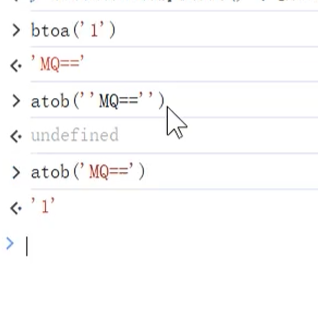
加密数据中有= , 可能就是b64编码的, 就会涉及有btoa, 和atob这两个方法,( 获取可以直接搜索??)
- $ 字符串=>B64编码:
btoa("1) - $ B64编码=>字符串:
atob("MQ==")
| 编码 | 加密 | |
|---|---|---|
| 目的 | 将信息转换形式,以便存储、传输和处理 |
保护信息,防止未授权访问 |
| 原理 | 依标准规则转换(如 Unicorn映射字符二进制,公开透明) | 靠复杂算法和密钥(如AES算法通过数学运算与密钥干扰转换明文为乱密文,算法密钥保密关键) |
| 可逆性 | 双向且易逆(如UTF-8编中文,二进制易还原中文字符) | 双向但逆程受密钥算法控,无密钥难还原 |
| 常见 | ASCII编码英文字符, B64编码 | 摘要算法(哈希), 对称加密, 非对称加密 |
第二章 MD5加密
第一节 特点
| 名称 | 类型 | 私钥长度 | 公钥长度 | IV | 模式 | 补位 | 明文长度 | 密文长度 | 密文固定? | JS包 |
|---|---|---|---|---|---|---|---|---|---|---|
| MD5 | 哈希算法 | ❌ | ❌ | ❌ | ❌ | ❌ | 任意 | 32 | 固定 | crypto-js |
| SHA系 | 哈希算法 | ❌ | ❌ | ❌ | ❌ | ❌ | 任意 | 40/56/64/96/128 | 固定 | crypto-js |
| HMAC | 哈希算法 | ✔️ | ❌ | ❌ | ❌ | ❌ | 任意 | 和底层算法相同 | 固定 | crypto-js |
| DES | 对称 | 56 | ❌ | ✔️ | ✔️ | ✔️ | 任意 | 和明文长度成正比 | 固定 | crypto-js |
| AES | 对称 | 128/192/256 | ❌ | ✔️ | ✔️ | ✔️ | 任意 | 和明文长度成正比 | 固定 | crypto-js |
| RSA | 非对称 | 428/812/1588 | 128/216/392 | ❌ | ❌ | ✔️ | 53/117/245 | 88/172/344 | 完全不固定 | JSEcrypt |
- 模式: ECB, CBC, CFB,OFB, CTR; 除了ECB都需要IV值
- 补位: ZeroPadding, NoPadding等
- ! ①RSA: 尽管 “公钥”, “私钥”一定, 加密也不固定; ②HMAC, DES, AES只要 “明文” 和”秘钥”一致, 输出的密文就是固定的
- ! HMAC: HMAC 与其他摘要算法结合时,其密钥长度不会影响最终输出的长度,输出长度始终等于底层摘要算法的固有长度
第二节 JS实现
- $ 语法: 不
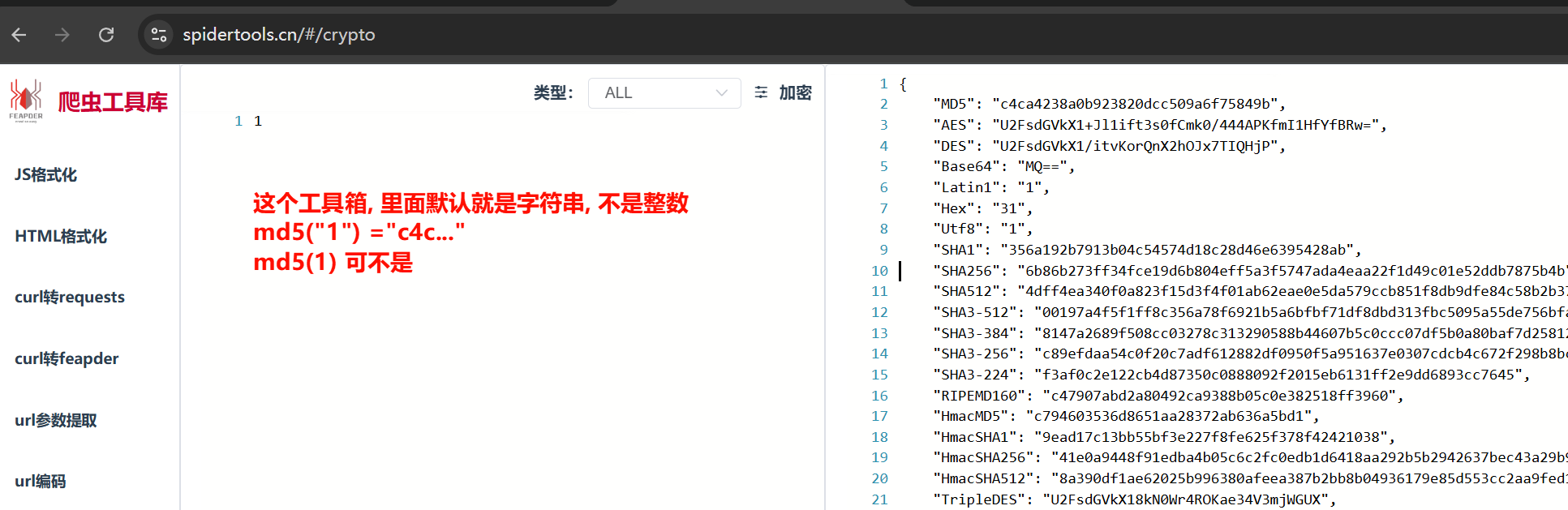
toString()展示的是加密后的幻数,toString()后才是加密的字符串 - ! 注意: ①是加密”1”, 字符串的”1”, MD5结果才是
c4c...; 数字1不是 ②爬虫工具箱 中输入会转为字符串进行加密, 数字1不是c4c❗
npm install crypto-js
var crypto = require("crypto-js")

var plaintext = "1" // 需要加密的内容

// 实现MD5
function my_MD5() {
    res = crypto.MD5(plaintext) // 包含加密后的幻数
    return res.toString() // 必须要toString()才是加密后的内容
}

// 实现SHA1/SHA224/SHA256/SHA384/SHA512
function my_SHA(type) {
    return crypto[type](plaintext).toString()
}

// HMAC结合 MD5/SHA1/SHA224/SHA256/SHA384/SHA512
function my_HMAC(type) {
    key = "secrypt"
    return crypto[type](plaintext, key).toString()
}

console.log("MD5: ", my_MD5()); // MD5: c4ca4238a0b923820dcc509a6f75849b

["SHA1", "SHA224", "SHA256", "SHA384", "SHA512"].forEach(t => console.log(t, ": ", my_SHA(t)));
/*
SHA1 :  356a192b7913b04c54574d18c28d46e6395428ab
SHA224 :  e25388fde8290dc286a6164fa2d97e551b53498dcbf7bc378eb1f178
SHA256 :  6b86b273ff34fce19d6b804eff5a3f5747ada4eaa22f1d49c01e52ddb7875b4b
SHA384 :  47f05d367b0c32e438fb63e6cf4a5f35c2aa2f90dc7543f8a41a0f95ce8a40a313ab5cf36134a2068c4c969cb50db776
SHA512 :  4dff4ea340f0a823f15d3f4f01ab62eae0e5da579ccb851f8db9dfe84c58b2b37b89903a740e1ee172da793a6e79d560e5f7f9bd058a12a280433ed6fa46510a
* */

["HmacMD5", "HmacSHA1", "HmacSHA224", "HmacSHA256", "HmacSHA384", "HmacSHA512"].forEach(t => console.log(t, ":", my_HMAC(t)))
/*秘钥不同, 结果不同, 没必要记加密"1"的结果
* */
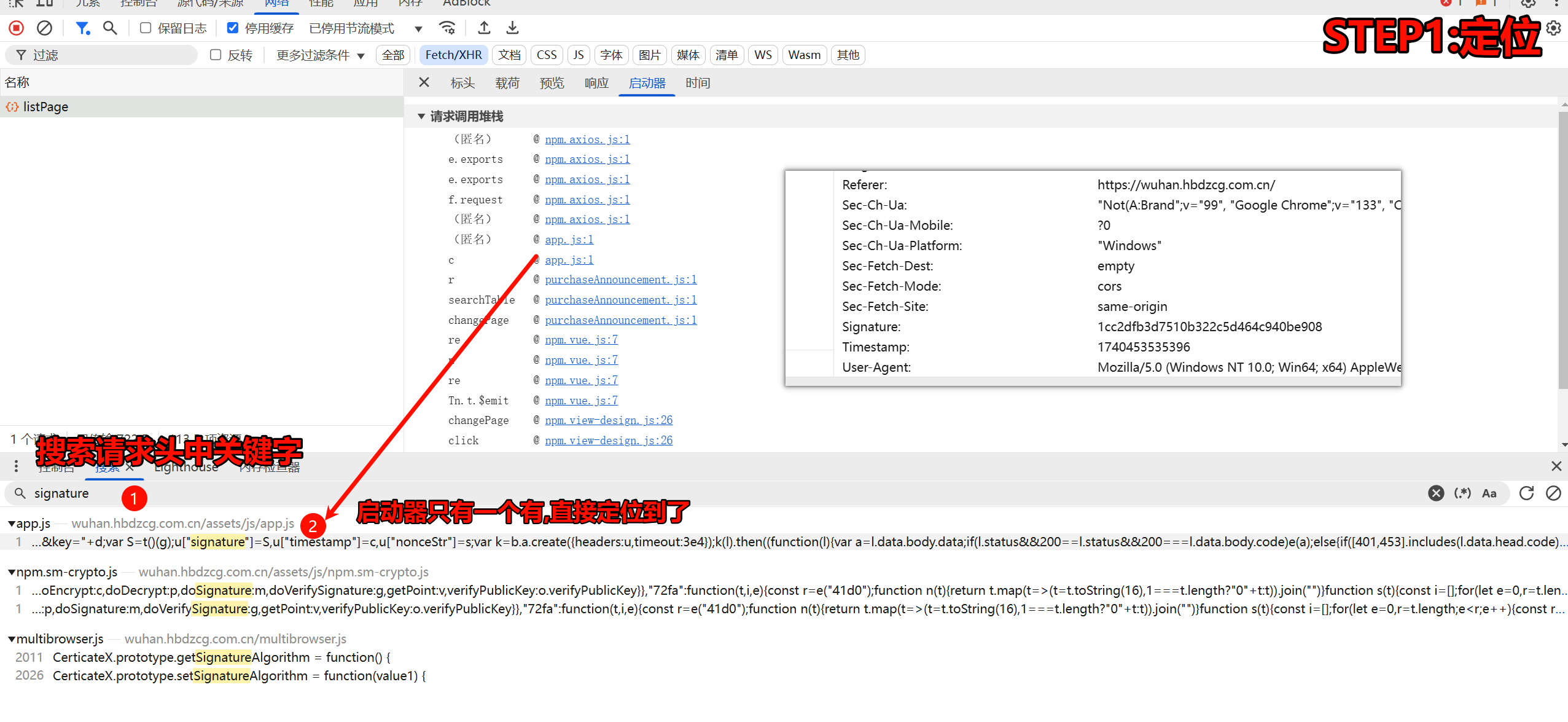
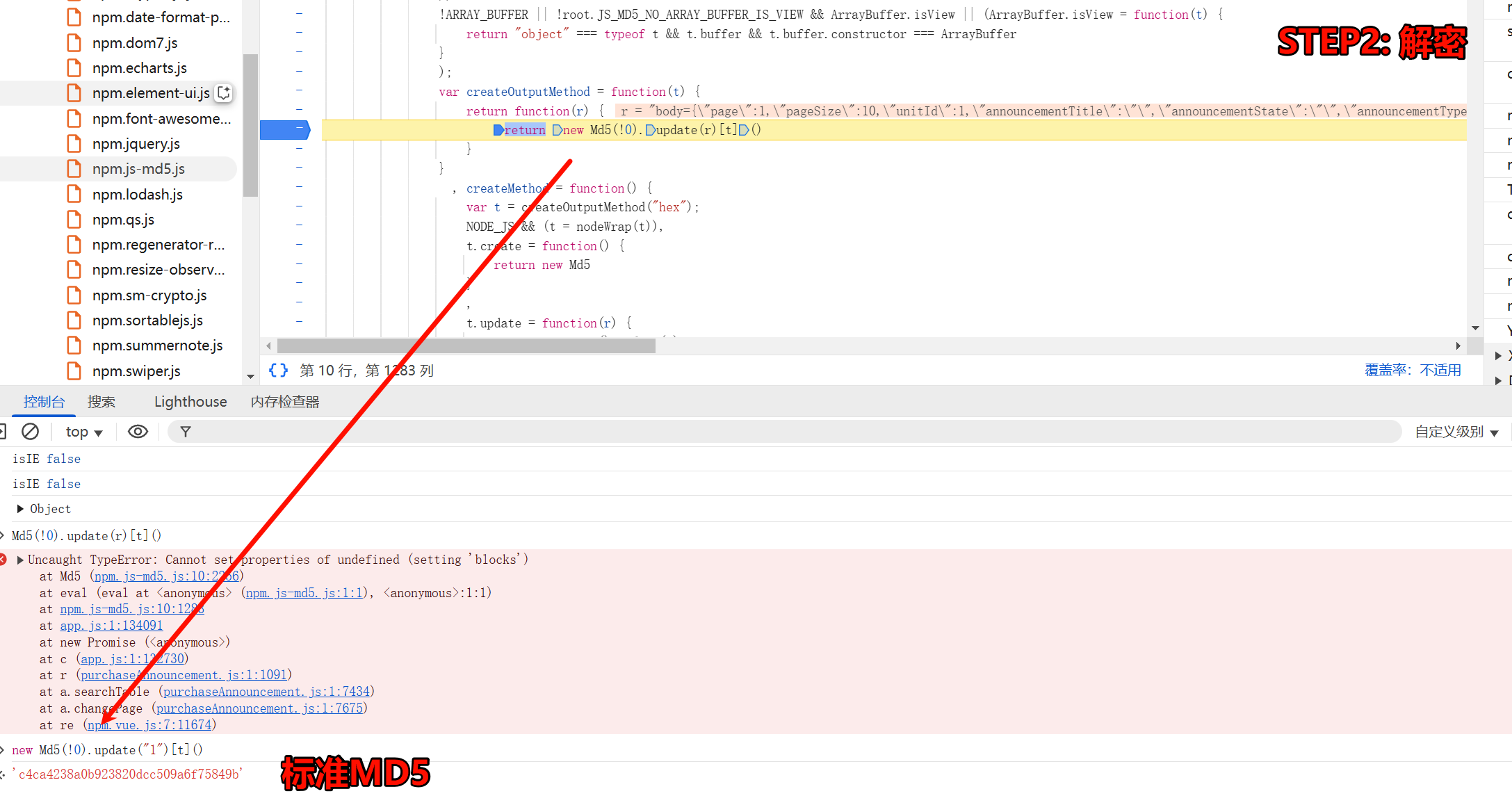
案例一 武汉电子商城
需求: 爬取 “武汉市政府采购电子商城” link中竞价公告的十页内容, 存入mongodb
- ! 注意: POST请求传递json还是data??? [[4.Requests模块#第三节 发送POST请求post()使用 data传参]] link
- ! 注意: 关于空格的问题: [[1.JS基础与浏览器开发工具#第13节 py和js转JSON时空格问题]] link
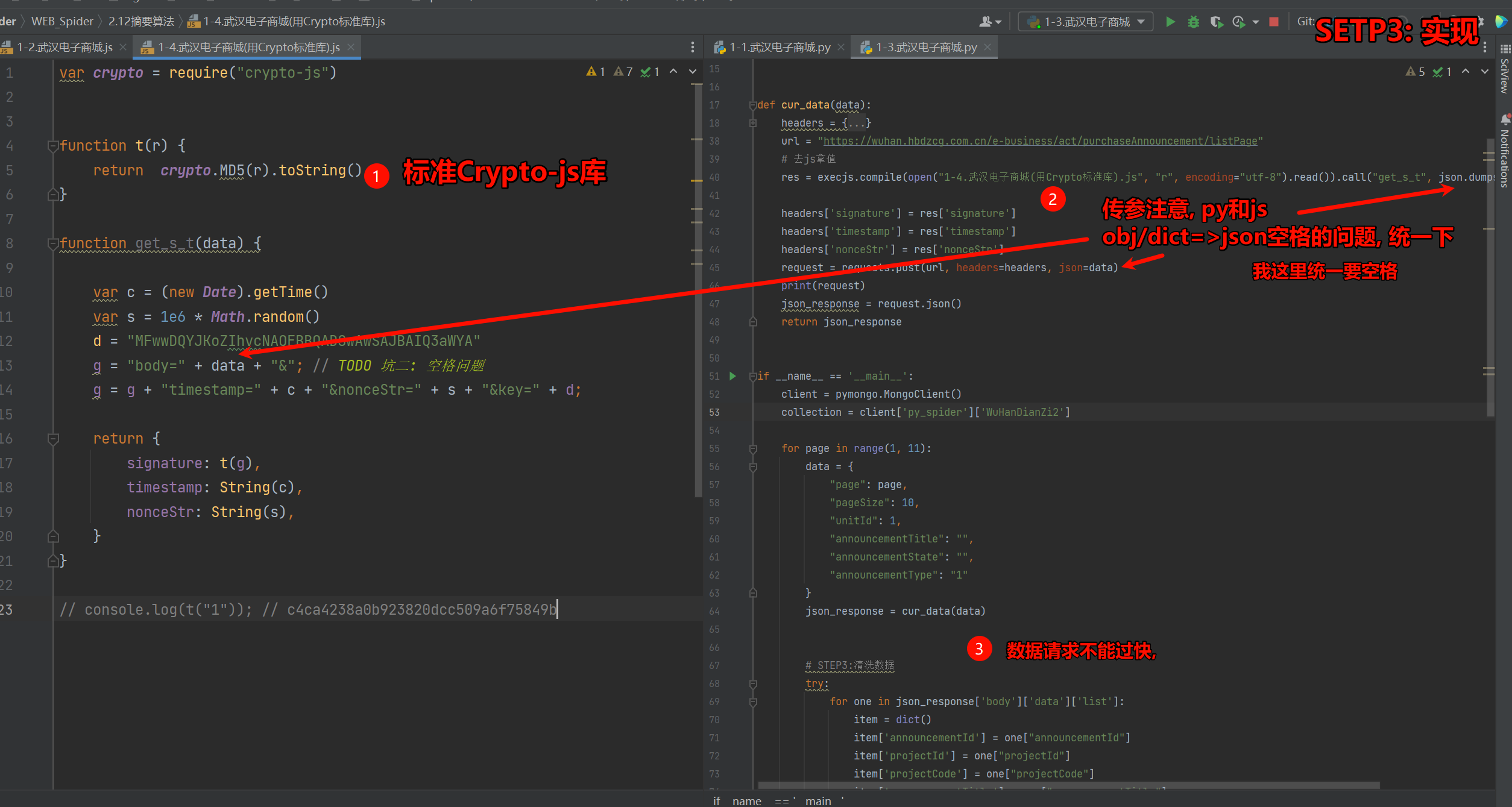
var crypto = require("crypto-js")


function t(r) {
    return  crypto.MD5(r).toString()
}

function get_s_t(data) {

    var c = (new Date).getTime()
    var s = 1e6 * Math.random()
    d = "MFwwDQYJKoZIhvcNAQEBBQADSwAwSAJBAIQ3aWYA"
    g = "body=" + data + "&"; // TODO 坑二: 空格问题
    g = g + "timestamp=" + c + "&nonceStr=" + s + "&key=" + d;

    return {
        signature: t(g),
        timestamp: String(c),
        nonceStr: String(s),
    }
}

// console.log(t("1")); // c4ca4238a0b923820dcc509a6f75849b
# =================================
# @Time    : 2025年02月22日
# @Author  : 明廷盛
# @File    : 1-1.武汉电子商城.py
# @Software: PyCharm
# @ProjectBackground: $END$
# =================================
import time

import execjs
import requests
import json
from loguru import logger
import pymongo


def cur_data(data):
    headers = {
        "Accept": "application/json, text/plain, */*",
        "Accept-Language": "zh-CN,zh;q=0.9,en;q=0.8",
        "Cache-Control": "no-cache",
        "Connection": "keep-alive",
        "Content-Type": "application/json",
        "Origin": "https://wuhan.hbdzcg.com.cn",
        "Pragma": "no-cache",
        "Referer": "https://wuhan.hbdzcg.com.cn/",
        "Sec-Fetch-Dest": "empty",
        "Sec-Fetch-Mode": "cors",
        "Sec-Fetch-Site": "same-origin",
        "User-Agent": "Mozilla/5.0 (Windows NT 10.0; Win64; x64) AppleWebKit/537.36 (KHTML, like Gecko) Chrome/133.0.0.0 Safari/537.36",
        "nonceStr": "553609.1504313218",
        "sec-ch-ua": "\"Not(A:Brand\";v=\"99\", \"Google Chrome\";v=\"133\", \"Chromium\";v=\"133\"",
        "sec-ch-ua-mobile": "?0",
        "sec-ch-ua-platform": "\"Windows\"",
        "signature": "0aa870538cb538b0f6024c11e839cac4",
        "timestamp": "1740211944128"
    }
    url = "https://wuhan.hbdzcg.com.cn/e-business/act/purchaseAnnouncement/listPage"
    # 去js拿值
    res = execjs.compile(open("1-4.武汉电子商城(用Crypto标准库).js", "r", encoding="utf-8").read()).call("get_s_t", json.dumps(data))

    headers['signature'] = res['signature']
    headers['timestamp'] = res['timestamp']
    headers['nonceStr'] = res['nonceStr']
    request = requests.post(url, headers=headers, json=data)
    print(request)
    json_response = request.json()
    return json_response


if __name__ == '__main__':
    client = pymongo.MongoClient()
    collection = client['py_spider']['WuHanDianZi2']

    for page in range(1, 11):
        data = {
            "page": page,
            "pageSize": 10,
            "unitId": 1,
            "announcementTitle": "",
            "announcementState": "",
            "announcementType": "1"
        }
        json_response = cur_data(data)


        # STEP3:清洗数据
        try:
            for one in json_response['body']['data']['list']:
                item = dict()
                item['announcementId'] = one["announcementId"]
                item['projectId'] = one["projectId"]
                item['projectCode'] = one["projectCode"]
                item['announcementTitle'] = one["announcementTitle"]
                item['createdTime'] = one["createdTime"]
                item['bidTime'] = one["bidTime"]
                # STEP4:存储数据
                logger.info(f"数据{item}插入中")
                try:
                    collection.insert_one(item)
                    logger.info("数据插入成功:", )
                except Exception as e:
                    logger.error("数据插入失败:", e)
        except Exception as e:
            logger.error("json解析可能存在问题: ", e)
            print(json_response)  # time.sleep(60) # 坑三: {'code': 21999, 'msg': '请求过快,请稍后再试!', 'success': False, 'data': None}}
        time.sleep(30)
案例二 豆丁考研
需求: 爬取 “豆丁考研” link软件工程开设院校的数据
- $ 语法: 深入理解 JS的对象 [[1.JS基础与浏览器开发工具#第14节 JS的对象 function XXX() {} 和class XXX{}]] link
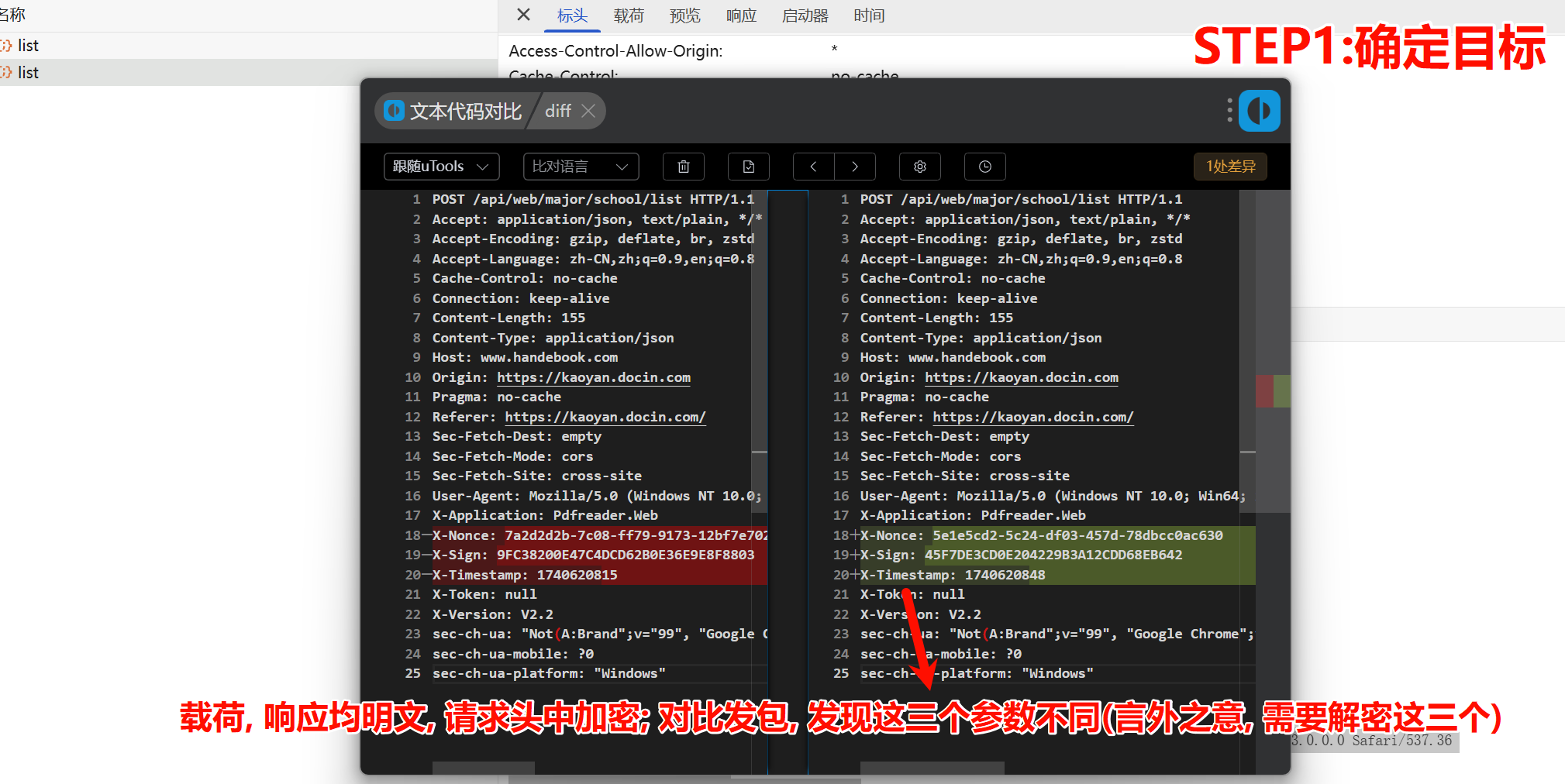
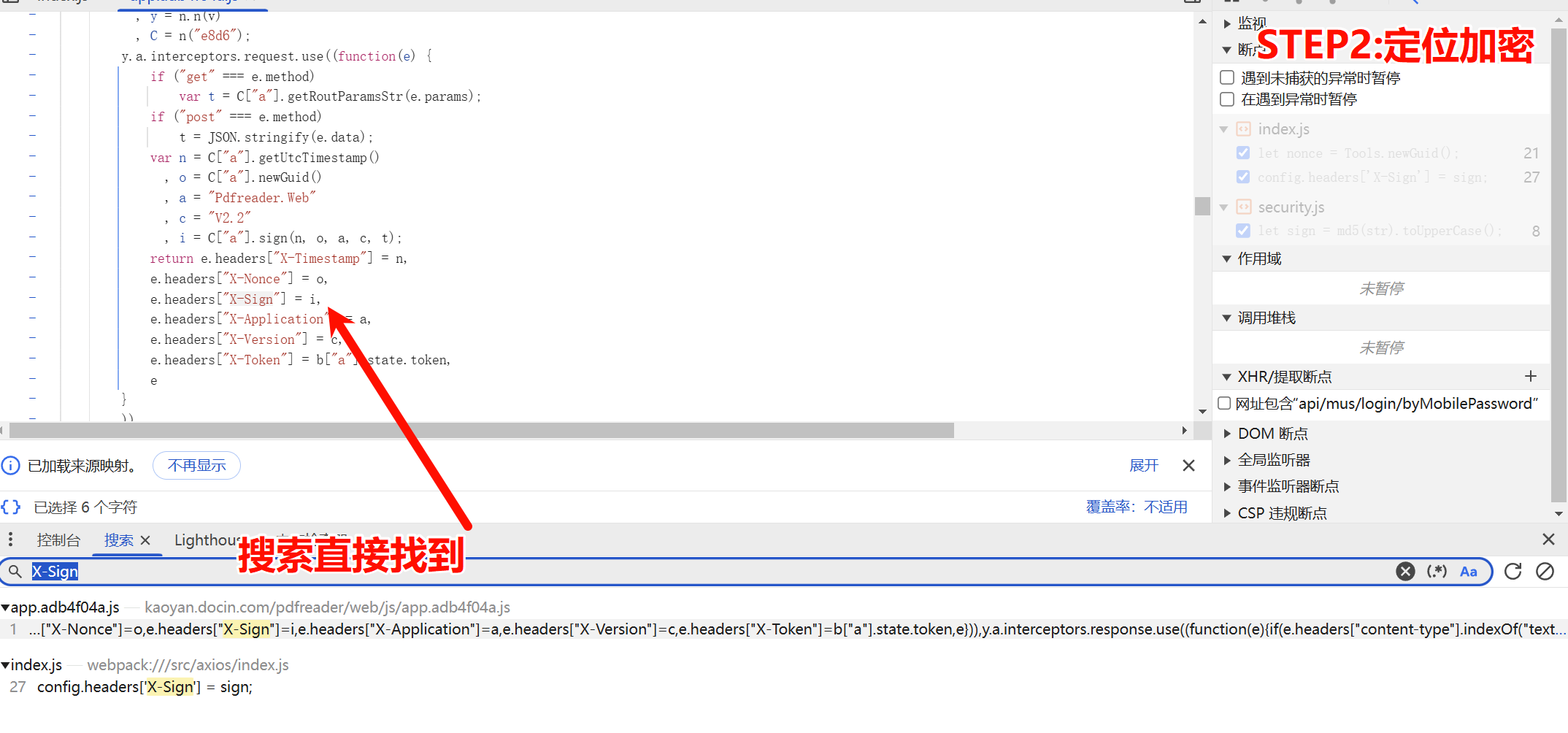
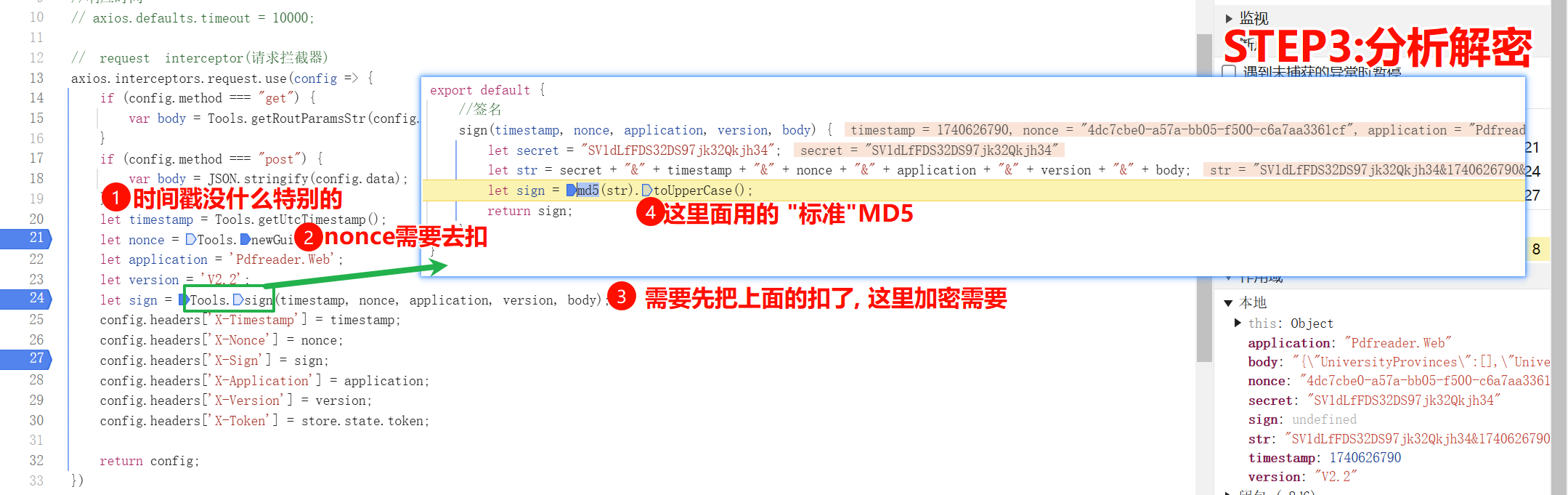
var crypto = require('crypto-js')

function MyMD5(str) {
    return crypto.MD5(str).toString()
}


// 相当于给Tools定义构造函数
class Tools {
    static newGuid(format) {
        return Guid.NewGuid().ToString(format);
    }

    static sign(timestamp, nonce, application, version, body) {
        let secret = "SV1dLfFDS32DS97jk32Qkjh34";
        let str = secret + "&" + timestamp + "&" + nonce + "&" + application + "&" + version + "&" + body;
        // for test
        // str = 'SV1dLfFDS32DS97jk32Qkjh34&1740237565&3393839a-5fbe-9bd1-68c7-24f56d834d07&Pdfreader.Web&V2.2&{"UniversityProvinces":[],"UniversityTeachTypes":[],"UniversityCharacteristics":[],"UniversitySubject":"","MajorCode":"083500","PageIndex":3,"PageSize":10}'
        let _sign = MyMD5(str).toUpperCase();
        console.log(_sign)
        return _sign;
    }

}

function Guid(g) {
    var arr = new Array(); //存放32位数值的数组
    if (typeof (g) == "string") { //如果构造函数的参数为字符串
        InitByString(arr, g);
    } else {
        InitByOther(arr);
    }
    //返回一个值,该值指示 Guid 的两个实例是否表示同一个值。
    this.Equals = function (o) {
        if (o && o.IsGuid) {

            return this.ToString() == o.ToString();

        } else {

            return false;

        }

    }

    //Guid对象的标记

    this.IsGuid = function () {
    }

    //返回 Guid 类的此实例值的 String 表示形式。

    this.ToString = function (format) {

        if (typeof (format) == "string") {

            if (format == "N" || format == "D" || format == "B" || format == "P") {

                return ToStringWithFormat(arr, format);

            } else {

                return ToStringWithFormat(arr, "D");

            }

        } else {

            return ToStringWithFormat(arr, "D");

        }

    }

    //由字符串加载

    function InitByString(arr, g) {

        g = g.replace(/\{|\(|\)|\}|-/g, "");

        g = g.toLowerCase();

        if (g.length != 32 || g.search(/[^0-9,a-f]/i) != -1) {

            InitByOther(arr);

        } else {

            for (var i = 0; i < g.length; i++) {

                arr.push(g[i]);

            }

        }

    }

    //由其他类型加载

    function InitByOther(arr) {

        var i = 32;

        while (i--) {

            arr.push("0");

        }

    }

    /*

    根据所提供的格式说明符,返回此 Guid 实例值的 String 表示形式。

    N  32 位: xxxxxxxxxxxxxxxxxxxxxxxxxxxxxxxx

    D  由连字符分隔的 32 位数字 xxxxxxxx-xxxx-xxxx-xxxx-xxxxxxxxxxxx

    B  括在大括号中、由连字符分隔的 32 位数字:{xxxxxxxx-xxxx-xxxx-xxxx-xxxxxxxxxxxx}

    P  括在圆括号中、由连字符分隔的 32 位数字:(xxxxxxxx-xxxx-xxxx-xxxx-xxxxxxxxxxxx)

    */

    function ToStringWithFormat(arr, format) {

        switch (format) {

            case "N":

                return arr.toString().replace(/,/g, "");

            case "D":

                var str = arr.slice(0, 8) + "-" + arr.slice(8, 12) + "-" + arr.slice(12, 16) + "-" + arr.slice(16, 20) + "-" + arr.slice(20, 32);

                str = str.replace(/,/g, "");

                return str;

            case "B":

                var str = ToStringWithFormat(arr, "D");

                str = "{" + str + "}";

                return str;

            case "P":

                var str = ToStringWithFormat(arr, "D");

                str = "(" + str + ")";

                return str;

            default:

                return new Guid();

        }

    }

}

// 没有prototype, 静态方法, 直接类名.调用
Guid.NewGuid = function () {
    var g = "";
    var i = 32;
    while (i--) {
        g += Math.floor(Math.random() * 16.0).toString(16);
    }
    return new Guid(g);
}


// 加上prototype就是成员方法, 需要new Tools()后才能调用
Tools.prototype.getUtcTimestamp = function () {
    return Math.floor((new Date()).getTime() / 1000);
}


function get_real_answer(data) {
    // data= JSON.parse(data)
    body = data
    application = 'Pdfreader.Web';
    version = 'V2.2';
    timestamp = new Tools().getUtcTimestamp()
    nonce = Tools.newGuid();
    sign = Tools.sign(timestamp, nonce, application, version, body);
    return {
        "timestamp": String(timestamp),
        "nonce": String(nonce),
        "sign": String(sign),
    }
}
# =================================
# @Time    : 2025年02月22日
# @Author  : 明廷盛
# @File    : 2-1.豆丁考研.py
# @Software: PyCharm
# @ProjectBackground: $END$
# =================================
import execjs
import requests
import json

headers = {
    "Accept": "application/json, text/plain, */*",
    "Accept-Language": "zh-CN,zh;q=0.9,en;q=0.8",
    "Cache-Control": "no-cache",
    "Connection": "keep-alive",
    "Content-Type": "application/json",
    "Origin": "https://kaoyan.docin.com",
    "Pragma": "no-cache",
    "Referer": "https://kaoyan.docin.com/",
    "Sec-Fetch-Dest": "empty",
    "Sec-Fetch-Mode": "cors",
    "Sec-Fetch-Site": "cross-site",
    "User-Agent": "Mozilla/5.0 (Windows NT 10.0; Win64; x64) AppleWebKit/537.36 (KHTML, like Gecko) Chrome/133.0.0.0 Safari/537.36",
    "X-Application": "Pdfreader.Web",
    "X-Nonce": "8663aa53-e303-13ab-6083-677616e72054",
    "X-Sign": "C4A7E2EF5D72C64FE5427495F3910975",
    "X-Timestamp": "1740232298",
    "X-Token": "null",
    "X-Version": "V2.2",
    "sec-ch-ua": "\"Not(A:Brand\";v=\"99\", \"Google Chrome\";v=\"133\", \"Chromium\";v=\"133\"",
    "sec-ch-ua-mobile": "?0",
    "sec-ch-ua-platform": "\"Windows\""
}
url = "https://www.handebook.com/api/web/major/school/list"
data = {
    "UniversityProvinces": [],
    "UniversityTeachTypes": [],
    "UniversityCharacteristics": [],
    "UniversitySubject": "",
    "MajorCode": "083500",
    "PageIndex": 3,
    "PageSize": 10
}

# 执行js代码
with open("./2-1豆丁考研.js", "r", encoding="utf-8") as f:
    js = execjs.compile(f.read())

js_res = js.call("get_real_answer", json.dumps(data))
print(js_res)

headers['X-Nonce'] = js_res['nonce']
headers['X-Sign'] = js_res["sign"]
headers['X-Timestamp'] = js_res["timestamp"]
print(js_res)
print(headers)

response = requests.post(url, headers=headers, json=data)

print(response.text)
print(response)
第三章 sha系列加密算法
第四章 hmac系列加密算法
- Title: 4. 摘要算法
- Author: 明廷盛
- Created at : 2026-02-12 01:17:04
- Updated at : 2025-02-26 08:13:00
- Link: https://blog.20040424.xyz/2026/02/12/🐍爬虫工程师/第二部分 JS逆向/4. 摘要算法/
- License: All Rights Reserved © 明廷盛